Automated Social Media Post Creation That Feels On-Brand
Learn how to choose automated tools that create on-brand social media posts from concept to design, saving SMBs time and boosting engagement without compromising authenticity.
Automated Social Media Post Creation That Actually Feels On-Brand
Popular social media content creators and builders offer a flawed compromise between the two. Either you create a beautiful visual with a mediocre and impersonal message, or witty copy on a design-heavy template that looks impersonal and generic. The outcome is to churn out a lot of social content fast but that is also very hard to believe in because it is not cohesive, not authentically aligned with your brand, and not native to how each social media platform incentivizes engagement. For a SMB, it has a price. Every social media post takes too long or underperforms by not getting engagement, clicks, and leads.
What I’m talking about with automated tools that write and design social media posts is an end-to-end experience from zero to one: It develops the concept and content; crafts the headline, text and call to action; and renders a completed design asset like an image, carousel or video thumbnail that is the right size and format for wherever you are posting it. In practice, the end result should be that you have the experience of creating one cohesive post, rather than cobbling together five separate parts using five different tools and hoping the tone, graphics and the overall message align. If you’re exploring an end-to-end content generator like WoopSocial, this is the standard to hold it to.
In this guide, you won’t find yet another shiny feature matrix that won’t make a difference. You’ll learn how to choose the best tool for your desired results: whether that’s saving time between content conception to publication, ensuring your brand’s voice is maintained without the need for editing, or converting readers into engaged fans and customers. I’ll also cover the key decision points that I review when I’m assessing tools in the real world context of a marketing campaign, so you can be sure that you’re making the best choice for your business, your budget, and your favorite media channels.
AI-powered tools vs. real results: when does an AI tool do better than a write + design tool?
You should measure tools that help you create and design social media content not on how well they represent themselves as AI, but on results that you notice on a week-to-week basis.
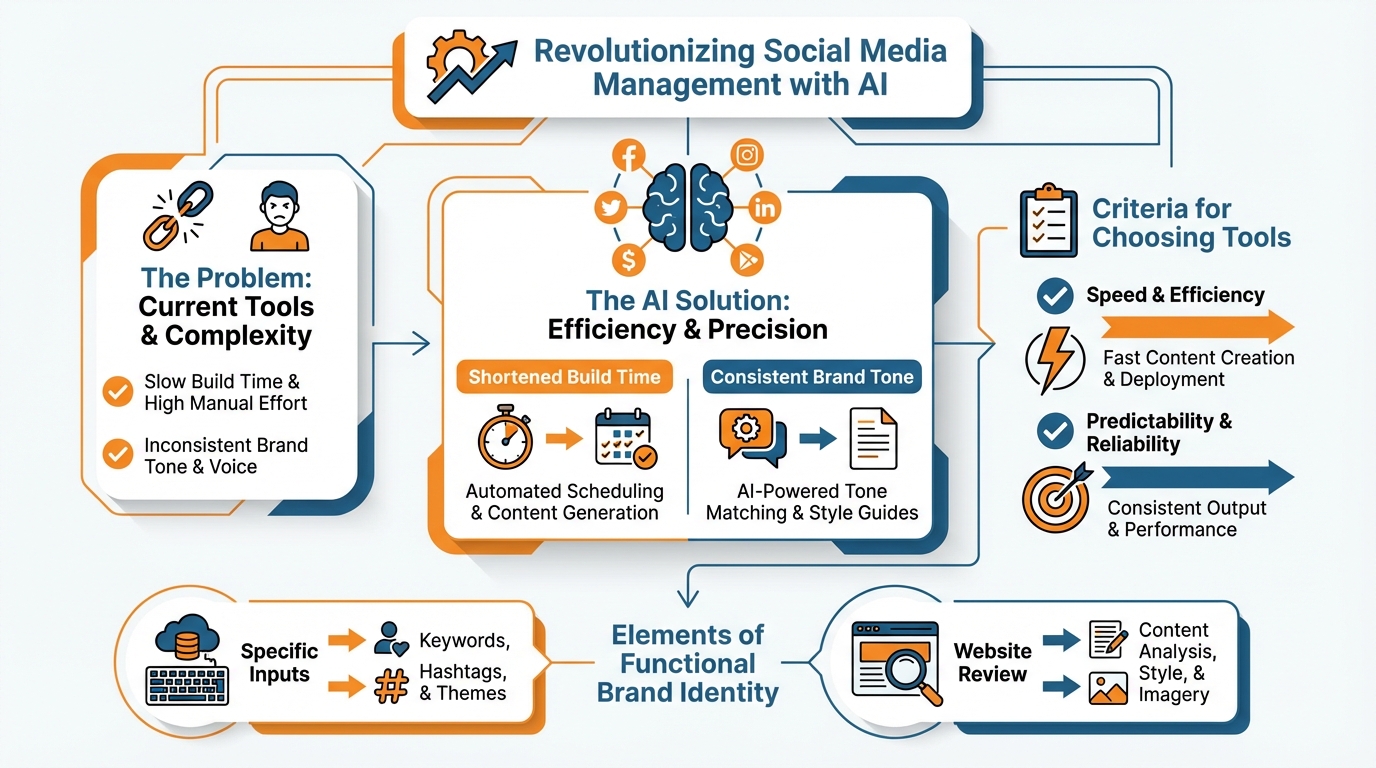
For me, there are five key benefits:
- shortened build time without sacrificing quality
- the same brand tone
- the same visual aesthetic
- the same formatting for each respective platform
- content that can be regenerated every week as opposed to posts that can only be used once for a campaign
Time-to-publish vs. edit time is a simple way to gauge this - if a tool takes an hour off the content creation process but it takes you 25 minutes to rewrite the caption and rearrange the content, you aren’t automating content, you’re simply shifting the workload.
The easiest way to determine whether you’re generating random social media posts or cohesive content is to run every test sample through a cohesion checklist.
You want to see clear messaging hierarchy (hook to value to proof to CTA) and visual hierarchy (headings, whitespace, contrast) that demonstrates the messaging hierarchy at a glance.
You want to see branding cues (consistent logo usage, correct colors, brand typography vs. tool typography).
If you have to rebuild and reorganize the messaging or force the design to display the CTA, the tool isn’t generating content, it’s generating raw materials.
To prevent AI sameness, you need to have tools that require stronger inputs and make the most out of them.
You should be able to put in your website positioning, the blog posts you’ve published in the past, your customer pain points, and the specific offer you are promoting this month, and to have that reflected in the angle, not just by changing a few adjectives. This lines up with how widely teams are already using generative AI: the Canva Marketing and AI Report (2023) reported that 83% have used generative AI to create written content (survey size: 4,000+ marketers, designers, and communicators across nine countries).
The quickest way to see if this is true is to do the following: Give the tool 2 customer avatars and the same offer.
Then, check if the hook, proof, objection, and CTA differ from one piece to the other.
A weak tool will keep the same structure and change a few surface-level words.
Stronger tools will change the promise, the story, even the visual emphasis, because the audience changed.
That’s where most tools fail.
They are broken down into modules.
The text tells a story, the design tells a different story and the call-to-action is independent of the template.
You want all of that to be optimized at the same time to make sure that your piece of content is coherent, that your text message is aligned with the visual hierarchy and that your call-to-action is aligned with the template.
That’s also why tools that are tailored for end-to-end content generation like WoopSocial will feel different: when you apply your tone of voice and visual styling automatically based on business data, you end up optimizing the idea and not trying to bridge the gap between a text editor and a design tool. If you want to compare this to other workflows, see smart social media automation in practice.
Determining which tool is best for your needs
(creator, business, agency, regulated industries)
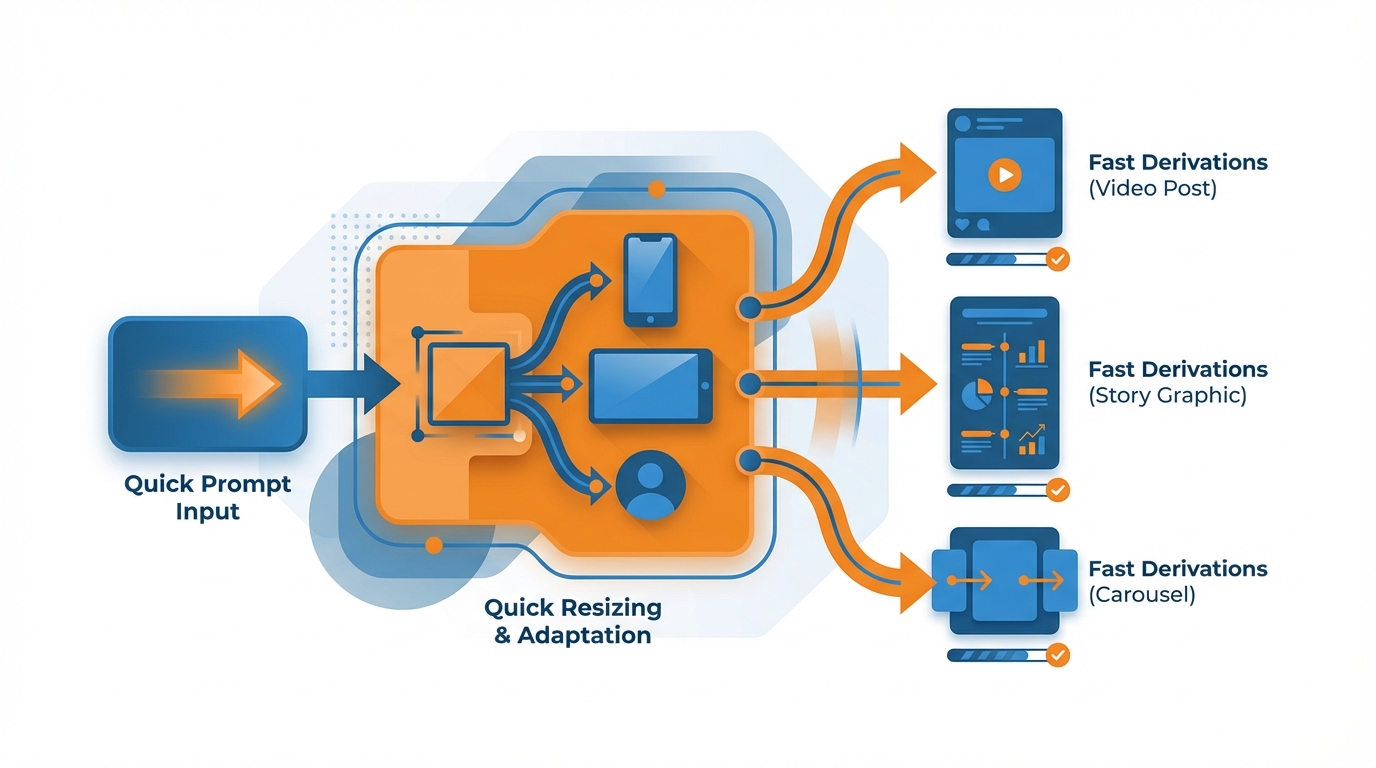
If you’re an independent creator, when choosing tools for creating and designing social media posts, you should test for speed and predictability: quick prompts, quick resizing, and fast derivations of the same concept.
If I were to give you a 10-minute test, it should look like this: are you able to come up with 3 different takes on the same subject and have each of those posts still sound like it was created by a human who has an opinion?
The danger zone in this scenario is that you create super glossy content that says nothing.
Nice graphics, generic advice.
One of the tricks I use to check for that is to make sure each post has at least one specific in it.
Either a metric, a process, a limitation, a real scenario, or a distinct before and after.
Specificity is what gets people to stop scrolling, and it’s what makes your writing sound like you.
It’s nice to be creative and fun if you’re an influencer or online personality, but as a small business or service-based local business you need to make sure your branding is consistent and that the tool helps you map offers to posts and repeat them.
In other words, you want to make sure the tool holds the logo and color and tone of voice but you need to be able to have the tool spit out offer-based posts with calls to action to rotate them through a simple month content calendar (you shouldn’t have to recreate the same messaging every single week). If you’re building that system, a social media content calendar can help make the rotation concrete.
A quick litmus test that I fall back on is the 60-30-10 rule: 60 percent of content should be around pain points and FAQ, 30 percent of the content should be proof of results and process and answers and then the last 10 percent can be feel-good content so if it’s not in that general range then you know that the tool can’t actually map content to offers and you’re going to end up with the same thing that you’re doing now which is posting a bunch of content that isn’t driving revenue so if you put in 1 offer are you getting multiple posts out of it that are actually selling different things about the same offer (not just rewording the same caption template).
If you’re an in-house marketing or agency person, then it’s all about maximizing output without too much fragmentation.
You need to make lots of things, to easily switch between tone and branding and style, and to be able to replicate campaign frameworks as often as you can (to deploy across multiple clients or business units).
The typical pitfall here is thinking you can easily triangulate between a writing AI and a design tool, when in reality you’re going to sink a lot of hours into editing, and making formatting edits, and sorting out hierarchical mismatches between headline, body copy, and CTA copy.
I’d experiment with campaign replicability: find a single core value prop, and see if you can get the tool to spit out a variety of different creatives that all promise the same thing, but with a different medium and tone, because that’s the key to turning this into a ‘factory’ and not just a ‘one-off thing’ factory. That focus on repeated workflows matches what’s happening across comms teams too: an Axios breakdown of the Muck Rack findings reported 75% of PR/communications professionals surveyed use generative AI at work (up from 28% in March 2023).
For regulated and high-trust industries, such as financial services, healthcare, and law, security is paramount.
You need a secure writing style, secure promises, and secure formatting styles that make sure your copy is effective without going overboard.
Most generators go out of control with promises, and worse still, offer legally safe disclaimers.
Both backfire: they don’t convert and still don’t save you from lawsuits.
Three variables that most vendor websites don’t offer should be used for your security and efficacy.
They include the type of content that works for you (e.g., a carousel, short-form video, or static post), how complicated your approval process is, and whether you need to transform one idea into five separate platform-specific versions formatted and written the right way.
In this context, an all-in-one content generator like WoopSocial is an excellent choice for small businesses because the platform ties generated copy to your website, which makes the copy less likely to stray off brand and require rewrites and risk.
A brand is more than just a logo and a color scheme
Here’s how I make brand voice and visual identity functional (so tools actually feel on brand):
AI-based social media content generators will only produce predictable results if you give them specific inputs that can be reused.
I begin with the five things I know will make or break the results: I provide a basic website review for voice and style, a short list of dos and don’ts for tone and style, three to five social media posts I like (not necessarily from my industry), a short list of audience pain points in simple terms and a list of offers and calls to action that can be used without rewriting them every week.
This should take less than an hour to prepare and it will save time in the long run: In my testing, the majority of editing is because there was not enough input, not because the AI performed poorly. The less editing there is to do the more time a small business owner will save. And it’s not just text: in the Visual Economy Report 2024 coverage from Canva, 82% have used AI-powered tools to produce visual content in the past year.
Second, I make your brand into constraints, since machines can only take constraints.
You need to nail down a vocabulary, an ideal sentence length, a point of view, and 2-3 signature framings that you can repeat all month.
For instance, I’ll choose a framing for awareness, a framing for education, a framing for differentiation, and I maintain the promise even as I shift the format.
You can do a quick test to see if this is possible: it’s a “heat test.”
Run 10 posts on the same offer and see if the tool maintains the same core nouns, the same level of directness, and the same point of view, and doesn’t slide into generic marketing synonyms.
If it can’t, you’ll feel off brand, no matter how lovely the designs are.
For visuals, I think about the core systems that supersede the design templates themselves, because templates will evolve over time, while patterns will remain consistent.
I need to know there are going to be repeating patterns for where the hook will be placed, how much text a headline is allowed, where the proof will be displayed, consistent type styles, colors and a single, simple convention for a logo so it’s never a topic of discussion again.
I need a basic contrast ratio and whitespace value so we know the post will be legible on mobile, and just a handful of component templates (headline, subhead, proof, CTA) that the platform can interchange.
And if I scroll through a 12-post grid in two minutes and can’t see a consistent hierarchy or visual brand signature, then I know I’m not actually designing a brand, I’m just cranking out an asset.
Last, I approach recontenting like a content coverage algorithm, not a copy and paste feature.
One idea, expressed differently according to the shape of each output: LinkedIn text post for the argument, IG carousel for the proof and steps, Story for a single punchy stat, and a short caption for the same campaign theme expressed in fewer words.
The value is in the integrity of the message across the outputs, so you’re not introducing new frames every post and disorienting your audience.
This is what I’m testing for when I look for brand kits or a customized style in a tool as well.
Can it maintain the same tone and branding guidelines for 30 days of posts, or will I have to re-prompt it each time.
Tools like WoopSocial are best when they can hook into your website as the context, and then hold those parameters constant, because it’s the execution across 30 posts that will make your SMB content marketing feel professional, not a single perfect post.
And, an end-to-end flow: create, design, adjust, schedule (not ‘5-apping’)
If you want social to feel effortless and still deliver customers, have one flow: begin with intent, develop a set of content ideas, filter for hits, develop captions and design assets, customize by platform, and batch schedule.
Your goal isn’t to write one ideal post; it’s to consistently ship 20-30 decent posts a month, all leading to the same offer and value proposition.
By beginning with intent, you cease making assumptions and start addressing the questions your customers are already asking, which is the ultimate driver of saves, comments, and clicks on every major platform.
Most companies bypass the feedback mechanism that makes volume work: filling content gaps.
You don’t need to go all spreadsheet ninja, but you need to establish some basic rule for what signals mean what.
I use saves as a proxy for usefulness, comment quality as a proxy for trust, click intent as a proxy for readiness, and DM starts as a proxy for friction in the way to a sale being removed.
Track the four signals and then you should refine in two ways:
- Double down on what’s driving saves and high-quality comments
- Refine your creative direction to be based on what people engaged with, not what looked good
I’ve seen this produce compounding results because it isn’t just about more volume, it’s about filling in the gaps on stuff your audience still doesn’t get. If you want to reduce the chaos of shipping consistently, a weekly social media system is a practical way to make this loop repeatable.
Here are the ways that designing and writing social media posts at the same time saves a small business a lot of headaches: you can create a whole month of content in minutes, keep the writing consistent with your brand voice without needing to rewrite anything, create brand designs with your logo and colors in the right place every time, and schedule a whole month of posts without needing to recreate the same designs and re-enter the same content from scratch.
An all-in-one approach means that you have time to decide what to write and how to word it, not how to copy and paste your text and how to fight with a design template.
For instance, I’ve been using WoopSocial to get a month of social media post ideas for my website in a matter of minutes, get consistent content, generate designs that are branded with my logo and color scheme, and prepare an entire month’s worth of content in a single sitting, which is what I need when what’s holding me back is finding time and posting consistently. If you need help with the text side specifically, an AI caption generator for Instagram can reduce the rewrite loop; and if you need to ship consistently across campaigns, an AI social media calendar generator can help you batch schedule without recreating the same messaging every week.
For quantity to maintain quality, you need a system to ensure variety and consistency.
Format and medium to keep it fresh, hook and CTA to reach a different portion of the same target market, campaign to keep the messaging for 2-4 weeks to achieve recognition and not fatigue.
Absolute rule, no generic post rule: every post must contain at least one specific element, a step, a limitation, a figure, a transformation, a stated objection, otherwise the content isn’t concrete and your page isn’t valuable. This is consistent with what many marketing teams already do with AI: the HubSpot summary of AI trends notes 43% of marketers use AI for content creation.
O fim.
Ultimately, the battle being fought in social media content creation products shouldn’t be about template quantity, it should be about outputting fully realized social media posts that are consistent, performant, and on-brand, with the ability to rapidly refine them.
The templates are superficial, the key to performance is the congruence of the hook, value, proof, and CTA, along with a visual information hierarchy that allows the consumer to quickly understand the value proposition on their mobile phone.
One way to easily notice the difference here is to look at your editing process: if the product you are using frequently causes you to have to edit the value proposition or adjust the visual layout, you aren’t saving time, you are just reducing the number of versions of the content you are reviewing.
The next thing you do is figure out which one to use for your workflow.
If you post a lot, you’ll want consistent output and to be able to change up a single offer quickly and easily without becoming generic.
If consistency of branding is important, you’ll want the tool to be able to maintain your tone, language, and visual style consistently over 30 days, not just on the first post.
If you need to reuse, you’ll want to be able to take one concept and easily flip it into various post formats, and have the message stay the same, because it’s that consistency that’ll get you the attention over time, not a single hit post.
Next, lock in a basic monthly framework to make the tool stack outcomes instead of adding more drafts to juggle.
Select one offer per month, attach it to a recurring blend of pain points, proof, and objection-handling, and fill out enough examples to allow your audience to choose what works.
Leverage the platform metrics you already get to shorten the cycle: saves reveal what’s helpful, quality comments show what establishes credibility, and clicks demonstrate what delivers intent to buy.
In my own experiments, the accounts that grow fastest aren’t the ones that try to brainstorm more, they are the ones that close the loop every week and rewrite the next cycle based on what actually gained traction.
To achieve that compounding impact for a small business, the optimal instruments should support starting from the business reality, capturing branding constraints and simplifying subsequent iterations.
This is the reason why a full-funnel tool like WoopSocial often offers superior performance because it takes its cue from your website to ensure voice, automatically updates branding to the content to limit rewrite/redesign cycles that threaten consistency.
Select your tool, set your monthly frequency, and evaluate it by the frequency of consistent posts it allows you to share that perform better and better.
Related reads
5/8/2026
The 7 best Blotato alternatives for developers - cheaper pricing, better API and feature comparison
Blotato is an AI-powered platform that allows you to create content and distribute it to different social media platforms. It also works as a unified social media API, which means you can run it with your AI agents to automatically post to social media.
5/7/2026
The 8 Best Bundle.Social Alternatives - Faster, Cheaper and Better Social Media APIs
Bundle.social offers a single endpoint to post to multiple social media platforms. It is also known as a unified social media API or a social posting API.
5/6/2026
The 7 Best Outstand Alternatives In 2026 - Cheaper, Reliable and Faster Social Media APIs
Outstand is a unified social media API that allows you to post to many social media networks through a single endpoint. Instead of having to build integrations for each of these platforms, you can now just build a single one and get started much quicker.