Social Media Automation for Non-Marketers: A Simple System
Learn a simple, repeatable social media automation system for non-marketers to stay visible without becoming content creation experts. Get quick answers to posting, creation, and scheduling challenges.
Best social media automation for non-marketers (a simple, repeatable system)
So, if you’re looking for the best social media automation for non-marketers, I don’t think you’re looking for some sort of massive list of features from some sort of social media automation tool.
You’re looking for a way to stay visible without having to become a full-time content creation machine, or posting a whole bunch of random stuff, or coming across like a robot,
and that’s exactly what this guide is going to do for you.
I’m going to take “best social media automation for non-marketers” to be what non-marketers really mean by it: a low-fuss way to get quick answers to these 4 questions:
- What the heck should I post when I’m racking my brain for ideas.
- How can I create it in a flash, instead of having to start from scratch every single time.
- How can I schedule it across all my platforms so it posts while I’m getting on with work.
- How can I keep posting consistently in a way that feels human and attracts interest, without giving off the kind of spammy signal that has people scrolling by.
What I promise: you will leave with a simple, repeatable process you can do in small sprints, with the actual materials you have in your business, like customer questions, quotes, before-and-after images, and things you learn on the go. I’ll also show you the safety rails for automation, so your content still rings true and your responses still sound like you.
If you want a practical reference point for scale, DataReportal’s 2024 deep-dive reports over five billion social media users worldwide, including 5.04 billion at the start of 2024 (62.3% of the world’s population), so “being present” matters even if you’re not chasing virality.
The non-marketer’s definition of best: use the most basic software that still sounds human
This isn’t a game of growth hacks or playing algorithmic whack-a-mole.
The ideal outcome for a small business owner (non-marketer type) automating social media is to just look active, generate a couple of comments and DMs here and there, and push a few people to take a few steps in the direction you want, such as scheduling, calling, checking out your website, or coming into your store.
If you are looking for a benchmark for this, consider that the average engagement rate across platforms is generally less than 1% per post, meaning that your goal isn’t virality, it’s generating a few comments and clicks every week from your target audience. If you want a quick way to sanity-check that, an engagement calculator can help you quantify “a few comments and clicks” without turning this into a full analytics project.
First, decide what’s the constraint and the constraint will dictate your system.
If you don’t have time, you need a system that’s going to take 30 minutes and create three, four, five posts without any editing or any fiddling.
If you don’t have ideas, you need a system that’s going to take from what you do know, like:
- a FAQ
- a quote
- before-and-after
- lessons learned
- biggest mistakes
- client success stories
and create the posts, and then you can approve them quickly.
If you don’t have confidence on camera, just default to text-first and simple photos so you can stay consistent without having to be on camera.
If you have too many platforms, just choose the one platform that your clients are using to actually ask you questions and then syndicate that same message to every other platform, but don’t try to create original content for every platform. (If you’re focusing on one primary channel, you may also want a streamlined Instagram content planner so the “syndicate” part doesn’t become a second job.)
Here is the flow that I follow when I don’t want to be overwhelmed by choices:
If you already have ideas but are just struggling to keep up with publishing, all you need is a minimalistic workflow - because the best of your time should be spent writing as a human and engaging as a human.
If you are out of ideas, or your branding is not uniform, or you want your content to reach multiple platforms without having to re-edit it every time, then you need a comprehensive workflow that offers planning, content and publishing, all rolled into one.
This is where tools like WoopSocial come in - pop in your business data, produce a series of ready-to-publish drafts in no time, brand your voice and tone and publish them to various social networks without spending a whole week trying to get the fonts right.
I have a minimum-viable-presence rule of thumb: If you post three times a week on your main channel, and share one of those on a secondary channel, that’s usually enough to not look dead in the average local or service business, without making yourself into a content factory.
That’s 12 times a month, which is more than enough to stay top-of-mind, to try and see what gets responses, and to build recognition.
The tooling rule of thumb is equally low-tech: eliminate clicks, eliminate context-switching, and eliminate setup.
Non-marketers don’t flail due to lack of features; they flail because the system has too much friction and dies on the vine when it doesn’t make it through a busy week.
The best system is the one that you can run even when you’re busy, and that still sounds like you when people see it.
What you should automate (and what you shouldn’t): keep it platform-friendly and ditch the robot feel
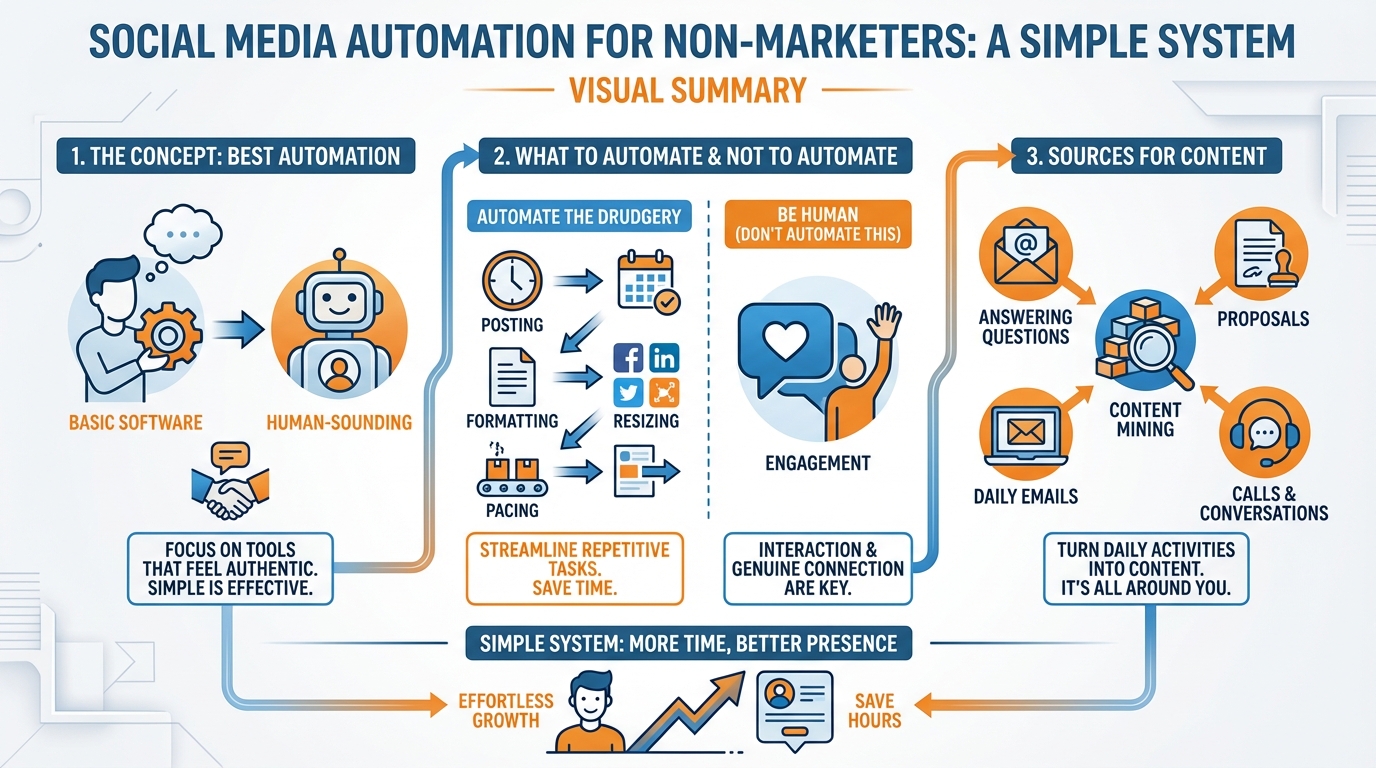
Automate the drudgery: posting, formatting, resizing, and maintaining a steady pace.
That’s the essence of great social media automation for non-marketers because it minimizes the busy-week day-to-day that can destroy any hopes of consistency.
But don’t automate being human.
No fake engagement, no auto-DMs, no mass commenting, no engagement pods, no scripted generic responses.
Social media algorithms get better and better at recognizing auto-patterns of engagement, and even if they don’t, your customers can sniff it out in an instant, and it’ll sap more trust than missing a post will ever sap.
To prevent automated content from tasting bland, apply a one human detail per post rule.
You can write one micro-story, one real opinion, or one specific example that only you could say, and the post suddenly has fingerprints.
You can do this in under 60 seconds: add a number, a moment, or a decision.
I might write, I raised my prices after realizing 70 percent of my time was going to the smallest clients, and the first week felt terrifying but my calendar immediately got cleaner.
Or, swap in a real photo whenever possible, even if it is just you at the shop, a behind-the-scenes snap, or a quick before-and-after, because original images are a strong authenticity signal and they prevent your content from blending into the template noise. (If you want more practical ideas like this, the post on behind-the-scenes content fits this approach.)
The idea with platform-safe scheduling is to not look like a robot.
Maintain a consistent cadence, don’t publish in binges, ensure you’re not publishing identical content to all platforms, and avoid copy-and-paste.
Don’t publish identical content across all platforms, especially in the same 5 minutes.
That’ll reduce reach and it’s a red flag.
Instead, use the one tweak per platform principle: Tweak one thing to optimize it for that platform, without over-investing.
You might make the lede shorter on one platform, add a local detail to another, or change the lead sentence to focus on what’s most important to that platform’s audience, even if you keep the rest of the content the same.
Stop automation when reality requires it: sensitive news, a controversy in your field, a delivery delay, a service interruption, or a customer conflict that plays out in public.
Build a quick three read rule before posting anything: read it once as if you were an irate customer, read it once as if the timing was bad, and if either of those readings makes you hesitate, stop and swap it out for a neutral or supportive message.
And when you do need speed without sacrificing personality, quick draft generation and that one human touch review is where WoopSocial shines: automation takes care of the creation and scheduling, and you retain the human eye for detail that makes it sound like you. Research lines up with this shift too: BCG’s June 2024 report notes that around 80% of CMOs have already deployed GenAI to make internal processes faster and more productive, including content creation and social media engagement.
Solution for the blank page: sources for content when you don’t do marketing
The quickest way to avoid staring at a blinking cursor is to stop looking for inspiration and start mining for content.
Your business already creates valuable content daily. It’s just that you don’t call it content.
Dig into the activities you do daily: the questions you answer over and over, the proposals and quotes you write, the sales objections you overcome before someone purchases, the support issues that show you what customers don’t understand, the onboarding messages that set customer expectations, the hard-learned lessons, and the back office decisions that your customers don’t see.
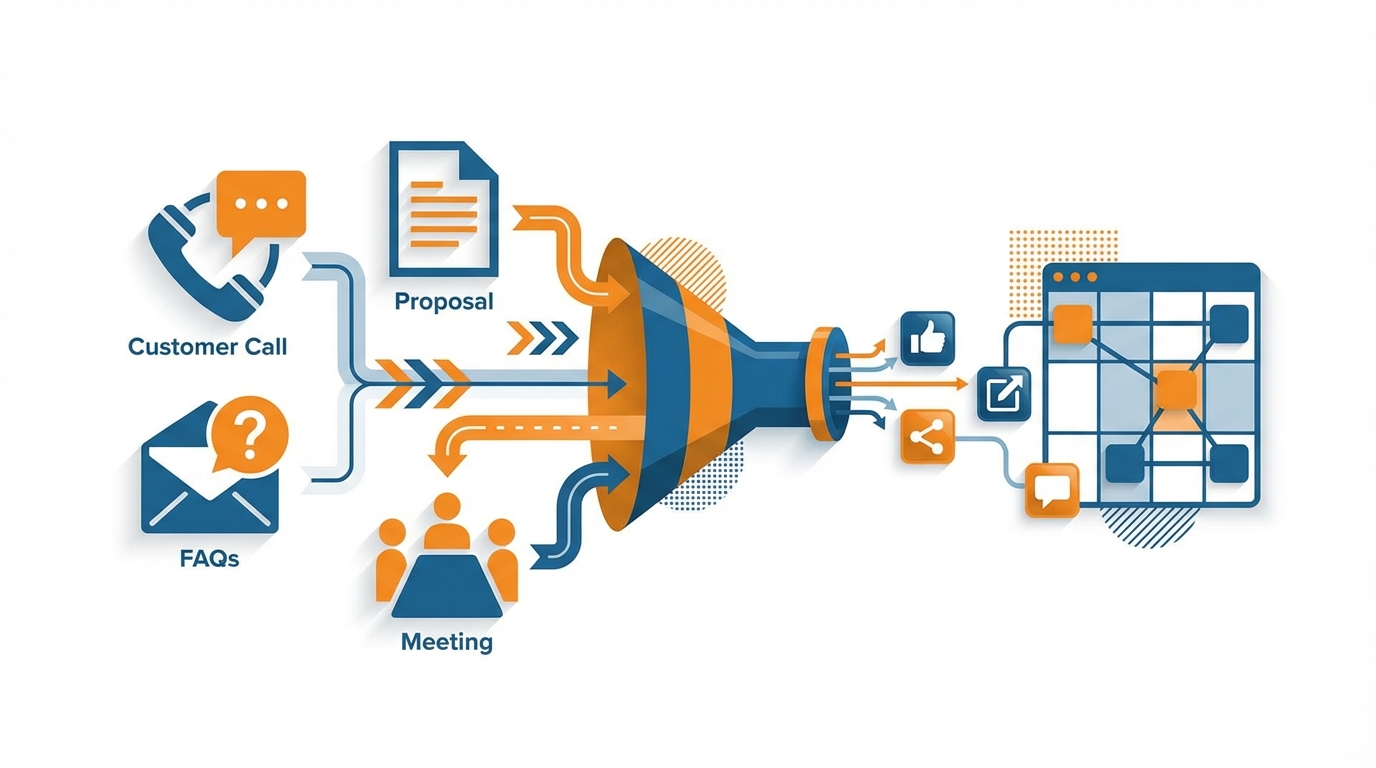
If you need a rule-of-thumb, then write down the next 20 questions you receive from real customers and turn them into articles.
In many small businesses, this list alone will cover 60-80 percent of what potential customers need to hear before they decide to trust you.
A single idea can be made into five to 10 different pieces of content without being repetitive as long as you shift the frame instead of the subject.
Take one piece of raw material, such as a standard objection you get, and turn it into:
- a two-sentence myth-busting article
- a brief anecdote about a customer who didn’t heed the warning
- a simple set of three to five things to consider
- a comparison of options A versus B
- a behind-the-scenes look at how you approach it
- and a results piece on how doing this correctly solves problems or otherwise creates a positive outcome
That’s how you can publish the same thing five to 10 different times and not be redundant, because each one answers a different question a customer might have.
This is a trick I use all the time: One sentence from a proposal turns into a short explanatory article, then into a before and after result, then into a two-step process, then into a potential mistake, and voila!
Two weeks’ worth of articles from a single client conversation.
So that this is useful, the pillars need to be framed in a way that is part of normal business discourse, not just a marketing construct.
And they need to be cycled through: problems solved, mistakes to avoid, quick wins for today, comparisons for better buying decisions, snapshots of the way we work, and outcomes that show the impact of change.
If you’re posting three times a week, that cycle provides a month of posts: week one is a problem to be solved and quick win, week two is a mistake to avoid and comparison, week three is a way we work and an outcome, and then just start the cycle again.
It also avoids the pitfall of non-marketers who post only announcements.
That almost never gains traction because it doesn’t support the decision process.
AI shouldn’t be used to generate generic-sounding captions like any other company would use.
Instead it should take your notes, your website pages, your previous email responses, and the actual questions you get from customers, and write social media posts in your words, your directness, and your realities.
This is why I prefer an automation that can scan a website or brand information and generate a month’s worth of fully ready-to-post social media ideas at once, that can automatically add your branding to the posts, because most non-marketers don’t have the problem of having a content calendar, they have the problem of creating the content and packaging it consistently.
So if you are looking at different social media automations for non-marketers, you should judge them by how well they can turn your business data into social media posts that are on brand, would be written and said by you, and require as little editing as possible. That’s also consistent with Salesforce’s 2023 findings that 68% of marketers say they have a fully-defined AI strategy.
What a normal week of work might look like + measuring success without marketing metrics
The most powerful social media automation tool for non-marketers is a ruthless workflow.
Mine is one hour a week, a weekly batch that frees up the rest of the week from tasks: it takes a short hour to create or curate 3 content pieces for your primary channel, have a human review pass, and schedule for later.
Your responsibility is to eliminate decisions from the busy days.
If you do it right, you are not coming in every day to try to figure out what to talk about; you are coming in every day to respond to people who responded to you.
A good “set it and forget it” process would look like this: You have a day that isn’t crazy, so you go in and schedule a month’s worth of posts.
Then, the only time you should have to touch your social media is if something is going on with your business or in your community that needs to be addressed.
And, it is important to plan for that: I only schedule 10-12 posts for the month, even though my plan may be to post 12 times, so I have the ability to go in and add a post if we just landed a new client, or if I need to go in and post about a storm, or if I need to go in and address something if I get the same question three times in a week.
That is how automation doesn’t get in the way of your business.
Without marketer dashboards, you can determine whether or not something worked by tracking the engagement signals that are tied to either conversions or communication.
That means engagement like:
- Responses and comments that start a dialogue.
- DMs seeking more information.
- Clicks to a single page you want them to visit.
- Signups or bookings.
- Saves and shares (both mean they want to return to your content or send it to another person likely to buy)
It takes a lot less effort to like a post than it does to save it. The two are not equal.
Saves and shares mean more than likes in most businesses.
So do a handful of the right kinds of engagements each week vs. hundreds of less meaningful likes. And if you’re wondering which platforms your audience is actually on, Pew’s 2024 study reports 83% of U.S. adults use YouTube, 68% use Facebook, and 47% use Instagram, which can help you choose that one primary channel.
Loop every 2-4 weeks.
After two weeks, do again whatever has yielded DMs or comments, and stop what has only yielded likes.
After four weeks, loop again by compressing a successful theme into a simplified sequence: if one post about pricing expectations drove questions, then your next post was about what can influence price, and then one about mistakes, and a quick before-and-after, etc.
This is also the point at which WoopSocial makes sense without becoming your entire plan: it gets you a month’s worth of curated ideas in under an hour, always in your brand’s voice, auto-generates your branded images, and posts to all major platforms, so you can focus your limited time and energy on what can’t be automated, which is talking to real people. If consistency is the real struggle, the article on inconsistent social media posting goes deeper on keeping a steady rhythm.
The best automation is the automation that will stay automated
The right automation for a non-marketer isn’t one with the most dials and settings, it’s one that works even on the busiest weeks.
Even if all it does is remove the blank page, help you maintain your voice, and get things posted, you’re still successful even with low engagement.
And you’re probably not getting higher than 1 percent on any given platform anyway, so consistency trumps viral in your quest to be memorable to your ideal client at the moment they are seeking your help.
To sustain it, make it your policy to design for friction, not perfection: you should be able to write the next week’s worth of posts by thinking about what has already happened in your business this week.
Simply use three questions your customers asked, one mistake you see people make, and one small win you gave them, and then add one piece of humanness that only you can bring to it.
I do this by writing the post as a response to a real conversation, then editing it down to the point where it’s clear and skimmable.
When you construct your content out of real life, automation no longer feels like showmanship but just good management.
The guardrails are what ensure automation works for you and for your audience: you automate the packaging and the pacing, but retain control over the opinions, the timing and the responses.
That’s how you avoid the robotic tells people can spot in a heartbeat, and that’s how you preserve trust if something shifts in your business or community.
A consistent cadence is more important than a ‘perfect’ calendar, and a steady weekly rhythm is better than a frenetic content blitz that implodes after a week and a half.
And if you need a simple solution, select a tool that will quickly transform your business content into branded posts, so that your weekly task is just to review, add your personal touch, and that’s it!
That’s where WoopSocial comes in: It will help you quickly create a month’s worth of content, keep the visual and textual branding intact, and still leave you being a business owner and not a marketing expert. (If you want to tighten that weekly rhythm, an AI social media calendar generator can help you map those 10-12 posts without adding complexity.)
The goal is not to have more content, it’s to have a steady presence, while still having time to engage, create connections, and manage your business.
And for a reality check on adoption: a 2024 Basis Technologies survey found that 90% of marketing professionals use generative AI tools at least once a month, and 70% use it weekly—so using AI to speed up drafts is already normal, as long as you keep the human touch review.
Related reads
5/8/2026
The 7 best Blotato alternatives for developers - cheaper pricing, better API and feature comparison
Blotato is an AI-powered platform that allows you to create content and distribute it to different social media platforms. It also works as a unified social media API, which means you can run it with your AI agents to automatically post to social media.
5/7/2026
The 8 Best Bundle.Social Alternatives - Faster, Cheaper and Better Social Media APIs
Bundle.social offers a single endpoint to post to multiple social media platforms. It is also known as a unified social media API or a social posting API.
5/6/2026
The 7 Best Outstand Alternatives In 2026 - Cheaper, Reliable and Faster Social Media APIs
Outstand is a unified social media API that allows you to post to many social media networks through a single endpoint. Instead of having to build integrations for each of these platforms, you can now just build a single one and get started much quicker.