OpenClaw, Clawdbot, Moltbot: Marketing Automation & Strategy
Discover how OpenClaw, Clawdbot, and Moltbot can be integrated into your marketing process for constant demand generation, market intelligence, and lead prospecting.
How to use openclaw clawdbot moltbot for marketing without turning it into a playground
If you are looking for ways to leverage openclaw clawdbot moltbot for marketing purposes, chances are you are not looking for 20 super cool one-shot tricks you can do and then ignore it. What you need is a constant companion you can integrate into your marketing process so every morning demand gen channels are being constantly fed with new market intelligence, content, and hyper-relevant messaging for lead prospecting that is actually informed by facts. That is what this platform does best, when you use it as intended, as a process, and not a playground. For a small business, that is the difference between night and day because your constraint is not creativity, it is scalability without killing yourself on repetitive tasks.
The reason you have to know why the name is chaos is because it dictates which tutorials are valid, which installers are safe, and which download links are phishing attempts. Clawdbot became Moltbot became OpenClaw, and there are still tutorials floating around on the internet which are based on old directory names, old config names, and old website locations. If you use the wrong one, it will cause you to lose time, or worse give credentials to something you didn’t intend to install. Throughout this article I’m going to keep names consistent and point out to you how to confirm you are using the correct one and the correct method to do so so you can worry about results instead of errors. As 2026 coverage has made clear, the surrounding ecosystem is chaotic: for example, The Verge reported more than 30,000 agents were using Moltbook in its piece on a strange social network for AI agents.
The results are easy to quantify: predictable demand gen results, reduced labor, and ROI accountability tied to campaigns and pipeline. It’s as simple as: you configure OpenClaw to monitor the relevant platforms, utilize the insights to create tactical resources, and format outreach communications for your review and approval. It’s like having a fully-automated junior SDR who writes, sequences and sends, while still giving you complete control to monitor fact-check, approve, restrict frequency, and set strict boundaries for messaging and legal. That’s how you gain leverage without sacrificing integrity.
Focus on building a marketing operating system for the agent (as opposed to a series of tactics). If you’re interested in learning more about how to use openclaw/clawdbot/moltbot for marketing, here’s a quick starting architecture to keep you out of the robot hell.
A quick starting architecture to keep you out of the robot hell
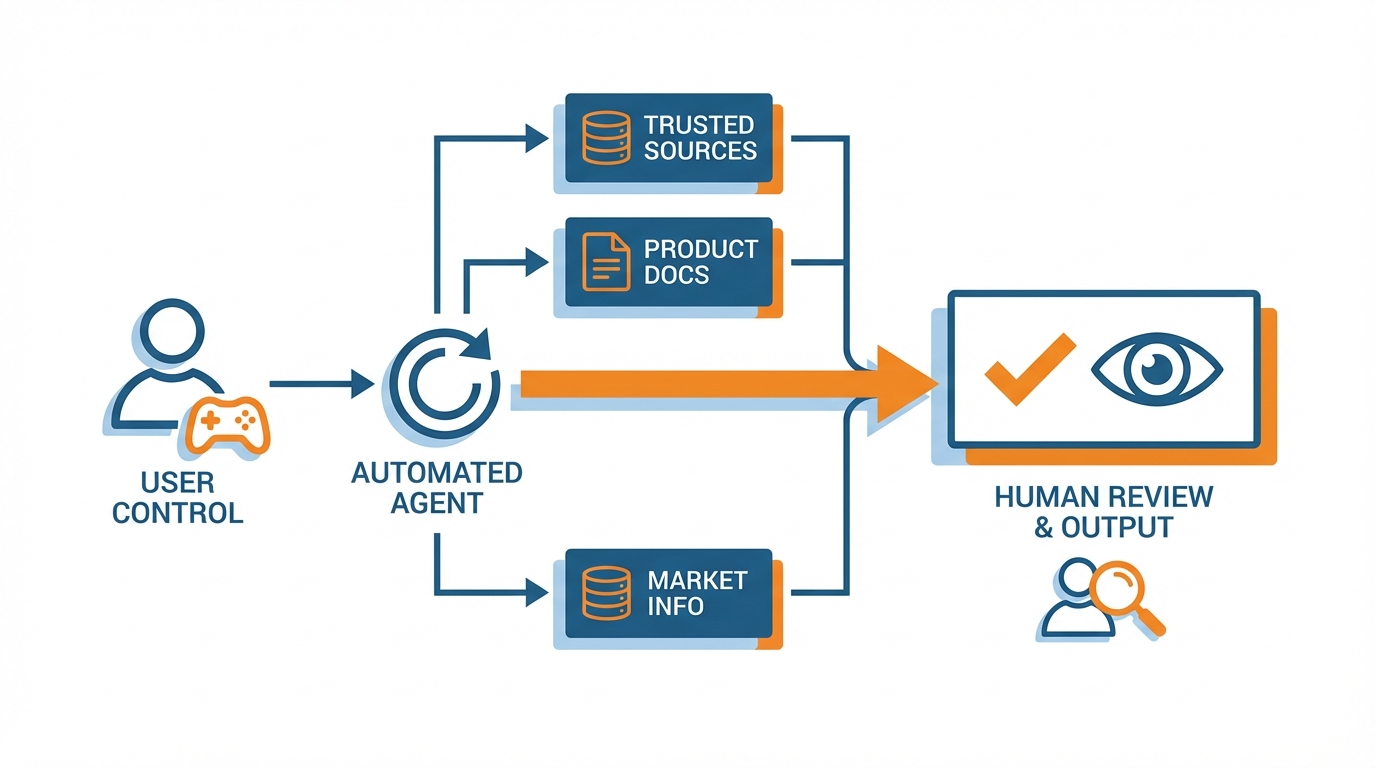
Imagine the agent running in one location under your control.
It only reads from a few, trusted sources like your website, your offer pages, your product documentation, and market information.
It only writes its output to one location, where it can be reviewed before it hits the public internet.
You keep a human in the loop in one place: when the agent needs to send something to the public internet or to a prospect.
I design the tool to be a power tool, not a collaborator: the tool can write, but it can’t publish.
It can research, but it can’t promise.
It can draft, but it can’t pitch.
To make this manageable, you’ll find that it works much better if you break the agent up into more specialized components with defined inputs and outputs, rather than a monolithic prompt.
There’s the researcher, who consumes a list of sources and returns findings and urls; the list-builder who consumes the findings and returns a clean list of prospects or partners, along with the fields you care about; the writer and repurposer, who consumes the approved ideas and returns drafts and channel-specific versions; the outreach assistant who consumes only the approved fields and any relevant constraints, and returns personalized outreach messages; and the QA checker, who reviews for factual accuracy, url correctness, tone, and anything that might expose you to legal or reputational risk.
If you structure things in this way, you can understand how many items are processed (and how accurate they are) at each stage; you can update one of the role prompts without breaking everything else.
I organize things this way because what small businesses need is not higher volume, it’s lower error rates and faster feedback. If consistency is often the problem for most, see inconsistent social media posting for the exact failure mode this SOP-style approach prevents.
Consistency is often the problem for most, so define the tasks as an SOP, not as a brainstorm.
Use template prompts for each role with clearly defined sections for purpose, allowed sources, claims that can never be made, required output format, and desired action if specific information is not available.
Version the prompts as you would a new product feature (v1.1 changed the language on tone, v1.2 modified the language on compliance, v1.3 added a new field) so you can track when responses improve or degrade and why.
Add a single, simple escalation rule that prevents the whole thing from going off the rails: if the tool cannot find a source for a factual assertion, if it is unsure of a price, guarantee, or eligibility term, or if it is about to name a competitor, it must pause and ask for your input.
That single rule will help you avoid the most common pitfall in automation, which is generating confidently wrong answers in volume.
Last step, get this to hum like a tranquil production line: a work queue (to manage the work in progress); a review step for any outgoing content (to keep the ship in your harbour water-tight); and a single source of truth for brand voice and offers (so you don’t end up with 5 mutually contradictory versions of your value prop floating around). If you want to formalize the cadence, this pairs cleanly with a social media content calendar approach.
Start small on purpose: get one workflow live from end to end; get the measurement in place for a week or two; and then add channels (not before you see the KPIs responding).
So for example, you might start with researcher → writer → QA → 2 weekly pieces your business is willing to put its name to; then list-building and outreach once you have your messaging dialed.
If you need to accelerate the brand-voice side of this equation, I sometimes couple the agent with WoopSocial (brand-voice and -creative consistency across channels; but agent can handle research, writing and QA).
But the timing stays the same: get one workflow live; measure it; then expand.
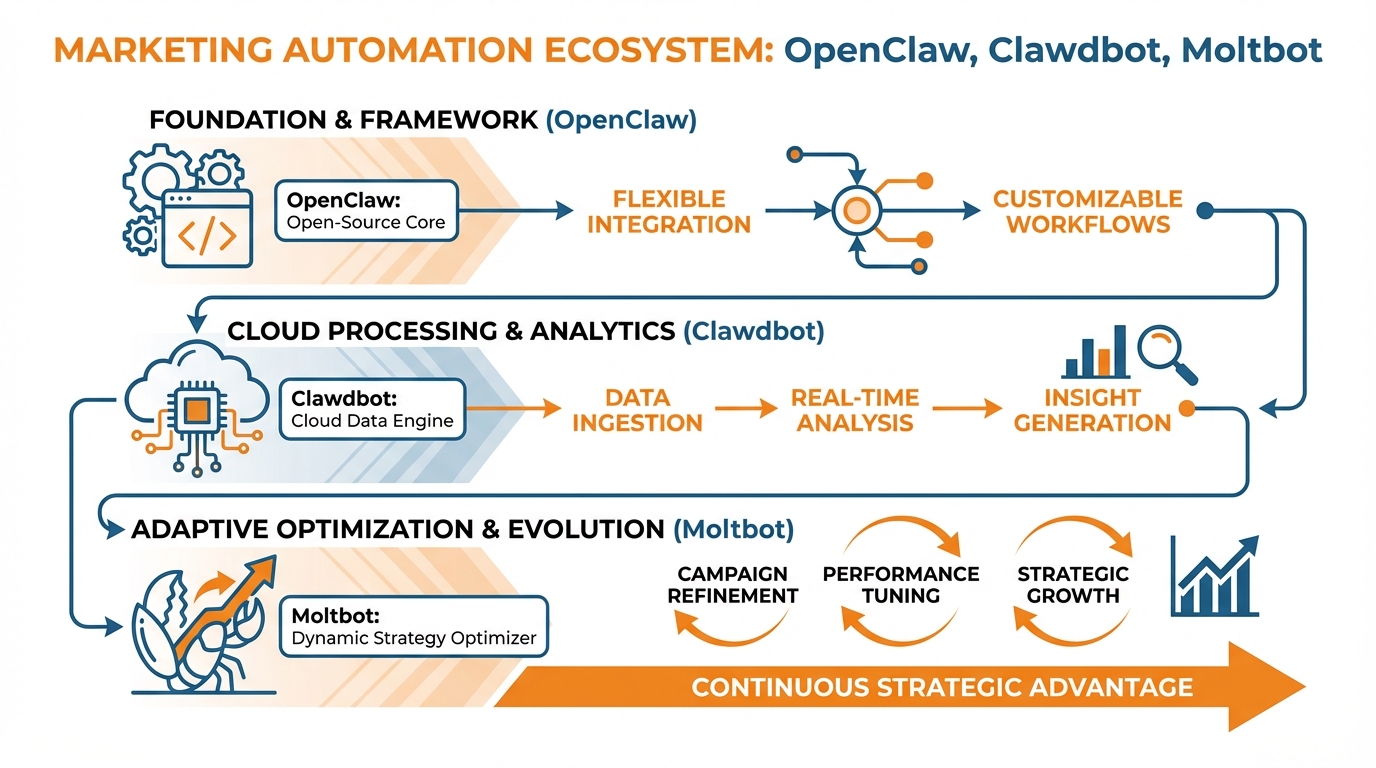
Configured for secure execution
Security, compliance, and platform-risk controls
The initial victory when learning to deploy openclaw/clawdbot/moltbot for business is not the perfect automation script, it is the silent installation of the actual binary without introducing a keylogger to your work laptop.
All builds and updates must be downloaded directly from the project’s official GitHub page and any accompanying keys and hashes must be verified, since the name storm has attracted a cottage industry of mirror ‘bots and benign “integrations” to web browsers and text editors. This risk is not theoretical: TechRadar reported Moltbot had more than 93,000 GitHub stars at the time of reporting, while warning that a fake Moltbot assistant spread malware, including a malicious VS Code extension that claimed integration with seven different AI providers.
The bot must be run from a sandboxed virtual machine, started from a fresh and dedicated interpreter, and it must be assumed that everything handled by the bot could be transmitted somewhere if you do not choose your permissions wisely.
Second, consider the account access and permissions as if you were hiring a temp: provide only the minimum access that the service requires.
Separate keys between test and prod environments (don't let a test mistake nuke your live account) and rotate keys regularly or after any unusual activity.
Also limit filesystem and network access as much as possible (e.g., read-only access to a limited directory of approved resources, no access to password managers or browser profile directories) and only allow network access to domains that the service needs to consult for the workflow.
And keep the company accounts completely separate from your personal accounts: it's easy for a personal account ban or security event to bleed into the company account and I've known small companies that lost weeks of time because one of their shared accounts got flagged and dragged everything else under. This operational caution matches what The Verge noted in its reporting on the “actually does things” agent obsession, including a described exposure issue involving private messages, account credentials, and API keys being left exposed online.
This is a danger zone for scalability becoming a legal issue, so there are some steps you need to take before you can hit send on that first message.
You need to establish and track the existence of your legal basis or consent, track the source of every email address, ensure every email contains the required signature as well as an unsubscribe link or clear path to opt-out (and it needs to actually work), and ensure that you have a suppression list the agent checks against before it even drafts an email (including the email addresses of those who have previously unsubscribed, dead emails, do not contact, etc.) because some of the most costly violations are a result of an unwanted repeat email.
Finally, the agent’s role should be to draft and prepare, but the send function should still have a ruleset and review before email is sent out to ensure that the volume of emails never outpaces the governance process.
There are rate limits, and an implied risk tolerance, for virtually any interaction with a platform; if you do any of it too quickly, too many times, too uniformly, you'll get rate-limited or shadow banned.
You should architect to the rate limits, and keep yourself on the right side of the support, as opposed to replace, the human, and you do this by having the bot research, personalize, and suggest posts or comments or messages for you to approve, and for public facing material like posts, adding a risk review function that goes through factual claims and sources, verifies every link, and double-checks the tone to ensure that you're not posting false promises or bad prices or off-brand tone at scale.
If you want to keep a brand voice, but let OpenClaw do the research and drafting for you, I've used WoopSocial in that role to create on-brand content for you, but the risk rule remains the same: no public publishing without the verification step.
Turn it into a growth flywheel: data → content → distribution → partnerships
What to do with openclaw/clawdbot/moltbot for compounding marketing? Don’t treat it as a content toy, treat it as always-on market intelligence.
You set the researcher role to follow three main things:
- Competitor intelligence (when they release new landing pages, change prices, release new features)
- Community issues (problems people keep talking about on forums/groups/comments)
- Commercial intent (job postings, tool stacks, legal requirements, migrating away from X)
...and every single result has to be pushed to a template:
What just happened, who is it relevant for, source links, and what does it mean for my offering this week.
The output is essentially a weekly Kanban pipeline of things that matter, ordered by 2 fast metrics I’ve developed:
urgency (market timing) and relevance to revenue (how directly does this relate to a product, service or upsell you currently sell).
Second, you create a unique influence and partner database that serves more like a “database” because it’s kept up-to-date and automatically adds/removes “tags” to help you manage activities.
You maintain the usual targeting fields such as “audience relevancy” (not just their overall size, but who they actually serve), “key topics” (key themes within their content), “existing relationships” (previous collaborations you’ve had, formats used, and success), and “communication” (speed, medium and date last contacted).
You also leverage your “agent” tool to keep it updated through things like re-scanning posts to refresh your labels.
You don’t have to dig back into spreadsheets every week to refine your targeting!
The other piece that I’d add (which most smaller operations omit) is “partner viability,” which asks: do they have a solid CTA?
Are they regularly producing content?
Have they worked with a partner recently (last quarter or so)?
If so, you have a stronger likelihood of success.
Having that database in place then means you can do high-throughput partner engagement that doesn’t feel spammy, by imposing tight rules on personalization.
You never ask for something without giving something away first, where that something is low cost to you but high value to them, whether a channel-specific syndication of their top-performing content, say, or converting one of their insights into a co-branded template that your readers can apply, or even just suggesting a minimal co-produced content asset where you do most of the work.
You also keep the genie in the bottle: it can only draw on verified information in their recent content, it has to identify a particular theme they are demonstrably interested in, and it has to offer a single collaboration idea per email if it’s to sound human.
Then you can maintain ongoing relationships via the agent building a lightweight touch-point plan based on signals such as: wishing them well when they announce something new, making an introduction when two partners seem relevant to each other, or simply sending a quick retweet when they publish a post that matches one of your customers’ pain points.
Finally, you achieve scalable content creation by extending one idea across several platform-specific social media posts, while maintaining your branding.
For each social media platform, you convert one market insight into a how-to post, a contrarian post, a short list post, a customer story post, a partnership post, each with its own header and word count requirements, while the AI ensures that your branding non-negotiables, such as tone, claims, and positioning, are met. For additional structure on the “always-on” side, this fits well with social media calendar automation.
And for the transition from drafting to publishing at scale, I have OpenClaw perform research, writing, and quality assurance, and then shift the completed and approved posts to WoopSocial so that your text matches your tone, and your graphics are automatically customized, allowing you to generate a month’s worth of consistently branded social media content rapidly without having to make marketing a daily grind.
It’s worth remembering why the naming chaos matters in the first place: Wired stated Moltbot was released as Clawdbot last November, relative timing stated in the article, in its report on how the viral assistant spread.
Demonstrate ROI: measurement, attribution, and feedback loops
If you want to answer questions about how to use openclaw/clawdbot/moltbot for marketing and demonstrate to yourself that it's working, you're going to need a logging discipline to turn results into learnings.
I log source, audience, campaign tag, asset, CTA, and outcome for every workflow I run, because otherwise you only know the bot did something, not whether it made you money.
You can do this in a spreadsheet, but be disciplined: every agent-generated post, message draft, partner pitch, or landing page variation must have those fields, and the workflow does not count as delivered until they are filled in.
This one discipline enables you to answer the questions you care about as a small business: which audience segment responds fastest, which offer is easiest to pitch, and which channel delivers signal vs vanity.
While we don’t require attribution to be complete, it does need to be accurate.
Apply UTM discipline to each and every link the agent produces, map each UTM campaign to one and only one LP offer (apples to apples), and add a few fields in CRM that connect what the agent produces to pipeline: campaign tag, asset, first touch source. If you want a lightweight way to standardize this, you can use a UTM generator to keep naming consistent across workflows.
This will allow you to connect an OpenClaw workflow to downstream revenue without requiring a specialized tool: when the lead is converted, you will know what agent-produced asset was clicked, what page captured the lead, and which followup sequence generated a response.
The trick here is that you have to think of what the agent produces as inventory, with SKUs: if you can’t figure out what the exact variant that worked, you can’t improve it, and you will wind up just producing more noise instead of increasing performance.
Review your KPIs by funnel stage so you aren’t using late-funnel measurements to evaluate early-funnel workflows.
In awareness, use direct levers like qualified impressions and partner reshares, and look at week-over-week (WOW) lift instead of absolute numbers.
In engagement, emphasize signal quality like saves, replies, profile clicks, and time on page, since those are stronger indicators of intent than likes.
In leads, use conversion from landing page to form submit or booking, and in revenue, use pipeline created and CAC, but skew your decisions to leading indicators during the first two weeks of a new workflow so you can optimize before you’ve sunk a whole month.
If you want to maintain some consistency in brand voice while you test like hell, sometimes I push the approved final copy through WoopSocial to keep the copy and imagery on-brand while the offer and hook variants continue.
Continuous optimization is where the leverage comes into play: weekly testing for incremental improvement on the winners (which are folded back into the agent playbook so that the baseline continues to improve).
Test 1 variable per week per channel, say subject lines, first line hooks, audience segments, or post times.
Have the agent create 2 versions of that variable (which is changed in isolation), and then compare the two variations (which are then measured against a stage-specific KPI).
When automation is working, we should see low variance and increasing lift, such as reply rates improving with similar declines in negative responses, or qualified clicks going up with similar effort; when automation is creating noise, we should see increases in volume with stable outcomes.
We should have hard and fast limits that when reached, tell us to turn a channel off and re-optimize, say if we get a certain number of low-quality leads in a row, if we see a spike in unsubscribes or spam complaints, or if we see a demonstrable decrease in quality of engagement.
We should then tighten the guardrails further, say by restricting the sources, tightening the claim rules, or inserting a human in the loop, until the metrics improve.
Leverage OpenClaw as the operator, not the salesperson
And, if you want a true response to the question of how to use openclaw clawdbot moltbot for marketing, the answer is to use it as if you were an operations person, operating a bounded system, rather than a marketer, spamming the world.
As a SMB, your superpower is to be fast but bounded: bounded roles, bounded rails, bounded measurements that are frequent enough to catch errors before they compound.
But unbounded quantity doesn't actually feel like what you think it does. It feels like a jumbled brand voice. It feels like an increasing rate of unsubscribes. It feels like a lot of wasted outreach time.
Because the real constraint in marketing isn't the quantity of ideas you can generate. It's the quantity of trust and consistency you can generate.
Now, let me give you a more concrete plan.
Select one workflow and fully execute it end-to-end before trying anything else.
Select insights if you need more definition; select content transformation if you need volume without exhaustion; select partner activation if you need reach without paid social. If you want a companion framework for that “one workflow” focus, read smart social media automation for.
Then, lock it down and then track it - a unique identifier for every asset, UTM tracking codes for every link, and a standardized review process for every content piece - so you can answer some of these very basic business questions of “which topics are generating responses?” “which content types are getting saves?” and “which partner pitches are generating legitimate leads?”
Scaling feels the opposite of exciting, by design: more volume with the same (or lower) risk.
You scale by optimizing inputs, not adding more outputs; by increasing the draft to approved pass rate, not increasing the number of drafts.
I’ve seen one well-instrumented workflow beat the pants off a dozen fancy automations because once you can track lift week over week, you can make one tweak, see your KPI shift, and codify that tweak into your playbook.
You then discover the publishing hard truth: that distribution starts to stabilize when your pipeline can consistently feed approved content on a frequency you can sustain.
When you achieve that, the most efficient way to take your approved inventory and have it volume produced and branded to post consistently is to outsource that to a tool designed for brand-consistent volume; this is where you enter tools like WoopSocial. Also note that TechCrunch timestamped its report on OpenClaw assistants building their own social network as published January 30, 2026, which is another reminder that the surrounding ecosystem is evolving quickly.
Related reads
5/8/2026
The 7 best Blotato alternatives for developers - cheaper pricing, better API and feature comparison
Blotato is an AI-powered platform that allows you to create content and distribute it to different social media platforms. It also works as a unified social media API, which means you can run it with your AI agents to automatically post to social media.
5/7/2026
The 8 Best Bundle.Social Alternatives - Faster, Cheaper and Better Social Media APIs
Bundle.social offers a single endpoint to post to multiple social media platforms. It is also known as a unified social media API or a social posting API.
5/6/2026
The 7 Best Outstand Alternatives In 2026 - Cheaper, Reliable and Faster Social Media APIs
Outstand is a unified social media API that allows you to post to many social media networks through a single endpoint. Instead of having to build integrations for each of these platforms, you can now just build a single one and get started much quicker.