Schedule Your Pinterest Pins with Ease
Save time by planning and scheduling your Pinterest pins in advance. Build your visual presence and grow your audience with consistent content.
Get started now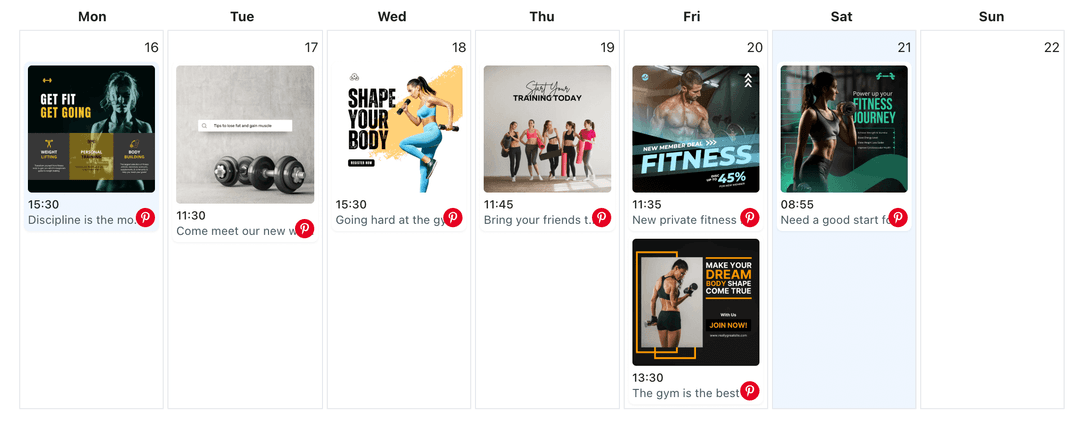
Grow your Pinterest presence
Streamline your Pinterest strategy with powerful features designed for creators
Smart Scheduling
Schedule your Pinterest pins in advance.
- Unlimited pins (Free & Pro)
- AI post generation
- Visual calendar view
Account Management
Manage multiple Pinterest accounts from one dashboard.
- Unlimited accounts (Free & Pro)
- Business profiles
- Add other social platforms as well
Content Features
Create engaging Pinterest content with rich media.
- Image pins
- Idea pins
How It Works
Connect Pinterest
Connect your Pinterest account securely
Create Content
Create pins and organize your boards
Schedule & Publish
Set your preferred time and let us handle the publishing
Frequently Asked Questions
Both Free and Pro plans include unlimited pins. All users can schedule as many Pinterest pins as they need.
Yes, you can connect multiple Pinterest profiles on both Free and Pro plans. All plans support unlimited social accounts.
You can schedule image pins, video pins, and idea pins to your Pinterest boards.
Yes, you can schedule the same pin to multiple boards on both Free and Pro plans.
The Free plan includes unlimited pins, AI post generation, 3 AI images (lifetime), AI content calendar generation, drag & drop calendar, content library, and business profiles. Pro plan ($19/month) adds 100 AI images per month, advanced scheduling, and priority support.
Features
Switch Between Pinterest Profiles
Switch between multiple Pinterest profiles from one dashboard. Manage all your profiles, schedule pins, and switch accounts without logging in and out repeatedly.
Learn moreAutomate Your Pinterest Posting
Automate Pinterest pin posting with WoopSocial. Set up pins to publish automatically at scheduled times and maintain consistent board presence.
Learn moreAutomate Pinterest Pins with AI
Use AI to draft Pinterest pin copy faster and automate pinning. Approve descriptions, pair the right images, and post to boards on schedule without manual pinning.
Learn moreDesign a Pinterest Content Planner for Every Board
Turn seasonal ideas, product pins, and inspiration boards into a Pinterest content planner. Map posts on WoopSocial's calendar so every board stays fresh automatically.
Learn moreCreate Your Pinterest Content Strategy with AI
Get AI-powered content strategy recommendations for your Pinterest boards. Receive topic suggestions, pin planning guidance, and strategic insights to grow your Pinterest presence.
Learn moreCreate Pinterest Images with AI
Generate Pinterest-ready images with AI. Turn prompts into vertical pins, add keyworded descriptions, and schedule them to the right boards from one calendar.
Learn moreCreate Your Pinterest Pins with AI
Use AI to draft Pinterest pin titles and descriptions faster. Generate keyword-rich copy for your boards, then edit and schedule image and video pins from one calendar.
Learn moreCross-Post Your Pinterest Content to Instagram
Cross-post Pinterest pins and Idea Pins to Instagram feed or carousels. Keep visuals consistent, adapt captions for Instagram, and schedule both channels from one calendar.
Learn moreCross-Post Your Pinterest Content to LinkedIn
Cross-post your Pinterest pins, Idea Pins, and business visuals to LinkedIn. Adapt discovery-focused content for professional audiences and schedule both platforms from one calendar.
Learn moreCross-Post Your Pinterest Content to TikTok
Cross-post your Pinterest pins, Idea Pins, and videos to TikTok. Turn Pinterest visuals into TikTok-ready clips with concise captions and scheduled publishing.
Learn moreGenerate Pinterest Captions with AI
Use AI to generate Pinterest pin descriptions faster. Describe your pin idea, get caption suggestions, then edit and schedule them from one calendar.
Learn moreManage Multiple Pinterest Profiles and Boards from One Calendar
Connect every Pinterest profile you run, plan pins for multiple boards in a single WoopSocial calendar, and publish image or video pins automatically.
Learn morePin at the Best Time on Pinterest
Schedule Pinterest pins at optimal times for your audience. Plan your pinning schedule and publish automatically when pinners are most active.
Learn morePost Content to Multiple Pinterest Accounts
Post the same pin to multiple Pinterest accounts at once. Share images, videos, and idea pins across all your Pinterest accounts with one workflow.
Learn moreSchedule Your Pinterest Carousel Posts
Plan Pinterest carousel Pins inside WoopSocial. Upload up to five vertical frames, add descriptions with keywords, and schedule automatic publishing to your boards.
Learn moreSchedule Your Pinterest Image Pins
Schedule Pinterest image pins to your boards. Upload images, write descriptions, and schedule automatic pinning with WoopSocial.
Learn moreSchedule Your Pinterest Short Video Pins
Schedule short vertical video Pins to your Pinterest boards. Upload clips, write keyword-rich descriptions, and publish automatically when your audience is looking for ideas.
Learn moreSchedule Your Pinterest Story Pins
Schedule Pinterest Story Pins (Idea Pins) with WoopSocial. Upload vertical panels, add keyword-rich notes, and publish multi-page stories automatically to the right boards.
Learn moreSchedule Your Pinterest Video Pins
Schedule Pinterest video pins to your boards. Upload videos, write descriptions, and schedule automatic pinning with WoopSocial.
Learn moreReady to Grow Your Pinterest Presence?
Join thousands of creators who trust WoopSocial
Get started for free