Create Pinterest Images with AI
Generate Pinterest-ready images with AI. Turn prompts into vertical pins, add keyworded descriptions, and schedule them to the right boards from one calendar.
Create Pinterest images with AI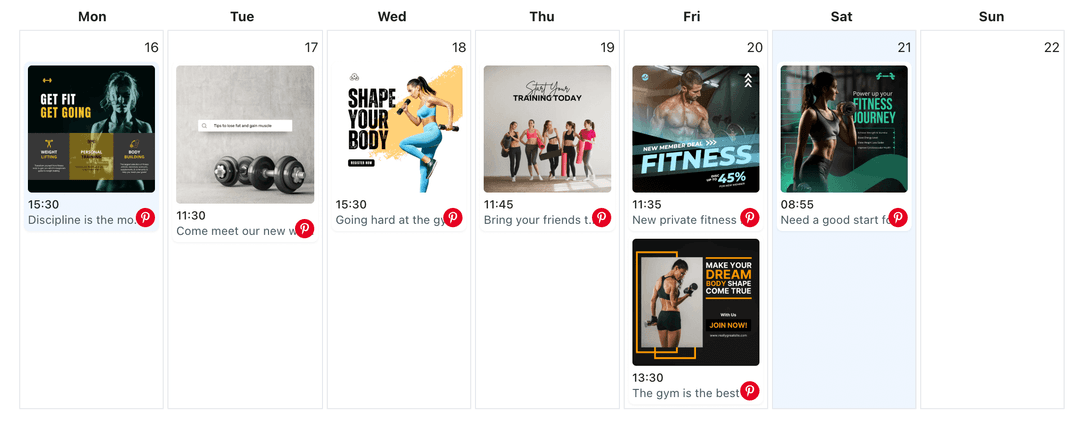
Relied on by merchants and creators who need steady, search-friendly pins without waiting on design resources
Pinterest rewards clear visuals and useful descriptions. WoopSocial’s AI image generation delivers multiple vertical options from a single prompt so you can pick the best fit, pair it with keywords, and keep your boards active.
Grow your presence
Streamline your Pinterest strategy with powerful features designed for creators
AI Pins for Your Boards
Enter the product, project, or tutorial you want to share and let AI produce Pinterest-ready images. When you approve a visual, you can also schedule Pinterest image pins directly. schedule Pinterest image pins
- Vertical outputs
- Brand and style cues
- Editable variations
Keyword-Friendly Pairing
Generate title and description starters that match each AI image and weave in the keywords you supply so pins stay helpful and discoverable.
- Search-aware text
- Board-specific angles
- Readable phrasing
Board Planning in One Calendar
Place AI-created pins on the Pinterest content planner, space them across boards, and keep seasonal, evergreen, and promotional pins balanced. Pinterest content planner
- Board selection at a glance
- Drag-to-reschedule
- Gap detection
How It Works
Outline the Pin Concept
Share the topic, target board, and any colors or style notes. AI returns vertical pin options designed for Pinterest discovery.
Choose and Refine Images
Select the visuals that best fit your board, request variations if needed, and pair them with edited titles and descriptions.
Schedule Pins to Boards
Attach the approved image and copy in WoopSocial, pick the board and time, and let WoopSocial publish automatically to your Pinterest profile.
Saved Brand Looks
Keep preferred palettes, fonts, and composition tips as prompt presets so future AI pins stay consistent with your shop or blog identity.
Variations for Seasonal Campaigns
Request multiple seasonal or evergreen angles from one prompt, then keep the versions that align with upcoming promotions or tutorials.
Descriptions that Match Intent
Ask AI to draft concise how-to blurbs, shopping highlights, or inspiration notes that match the visual and encourage saves and clicks.
Multi-Board Management
Running several boards or accounts? Generate dedicated visuals per board, then schedule them from one dashboard when you expand beyond the free plan. manage multiple Pinterest accounts
Why Generate Pinterest Images with AI?
Pins work best when the image instantly explains the value. AI image generation gives you quick concepts sized for Pinterest so you can spend time refining titles and keywords instead of staring at a blank canvas.
You stay in control: remove any output that feels off-brand, adjust prompts until the visuals fit your boards, and only schedule the pins that feel ready.
Keep Boards Fresh Without Repetition
Use AI visuals to fill gaps between product shots, tutorials, and blog promos so each board stays active without repeating the same creative. Mix promotional pins with educational or inspirational graphics for a healthier balance.
Organize pins in the Pinterest content planner, reorder them around launches or seasonal moments, and keep an even cadence across every board you manage. plan pins inside the Pinterest content planner.
Ready to Create Pinterest Images with AI?
Produce Pinterest-friendly visuals from simple prompts, pair them with strong descriptions, and schedule pins automatically in WoopSocial.
Create Pinterest images with AIFrequently Asked Questions
AI generates vertical, Pinterest-optimized images you can edit before publishing. You decide which visuals make it to your boards.
Yes. Provide keywords and AI will weave them naturally into titles and descriptions. You review and edit before scheduling.
Pins only publish after you approve the image and copy and schedule them. WoopSocial handles the automatic posting at your chosen times.
You can generate drafts on any plan. Free users can schedule 15 posts per month across platforms; Pro removes that limit.
Yes. Pick the board for each pin when you schedule. Pro users can manage multiple boards and accounts from one dashboard.
Save prompt presets with your color and style cues, review each output, and discard anything that does not match your brand before scheduling.
Start Creating Pinterest Images with AI
Keep every board stocked with fresh, on-brand pins using AI-generated visuals and WoopSocial’s scheduling calendar.
Get Started with WoopSocial