Social Media Traffic in GA4: Clicks vs. Sessions & Fixes
Unravel the mystery of social media traffic discrepancies in GA4. Understand why clicks don't match sessions and how to fix attribution issues with smart UTM tagging and data validation for accurate reporting.
Social media traffic in GA4: why clicks don’t match sessions (and how to fix it)
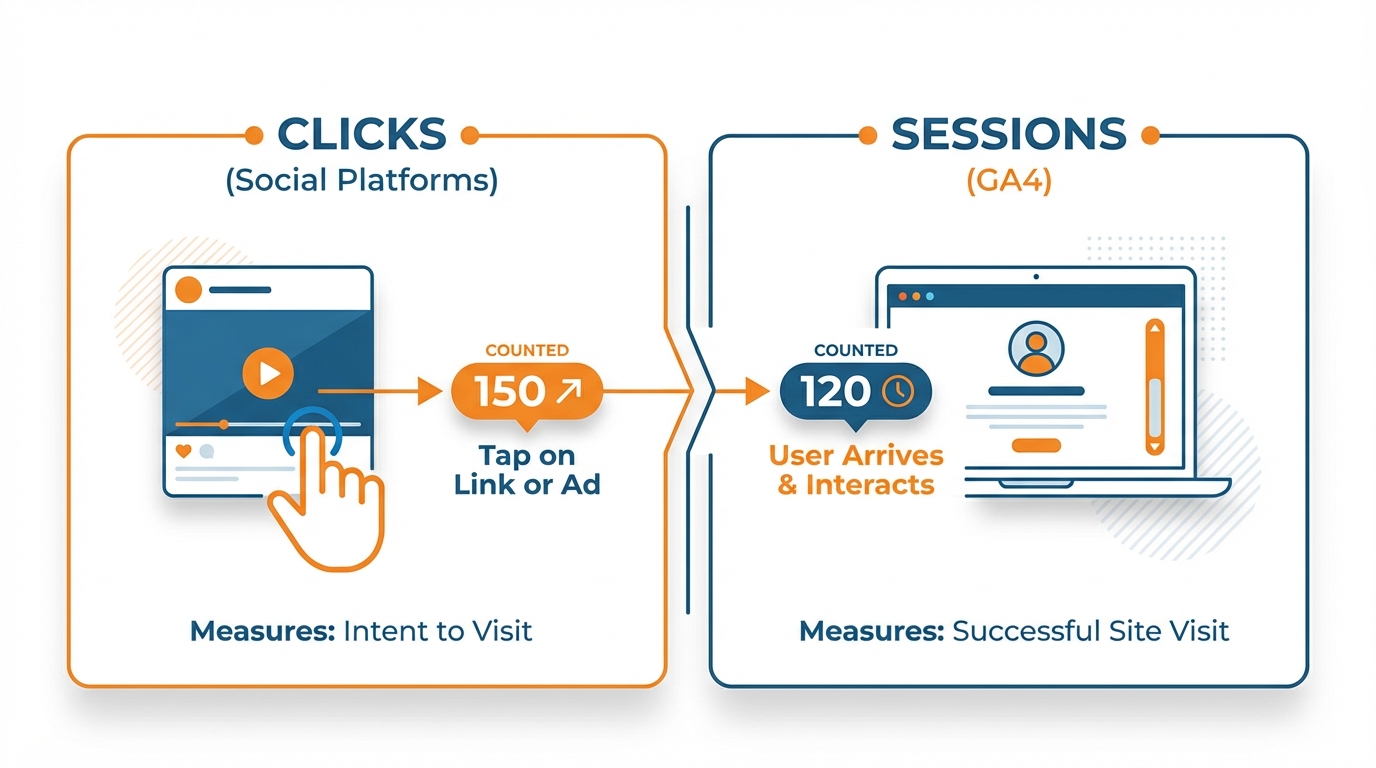
The reason it is difficult to reconcile social media traffic to your website in GA4 is that one is counting a “click” and the other is counting a “session,” but what does that actually mean? The click is counted by the social platform when the user clicks on the link. The session is counted by GA4 when the user arrives on the page, the tag has fired, consent for measurement is granted, and the session has been correctly attributed. This is why 500 clicks might equal 220 sessions and nothing is wrong. But then you also have to consider in-app browsers and privacy modes as well as slow load times. These factors will further widen the discrepancy for low-traffic sites with smaller sample sizes.
Then there’s the bucketing issue. Unless you’re using strict tagging, it’s really easy for GA4 to attribute paid social as organic social, or referral, or direct, or (worst of all) unassigned. I usually see this when ad traffic is tagged with the same link as organic traffic, or when UTM case is not consistent, or when one campaign is tagged with utm_medium=social and the other with paid_social (and GA4 decides these are different). You believe you’re comparing different campaigns, but really you’re comparing different naming conventions. A practical way to standardize this quickly is using a consistent UTM builder like the UTM generator so your naming conventions don’t drift.
In this tutorial, you’ll be learning how to do all that, but better: Building a flexible, scalable UTM system that keeps your paid and organic traffic separate. Validating your data so you can trust it’s correct. Debugging the most common discrepancies, so you know why your data doesn’t add up. Reporting on social media data to answer real optimization questions, like which platform produces engaged visits, which campaigns drove leads or sales, or which landing pages are just eating up your spend, rather than just “where’s social”. If you’re also trying to reduce manual posting work while keeping tracking clean, social media automation can help you stay consistent without breaking your taxonomy.
How do you see social media traffic in GA4, and what is GA4 counting?
If you want to begin exploring social media traffic in GA4 as quickly as possible, you can simply go to Reports > Acquisition > Traffic acquisition.
This report is the most direct answer to the small business owner’s question: where are we getting traffic and conversions from today?
Use the primary dimension Session default channel group to easily find Organic Social and Paid Social, and use primary dimension Session source / medium to get the exact sender, e.g. facebook / paid_social or instagram / social.
If you want the people view instead of the visit view, you can use User acquisition and primary dimensions First user default channel group and First user source / medium to find which social platforms are sending new users for the first time (not just the same users coming back over and over again). If you’re struggling with the difference between social media traffic vs. social outcomes, it helps to remember that a 2022 snapshot showed that none of the top 20 websites receives more than 5% of total traffic via social referrals (excluding bit.ly), according to DataReportal’s social media referrals report.
Here’s what GA4 is really using to categorize your traffic:
- Organic Social is traffic that came from a known social referrer or a medium that GA4 thinks is social (like social, social-network, etc).
- Paid Social is traffic that came from a paid signal, usually in the medium field (paid_social, paid-social, cpc, etc), although you may be using a platform-specific paid medium (and if you are, hopefully you’re doing it consistently).
- Referral is traffic that came from a known referrer, which wasn’t matched to a social channel rule (which is why link-in-bio tools and some tracking redirects often fall in here).
- Direct is traffic that had no referrer and no campaign parameters that GA4 could use (so GA4 thinks it’s typed-in or saved traffic even if it originated from a social app).
- Unassigned is traffic where GA4 gave up because the source/medium pairing didn’t match any of its channel rules (which is why random UTM inconsistencies and weird medium values silently break your social data).
Social traffic falls into this bucket more frequently than you might anticipate because the classification is happening at the time the session begins and is based on the hit as it is interpreted by GA4.
So if your UTMs get dropped due to a redirect, if your page takes too long to load and the tag doesn’t fire, if consent is not provided, or if the case doesn’t match exactly (Facebook vs. facebook), then GA4 will not assign the session into the channel grouping you expect it to be in.
I’ve seen one company get 4 rows for what should be one single row for clean paid social because their utm_medium tag varied between paid_social, paid-social, social, and cpc, and this makes every subsequent comparison appear as though performance shifted when really the tracking changed.
Tracking social media traffic in GA4 is a lot like that.
Once you figure it out, it feels obvious, but for a long time it’s like trying to see 3D magic eye pictures.
What changed it for me was realizing that GA4 is measuring what happens after the click, and the platforms are measuring what happens before.
GA4 is measuring sessions and events on your site, after a click has resulted in your site loading and its measurement container successfully firing.
The platforms are measuring clicks that may or may not ever result in a session and event in GA4 because of everything from drop-off, to in-app browsers, to privacy features, to slow sites.
So you should use GA4 as your source of truth for what happens on your site, and the platforms as your source of truth for what happens before your site; and when they disagree, that’s just a story about measurement and user experience, not a failure. Also, the trend is getting tougher for publishers: Similarweb data summarized by Axios showed social media referrals to news sites fell about 30% from Sept 2022 to Sept 2025.
UTM parameters in Google Analytics 4 for social media tracking that don’t break when applied at scale
UTMs in GA4 work once you accept them as a common vocabulary instead of trying to get clever with them.
You need a classification system that will endure through different employees, campaigns, and geographies without inflating the number of rows.
I’m an advocate for keeping all of these consistent and lower case, not allowing spaces, and keeping the convention consistent for consistent readability in GA4 exports, as well as consistency in filters.
The greatest value to UTMs comes from controlled vocabulary: defining what the valid set of values for utm_source, utm_medium, and utm_campaign should be and sticking to that set.
If you do nothing else, standardize those three.
When you allow facebook, Facebook, fb, and facebook.com to be valid options, GA4 won’t average them together, it will fragment them and you’ll end up with a fictitious representation of change that really is just a story of shifting nomenclature. This fragmentation can also show up at the referrer level; for example, Analytics Mania’s guide to viewing social traffic in GA4 notes that multiple Facebook referrers can appear separately (like l.facebook.com, facebook.com, lm.facebook.com).
The paid vs organic split is where most small businesses mess up GA4 channel grouping without realizing it.
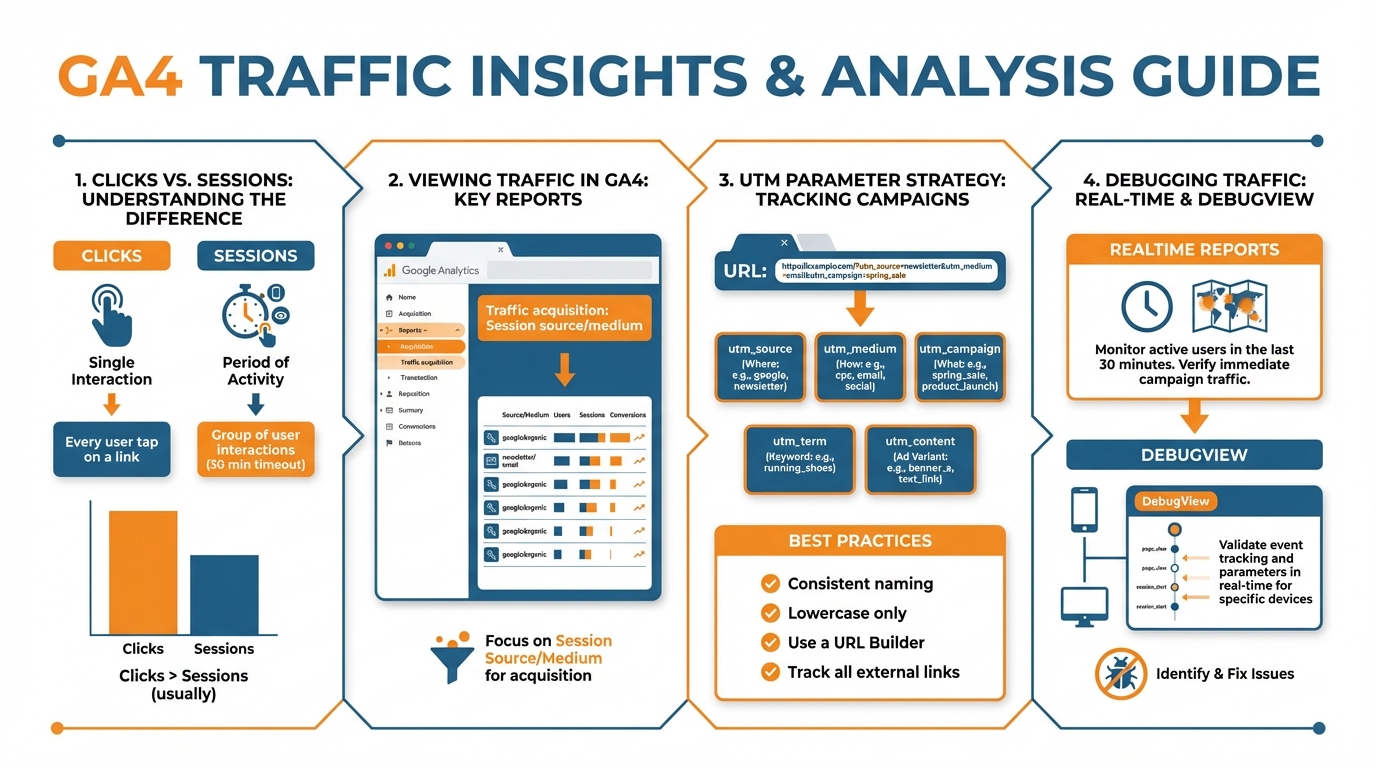
Your responsibility is to make utm_medium predictable and repetitive so GA4 reacts the same way every time.
Choose one paid medium and one organic medium and stick to it.
For example, you can use utm_medium=paid_social for every paid click and utm_medium=organic_social for every organic post.
Then use utm_source for the platform only such as facebook, instagram, linkedin, tiktok, and avoid mixing utm_source with placement or campaign names.
My reasoning here is that if medium is consistent, GA4 buckets the traffic correctly under Paid Social and Organic Social, but if medium varies like social, paid-social, cpc, boosts, paidsocial, you cause Unassigned traffic and fragment your performance across multiple rows that GA4 perceives as different channels.
To have the appropriate level of tagging to inform a decision without overwhelming your reports, you’ll need a hierarchical structure.
Use utm_campaign for a business-level decision you might want to change later, such as promo_2026q1, evergreen_leadgen, or product_launch.
Use utm_content for decisions you would actually optimize within a campaign, like creative theme, media format, distribution channel, partner/influencer, and link-in-bio tool.
For example, I might keep utm_campaign=evergreen_leadgen for months, and iterate on utm_content=video_hook1_ig_reels, carousel_offer2_fb_feed, partner_jamiesmith_story, or linkinbio_linktree to understand what’s driving engaged sessions and conversions, without creating 50 unique campaigns.
The key here is to squeeze as much meaning into a regularized pattern: creative -> placement -> partner (if applicable) in a consistent order to facilitate fast filtering and pivoting.
The key to this all working outside of you and your one month, is governance.
You need to determine who is the steward of the taxonomy and have them review every single outbound link format, and you need to treat UTM’s that are non-compliant as broken links, because, well, they do break measurement.
I prevent the creative spelling problem by limiting myself to a short list of allowed values and only using those, and I prevent the reporting problem by never renaming a campaign in mid-stream, and by never reusing the same utm_campaign for a totally different campaign later.
You need to test before you ship by clicking every link, and making sure that the UTM’s are still on the final URL that all redirects end up at, especially if you are using link in bio tools or tracking links.
Then, for the first 24-72 hours, you need to carefully monitor GA4 for any smoke signals that you can use to investigate problems early: a sharply increasing Unassigned percentage, a pop in Direct traffic on a day when social is strong, paid social traffic showing up in Referral.
These are not mysteries, they are almost always UTM’s being stripped, or values being changed, or redirects pulling a fast one on you, and you can quickly get those ironed out before they result in weeks of useless attribution data.
My go-to list for debugging social media traffic in GA4 when something seems off
In Tracking when your paid social traffic in GA4 vanishes or appears as direct or unassigned: First, determine whether your issue is with tagging, classification, or session starts.
You can do this quickly by comparing the three views below for the same date range: Traffic acquisition: Session source/medium, Traffic acquisition: Session default channel group, and an exploration with Landing page + query string: Session source/medium.
If you have UTMs in your Landing page query string but your session medium is direct, then GA4 probably never saw the UTM parameters at the start of the session (for example, a redirect or second pageview).
If you do not see the UTM parameters in your Landing page query string, then the issue is upstream (i.e., the link you shared is not the link that lands).
If you have clean UTM parameters but they land in unassigned, then you probably have a medium parameter that does not match any channel rule or you have case and punctuation variations that are causing your rows to split.
My final culprit: Redirect chains.
These are the silent killers of social attribution, especially when dealing with shorteners and link-in-bio tools.
You have to test that what you send isn’t what matters, it’s what GA4 receives.
So, click on your social link, observe the address bar, and make sure it contains your full utm_source, utm_medium, and utm_campaign as it bounces around from redirect to redirect.
The special trick here is that some redirects will keep the UTMs, but remove the referrer.
So, your organic social posts might just switch to Direct now, while your paid social (with UTMs) might be fine.
When I’m debugging this, I simplify: If possible, I have the social link point directly to the destination page.
If I have to go through a tool, I need that tool to pass through query parameters unmodified (and not rewrite or lowercase half the string).
Then, in GA4, I check to make sure I fixed the issue by looking at just my own traffic and making sure that my first page_view event got the right session source/medium.
If they only show up on the 2nd page, you still have a problem.
Another silent killer is cross-domain traffic and 3rd party checkouts since they can technically overwrite the original social session at the exact time the transaction is completed.
It is possible that a customer may click a social ad, land on your website, and after being redirected out to the domain of a payment processor to complete the transaction, that upon returning, GA4 will attribute the conversion to the wrong channel as it starts a new session on their return visit.
We need to confirm that both cross-domain measurement is properly configured on each of these domains, and that we are excluding unwanted referrals so that payment processor domains don’t poach credit.
I will confirm this by placing a test order after clicking on a social ad and checking for the conversion in GA4 within the Traffic acquisition report and also through an exploration including Session source/medium and Page referrer; if I see a payment processor domain as a referrer or as a session source prior to transaction, that is your smoking gun.
Lastly, you have to anticipate other sources of deltas: consent mode, iOS and Safari, in-app browsers, ad blockers, and slow load times can make actual clicks non-existent sessions because the tag doesn’t fire or measurement is rejected.
You can anticipate internally by monitoring the delta between platform clicks and GA4 sessions over time and treating anomalies as a site and privacy signal, not a social performance signal.
Then, GA4 reporting can make social look incomplete due to thresholding and identity reporting settings, particularly for small volume advertisers; I suspect this when I notice it and then look at the same numbers in Explorations (which don’t have these issues) vs. standard reports, switch identity reporting to a less restrictive option if needed, and verify in BigQuery export or Looker Studio if a report seems to suddenly be dropping rows.
Channel groupings are my final resort: I only edit GA4 channel definitions when I can show clean, consistent UTMs are still getting into the wrong channel, and when I do I test safely by duplicating the channel grouping and then comparing before and after, and also making sure that I haven’t inadvertently moved Email, Paid Search, or Referral into Social as I’m trying to fix it. If you need more advanced control here, note that GA4 has limits: KP Playbook’s breakdown of GA4 channel groups states you can create 2 custom channel groups with up to 25 channels per group (GA4 360: up to 5; still max 25 channels per group).
Reports that connect our social media efforts to revenue (not just the fluff metrics)
Now that we’ve got the social media traffic data in GA4, let’s use it for optimization.
Understanding how to track social media in GA4 is where reporting truly adds value by asking (and answering) three business critical questions that can inform tangible change:
- Which social channels and campaigns bring engaging sessions?
- Which landing pages convert once users arrive?
- Where does social support conversion even when it is not the last click?
You should be able to open a single view and make decisions around this influencer is sending quality traffic, this ad set is bringing in browsers, and this landing page is bleeding revenue.
I use engaged sessions, key events and revenue per session as metrics because likes don’t pay the bills and clicks without on-site engagement is just interest.
This is something you should implement in GA4.
You really need to live in the explorations, not just the regular acquisition reports.
So, I do a free form exploration.
I will do a row for session source/medium, session campaign, and then landing page and query string.
Then, I do some metrics here for sessions, engaged sessions, engagement rate, key event count, key event rate.
And then, total revenue or purchase revenue if you’re an e-commerce.
Then, if I’m trying to troubleshoot quality, I’ll do a breakdown by device category or country because you might see a campaign that looks awful, but actually it’s working really well on one device and it’s tanking on another.
So, when I find a winner, then I’m going to look at the specific landing page and campaign that it’s winning on and I’m going to look at the drop-offs at each step of the funnel by adding more events here like view_item, add_to_cart, begin_checkout, generate_lead or whatever events you have in your funnel so you can see where the social traffic is falling out and you can address that specific step instead of just trying to guess.
Finally, you need to be able to track partners and influencers.
This is where tracking often breaks down, so it has to be robust.
You should provide every partner with a persistent value for each of their UTMs, and that value needs to stay in the same UTM every time so that you can filter and compare throughout the year.
I do this by making the partner a controlled value (for example in utm_content), and leaving the rest of the taxonomy the same so that a partner isn’t inadvertently given a new source or new campaign.
You can then measure partners by engaged sessions, key event rate, and revenue per session in GA4, rather than trying to use screenshots from a platform that combines view through and modeled conversions and changes attribution windows at the drop of a hat.
This is also where attribution is useful for how you stop cutting top-of-funnel social that is working.
You can use reports like Advertising reports -> Conversion paths to see if social tends to appear at the front of the path and which channels tend to close, then use Model comparison to estimate what credit social gets under different models.
If social almost never gets last-click but almost always appears in paths that end in Branded search, email, direct, etc., that is not a failure, that is influence.
To keep stakeholders sane, you also need some kind of translation layer between GA4 and platform analytics: platforms will report clicks and conversions attributed off their own windows and models, while GA4 will report sessions and conversions on-site after consent and tag firing.
I tend to reconcile them by comparing platform link clicks to GA4 sessions for directionally consistent trends, then evaluate on GA4 outcomes like engaged sessions, key event rate, revenue, etc., because that is the part you can optimize on your site and tie back to cash. And if your organization is still getting comfortable with GA4, a 2023 poll found ~23% had fully implemented GA4, ~50% were still learning, and ~16% had not started using it, as summarized in Search Engine Land’s GA4 readiness coverage.
If you’re running into execution issues like inconsistent social media posting, fixing the process (not just the reports) matters; see inconsistent social media posting for the operational side of keeping things stable.
O Fim
Social media traffic in GA4 is not a mess if you approach it as a process rather than a setup.
Clean social tracking in GA4 is about consistent UTMs, valid attribution modeling, having a plan when the number of clicks don’t match the number of sessions, and reporting that’s designed to solve business problems rather than measuring followers and fans.
And if you keep your naming conventions tightly controlled, you prevent the stealthy row-splitting that makes it look like performance changed when it was really just the tagging that changed.
You will still see discrepancies between platform clicks and GA4 sessions, and that is not a bug, that is life: platforms measure the click, GA4 measures the session only once page loads, measurement fires, and consent permits it.
The key nuance is that your goal is not to reconcile to 100%, your goal is to understand how to explain variance.
If your click to session ratio falls off a cliff from the usual range (35-55%) to 10-20% in the span of a week, don’t conclude that social has tanked overnight.
Instead treat it as a smoke detector for redirects scrubbing UTM parameters, the “brand buys the brand” phenomenon, changes in consent rates, or page load time, etc.
Once you have cleaned up your tracking, you can make social spend and effort feel a lot less risky to a small business by making sure you’re not optimizing for noise.
You can scale the good by looking for campaigns that have both engaged sessions and high key event rates and revenue per session, you can fix the broken by identifying which landing pages are causing social traffic to drop off, and defend the budgets by showing them where social assists conversions even when it doesn’t often win last click.
I have seen small taxonomy errors that created 4 separate paid social rows and that diluted results so badly it looked like the ROI fell off, and the fix was to simply restore one clean medium and one clean source convention. If you want a broader system for staying consistent week after week, a weekly social media system can make governance easier.
The big reward is confidence: once you can confidently look at your GA4 and understand your data is accurate, you will make decisions that are both quicker and less costly.
You will shift from discussing whether your data is accurate or not to discussing what you need to do next, which is the only place you want to be when you are trying to grow with limited time and budget.
Setting up social media tracking in GA4 is not just about measurement; it’s about having a basis for deciding what to double down on, what to kill, and what to keep doing, and about being able to defend those decisions.
Related reads
4/27/2026
B2B SaaS social media benchmarks: Set the right targets.
B2B SaaS social media benchmarks: Set the right targets. The trouble with defining B2B SaaS social media benchmarks is that it's an inherently impe...
4/25/2026
Building a personal brand as a technical founder (without becoming a creator)
Building a personal brand as a technical founder (without becoming a creator) Creating a personal brand as a tech founder should feel less about ma...
4/20/2026
Creative Post Ideas for Sustainable Brands (That Don’t Sound Greenwashy)
Creative Post Ideas for Sustainable Brands (That Don’t Sound Greenwashy) That’s not what creative post ideas for sustainable brands should look lik...