Schedule a Week's Content in 5 Minutes (No Witchcraft)
Discover a repeatable, 5-minute process to schedule your social media content for the week. Eliminate daily decisions and gain certainty.
Schedule a Week’s Worth of Content in 5 Minutes (Without the Witchcraft)
If you’re reading this for the ultimate hack on how to schedule a week’s worth of content in 5 minutes, let me be clear with you upfront. Yes, 5 minutes is possible, but it has to be the case that you already have the posts created, and your scheduling template already built. There is no witchcraft in which you can research topics, create the graphics, write the copy, and schedule all of that in less time than it takes your coffee to get cold. This is a system for that last step, which is scheduling the posts you’ve already created and getting them all lined up for the week with the least amount of effort.
In this article I’m going to guide you through a repeatable, tool-agnostic weekly process you can follow even if you’re a small business who’s doing social alongside everything else. I’m going to show you how to get your inputs ready so that scheduling is a quick, almost mechanistic exercise, and how to set yourself up for a weekly framework that makes the right decision your default decision. I’m not going to cover high-level strategy, long templates you’ll never look at again, or content design from scratch.
The result you are looking for goes beyond reducing the number of clicks. It’s reducing the number of decisions you have to make. By eliminating the daily “what should I post?” and “when should I post it?” you are no longer siphoning time and attention throughout the week. I’ve learned that the true time saver isn’t speed, it’s certainty and you’re about to create a weekly workflow that will provide you with both. For a deeper look at why this matters, see social media time management.
The 5 minute rule: state assumptions and eliminate the true constraint (decision weight)
If you’re interested in learning how to schedule a week’s worth of content in 5 minutes, note that the clock doesn’t start when you open your scheduler, it starts when your inputs are complete.
That is, you have media exported and named, text to paste (either having written it for each post, or pulling from a caption bank), links and UTMs ready if you track traffic, and an established posting schedule so slots are already waiting for the week. If you track traffic, having links and UTMs ready is easier when you use a UTM generator.
With those 4 inputs ready, scheduling is 100% assembly: assign a completed post to a time slot, paste text, add link (if applicable), repeat.
The reason most of you will fail the 5-minute test is because you are deciding as you do.
You’re still deciding what to talk about, whether to go live or pre-record, writing the description, and figuring out what time is best, all within the same 30 minute vortex that feels like work but is actually just more deciding masquerading as doing.
What they don’t tell you is that deciding comes with context switching, and every time you have to stop and think about what to do means you’re both losing steam and increasing the likelihood that you’ll give up on the entire week altogether.
I’ve found that it’s never the clicks that are the problem, it’s the cognitive load, and this disproportionately affects SMBs because you’re also managing customers, operations, and sales simultaneously. That time drain shows up in research too: a 2024 survey of 500 social media marketers in the US and UK found that content creation & approvals averaged 5 hours per week, plus 3.8 hours on data analysis & reporting and 3.6 hours on strategic planning, according to this breakdown of how social media marketers spend their time.
To get that decision fatigue as close to zero as possible, we need a system that makes it feel like you’re just riding the rails.
We need time slots per week you don’t have to think about, content pillars that act as categories to ensure you never really start from scratch, and we need to repurpose things that have worked before, so a great post can be more of a template than a one-off.
An example would be that I have a proof post on Mondays, a tip post on Tuesdays, a BTS post on Thursdays, an offer post on Fridays, and I’m just cycling through those. If you want more BTS angles, you can pull ideas from behind-the-scenes content.
I do this because it’s how the platforms incentivize us to behave and because it makes my weekly planning session really simple: this time slot is this pillar, so I just need to go and get the next post off that pile and get on with it.
If you want to reduce the time it takes even further, WoopSocial can auto-generate on-brand captions and post ideas for you based on your website, so your caption bank and pillars never run dry, but again, the real speed gain here comes from elimination of choice.
Finished for the week means you’re done thinking about it: You have 5 to 7 posts scheduled (or however often you post), every post has the right creative, caption, and link, platform details are in order (format, character limits, tags, thumbnails if applicable), and you’ve done 1 quick review pass to ensure that previews display properly on mobile.
If you’re done and you’re still deciding what to post next, you didn’t schedule, you just procrastinated.
The 5 minute rule only works if scheduling is the last tactical step, not where strategy happens.
Before you start, build the system one time: time slots, content buckets, and an asset stack ready to be uploaded.
Want to know how to schedule a week’s worth of posts in just 5 minutes?
You’ve got to lay down the rails once, and then ride them every week.
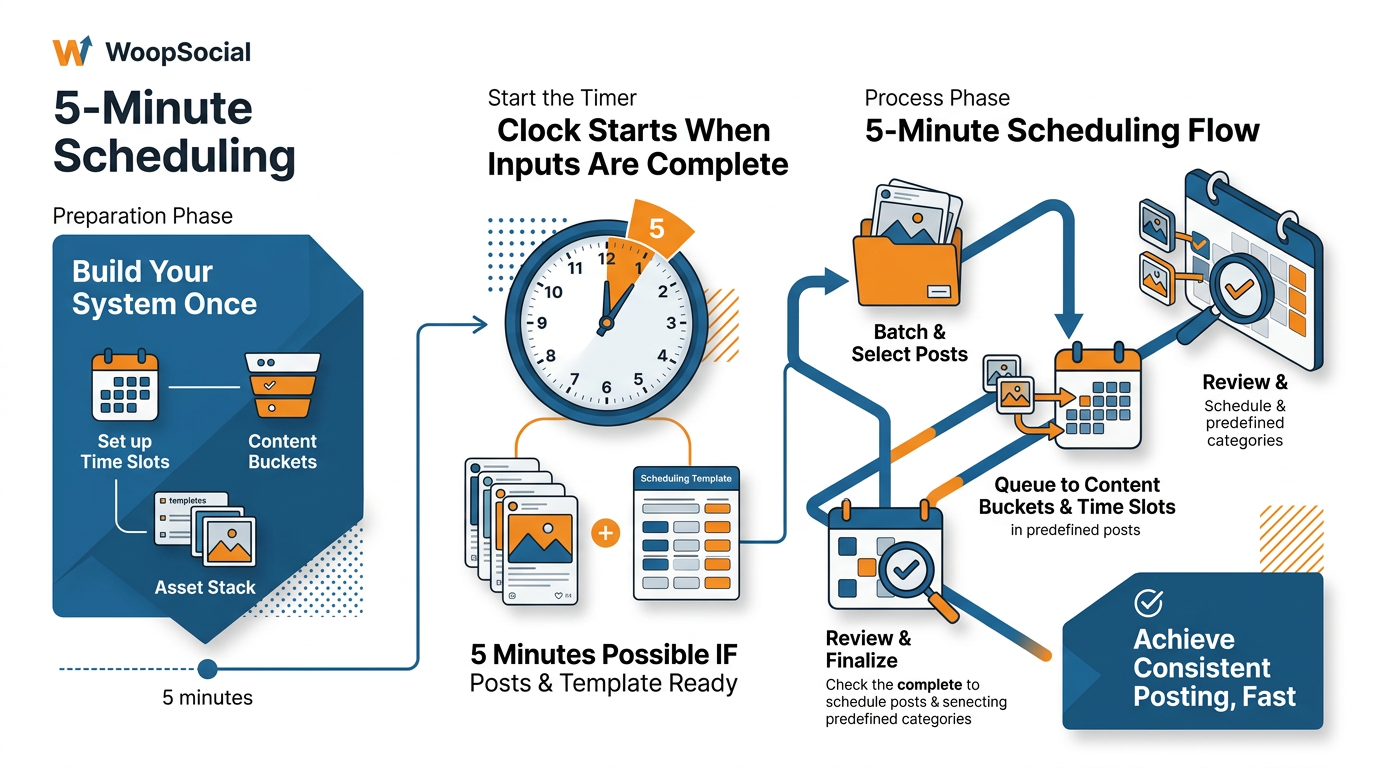
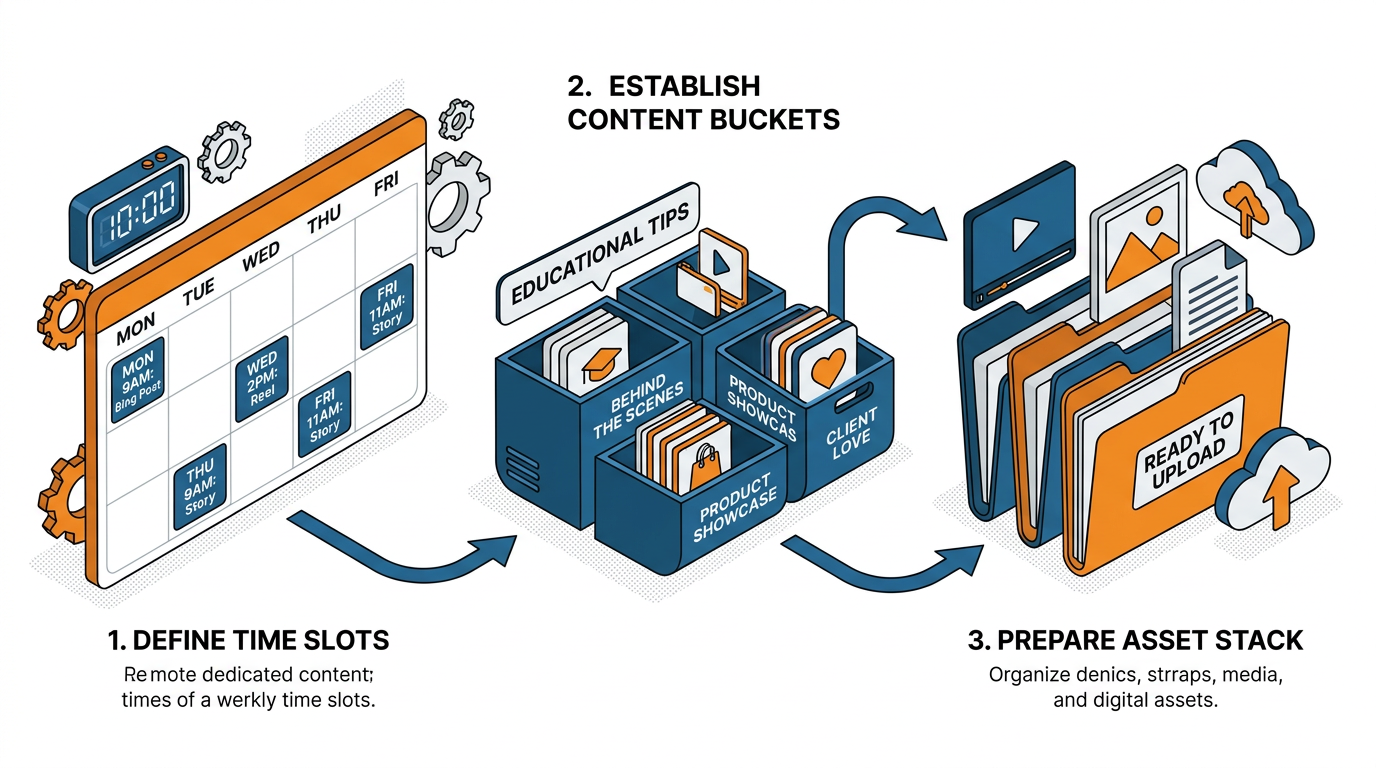
Lay down the rails by locking a reusable weekly schedule: Choose your posting days, and the specific times you will post, and leave them alone for 6-8 weeks.
Why?
Consistency isn’t just an algorithmic signal.
Consistency is also a decision killer.
Small businesses spend more time on micro-decisions than they do on execution.
Every additional decision ratchets up the drop-off rate.
If your time slots are already decided, you can use your weekly scheduling time to match up completed posts with empty slots, rather than deciding which one is worthy of going out on Tuesday at 10:00.
Now, define content buckets around intent, not generic categories.
I have four that are aligned to accelerating purchases: educate (removes confusion), proof (removes risk), personality (trust), and offer (spurs to action).
This makes scheduling a win for you (speed) and your customer (balance): If you want to post six times a week, you can target a basic pattern such as two educate, two proof, one personality, one offer, and know you’re guiding people along a buying journey rather than posting a stream of random tips.
When a time slot has a purpose, you’re no longer looking at a blank calendar and instead can begin grabbing from the right stack. If you want a more structured version of this, build off a social media content calendar.
Secondly, create a one-folder asset workflow so that formatting is never your speed-bump.
Create one master folder per week, with a sub-folder per post number, and assets within that are named something you can quickly recognize, such as 01-educate-topic, 02-proof-testimonial, etc.
Have platform-friendly versions from the outset, square, vertical and horizontal, because the biggest time-drain is re-sizing, re-exporting and searching for the correct asset when you’re in the middle of scheduling. If you keep getting stuck on re-sizing, a dedicated tool to resize images for social media removes that friction.
I also store a text file within that folder with the finished caption for each post, so the scheduling process is copy > paste > assign > done.
Last, keep a lean library of captions that save you from starting from zero: 20 hooks, 10 proof lines, 10 call-to-action endings, and 5 evergreen closers that match your tone.
You don’t want to avoid sounding repetitive, you want to be memorable, and repetition is often how your message sticks.
If I’m short on ideas, sometimes I use a tool like WoopSocial to rapidly generate more plug-and-play captions in a strong brand tone, then I add my favorites to my buckets so the system doesn’t go dry and prep time becomes the new log jam. You can also use an AI social media content generator when you need quick, on-brand drafts.
Here's my general 5-minute scheduling process (regardless of the tool used): batch and queue, automated scheduling, and 1 minute of review.
Want to know how I can schedule a whole week’s worth of posts in 5 minutes?
I treat it like assembly, not creation.
My process is identical every week: you choose the week’s media (which are already exported and labelled) → upload them all at once (or import if you can) → assign them to your queue or time slots → throw in the small platform-specific adjustments that actually count → do a final preview, then press go.
What makes it fast is not opening each post individually and not editing anything within the scheduler.
I also try to minimize the number of things I need to work with: a single weekly media folder, one document with all the captions, and links to copy-paste, so the entire process is a matter of copying, pasting, assigning, and repeating.
Now, there are 3 scheduling options, and one of them is the fastest based on how your week looks.
Queue-based scheduling is the fastest if you post regularly and your content can fit into buckets; you dump posts into buckets and it fills your next available slots with minimal thinking.
Bulk scheduling is the fastest if you have a specific campaign or a series, like a 5-part promotion or a launch week; you can schedule by date/time and keep the series intact.
Auto-schedule by best time is the fastest if you need to get the week done and are not a stickler about times; you give up time decisions and just focus on getting your posts and content in the system.
If you use a tool that generates on-brand captions and post ideas from your website (like WoopSocial), you can get to this step with more assets and a stronger caption library, making scheduling even more of a commodity. The bigger productivity issue is real at the role level too: the Q2 2023 Sprout Pulse survey (syndicated) reported that full-time social marketers spend an average of 40 hours/week on social management tasks and 63% report feeling burned out, in this social media productivity report.
The part that chews up your 5 minutes is never the act of posting, it’s the sneaky seconds: link formatting, hashtag positioning, first comment text, and identical text between platforms.
You eliminate link time by saving the full, final link in the caption document and having a standard format that you stick to, even if it means tracking whether or not you used a link so you don’t have to reconstruct it in the moment.
You eliminate hashtag time by choosing once how you’ll handle them on each platform and sticking to that choice; if a platform works better with the hashtags broken out from the rest of the caption, or if you need to separate them, you pre-write them that way instead of deciding in the moment.
You eliminate first comment time by writing the first comment text as part of your caption document so all you have to do is paste it into the right box.
And you eliminate identical text problems by setting a micro-variant rule for yourself, like rewriting the first line but leaving the rest alone, which takes maybe 10 seconds per post and minimizes the odds that your cross-posts will look lazy or get flagged.
My 60-second QA is the thing that saves the entire process: look at previews to verify the first line and thumbnail are correct, verify tags and mentions if you used them, click on each link once, verify the crop on mobile previews, and do a fast date/time sanity check for the week.
Then you leave it alone.
This last step is where a lot of small businesses lose time, because re-reading it over and over again feels like work but it is really just anxiety masked as editing.
One clean read, only fix the things that are clearly wrong, and you’re done for the week.
What breaks the 5-minute promise (and how I avoid it on all platforms, in all situations)
I’ve found the thing that commonly derails the 5-minute post-planner is having to re-edit at the last minute because I now have to deal with platform friction: I made a square graphic when I need a vertical graphic, I wrote a caption that renders properly on LinkedIn but gets cut off on X, I made a video that I can technically upload, but actually doesn’t work because it’s too big or too long or I forgot to include a thumbnail, or the “I’m just going to paste the same post everywhere” fail where I paste in my text then spend 20 minutes editing it so it doesn’t look like a copy-paste.
I sidestep this by making all of those choices before I even open a scheduler: I export all graphics in two formats (1:1 and 9:16), I keep both a short and a long caption for each post, and I choose what video file I need once and use it consistently throughout my process.
You’ll notice the difference right away because scheduling will become “place the post” instead of “edit the post”.
What is the most efficient approach for you is not based on your “why,” it is based on your “what.”
If you’re a solo producer on one platform, the answer is recurring slots and a content queue so that you’re constantly filling pre-set slots rather than deciding on a date every time; I’ve seen this reduce scheduling time to the length of time it takes to drag 7 items into 7 slots.
If you’re a small business on 3 to 5 platforms, the answer is bulk upload and auto-filling, followed by the few tweaks that will make a difference in results per platform, usually the first line, the mention formatting, and the link behavior.
If you are a high volume poster, the answer is a content library with topics and a detailed style guide, because the minute your team has to stop and ask “wait, which one are we using again?” you are no longer on the 5 minute plan.
Consistency is also busted by overposting, as you turn your calendar into a guilt engine and start frantically rewriting content to fill too many slots.
My guardrail here is frequency based on capability, not aspiration: pick a frequency that you can sustain for the next 6 to 8 weeks even in busy weeks, and then establish that as your baseline.
You grow more by being consistently present than by spiking for 2 weeks and then going dark for 3, and the math is real: if you halve the number of posts you try to publish in a week but can actually hold to that level, you’ll reduce context switching, reduce rush jobs, and increase the chances that you’ll keep the system running long enough for the algorithm and your readers to adjust to your cadence.
If you can schedule for 7 days, you can schedule for 30 days with the same process, as long as you’re not introducing new variables (like completely reimagining each piece of creative every single time or starting each caption from scratch).
I may create a few more on-brand options every now and then to keep the pool full, but the true secret is still a matter of architecture: you’re not getting faster, you’re just getting more rigid with your inputs so that the scheduling variable remains constant across each network and each week.
O fim
Being able to schedule a week’s worth of content in 5 minutes is not a talent competition. It’s a constraint competition.
You win by setting up your rails ahead of time and then doing either batch or queue-based scheduling where you simply drop assets into that pre-existing framework.
When your week already has set times for posting and each posting slot already has an assigned role to play that’s already been broken into buckets such as educate, proof, personality, offer etc. scheduling becomes a game of assembly rather than a game of deciding what to schedule, which is also why it no longer consumes your entire afternoons.
View this as a once-off initial setup, not a weekly battle.
Allocate one block of time to secure your repeating spots for the next 6-8 weeks, determine your buckets according to buyer intent, and normalise your inputs so that each time you post you do so with the same outputs: aspect ratios, copy-paste-able caption, and final link format.
Then, your weekly routine is 5-minutes: open your pre-saved folder, batch upload, place into queue or spots, make the minimal but important platform-specific adjustments, and complete a 1-minute preview to ensure you don’t have to think about it again.
Want to go even faster?
Sometimes I also use an AI scheduler to generate a stack of on-brand post ideas and captions so my buckets never run dry, and I can schedule more posts in advance, all without having to change my process.
The AI isn’t taking over your process, it’s just batching it for you so you don’t have to sit around trying to figure out what to post and can just focus on filling the slots you’ve already created.
The benefit to a small business goes beyond convenience: you get time back.
With scheduling that is routine and batched, you minimize context switching, the Thursday-night freakout, and the over-posting that can destroy consistency.
Set the rails just once, perform the 5-minute trick just once a week, and you will feel the difference right away: your calendar will stop making you feel guilty, and will start to feel like something you can trust.
Within the broader industry, the need for systems is widely recognized: in 2022, HubSpot research (syndicated) reported that 73% of marketers say their company has a posting schedule or calendar for social media marketing, as summarized in this syndicated HubSpot 2022 social media report, and a newer dataset includes 1,100+ global marketers in this HubSpot 2025 social media report. B2B teams lean on tooling as well: 71% use social media publishing/analytics technology according to the B2B Content Marketing 2023 report.
Related reads
4/27/2026
B2B SaaS social media benchmarks: Set the right targets.
B2B SaaS social media benchmarks: Set the right targets. The trouble with defining B2B SaaS social media benchmarks is that it's an inherently impe...
4/25/2026
Building a personal brand as a technical founder (without becoming a creator)
Building a personal brand as a technical founder (without becoming a creator) Creating a personal brand as a tech founder should feel less about ma...
4/20/2026
Creative Post Ideas for Sustainable Brands (That Don’t Sound Greenwashy)
Creative Post Ideas for Sustainable Brands (That Don’t Sound Greenwashy) That’s not what creative post ideas for sustainable brands should look lik...