Automate Social Media for Service Businesses Without Trust Loss
Service businesses struggle with social media visibility. Learn how to automate your social media marketing, transforming daily operations into content and demand while maintaining trust and efficiency.
Automate Social Media for Service Businesses Without Losing Trust
If you have a service business, you understand how social media gets pushed to the back of the line. You wake up with the intention of posting. The phone rings, you need to send a quote, your tech calls out, and the next thing you know, it’s 7 PM and your social media marketing is still waiting. The result is a frustrating loop: you know you should be visible, but the work that actually pays the bills always wins.
You repeat the cycle because you know you need to be seen but getting paid takes precedence.
That’s why we don’t want to just automate social media for service businesses by dumping a bunch of scheduled posts. True automation is a repeatable system that turns what you’re already doing every day into proof and then into demand. Your jobs, before and after photos, FAQs, estimates, warranties, and reviews are already the raw material. Automation is the process of capturing those assets consistently, packaging them into content that answers real buying questions, and routing interested people into a clear next step to request a quote, call, or book.
So, the guardrails to ensure that this is both profitable and that this is trustworthy are automating all of the things that are not judgment calls: automating collecting photos of the job, automating asking for a review when you’ve done a job, automating a frequently asked question section, automating having a template for how to format a post, and automating follow-up when somebody’s raised their hand. But, things that cannot be automated are things that require judgment or things that require trust: do I give a price break to this person?, what’s going on with this system?, how do I deal with complaints?, and is the tone okay so that we’re not coming across as a bunch of automated AI junk? And, it’s been my experience that small service businesses have done really well when automation can just do one thing for you: it creates awareness, and follows up quickly, but you remain a personality people recognize and can trust. If you want a broader take on systems like this, social media automation is covered in more depth here: social media automation.
Start with building the money funnel: post -> booking -> follow up
If you’re going to automate social media for service businesses, you need to define what sales funnel you expect every single post to send its viewers through: post -> clear offer -> click -> call, DM, or form -> schedule or estimate -> follow up -> review request.
If any of those links is fuzzy, automation will just spread the wrong thing.
I’ve seen businesses post consistently for months, get good reach, and still fail at booking because the post never clearly communicated what they wanted the viewer to do next, what the service area was, and what happens when they respond.
Over and over again, I see automation that suboptimizes for frequency and engagement while some fundamental issue is left unaddressed.
Sending more content can feel like progress, but if you’re alternating between five different calls-to-action, if you’re sending people to three different landing pages, if you’re inconsistently naming the areas where you offer service, you’re introducing variables that won’t be solved by sending more content.
Instead, standardize: Decide on a single primary CTA that you will repeat for a long time, lock down standard language about your service areas that you can use without having to think about it, and identify a single next step to which you will send people that fits the way you actually transact, whether that’s a phone call, a simple quote request, or a booking page.
In order to keep this actionable, view attribution as plumbing, not a physics experiment: you want to figure out where leads are coming from to do more of what is working. A simple way to keep this clean is a trackable link structure, and a UTM link builder helps you do that consistently.
Use a unique link for social so you can identify it in your site traffic, and add a simple required field to your inquiry form asking how they heard about you, with a couple options (e.g., Instagram, Facebook, Google, Referral).
If you drive a lot of calls, invest in basic call tracking (if available) to get a good sense of the calls coming from social vs. elsewhere, but don’t worry about airtight attribution, you just need a rough truth that you can act on.
GBP sits on the money trail because it is almost always the highest-intent platform you will have, and it is a proof-driven space.
GBP posts should replicate your strongest social promos and your strongest proof-based content, such as before-and-after photos, job-site photos, and short answers to common pricing and timeline questions, because buyers on GBP are closer to deciding than they are browsing.
Content is a one-and-done exercise, and it should be distributed everywhere the buyer will check, then automated as it’s posting, as long as the trail is clear; tools like WoopSocial can help you create and brand consistent posts quickly, but the real power comes from the fact that every post will lead to the same next step, and your follow-up and review request are in position to capture the lead. This also aligns with adoption trends: in the HubSpot AI trends update, 74% of marketers are using at least one AI tool at work, and 46% of marketers using AI report using it to generate social media posts.
Produce the types of content your business is already creating (to provide fuel for automation)
If you want to automate social media for your service business without sounding robotic, you need things that are already happening in your work week, not new content tasks that you’ll never have time to finish.
What are repetitive, easy to record, and relevant to your customer?
- Before and after photos
- a job of the week
- 30-second site observations
- questions you handle on every call
- objections to your price you hear daily
- seasonal concerns that cause demand to peak
- trust-building items like safety protocols, licenses, and insurance
What can you easily capture that repeats?
Because the inputs that repeat are what will make automation repeat.
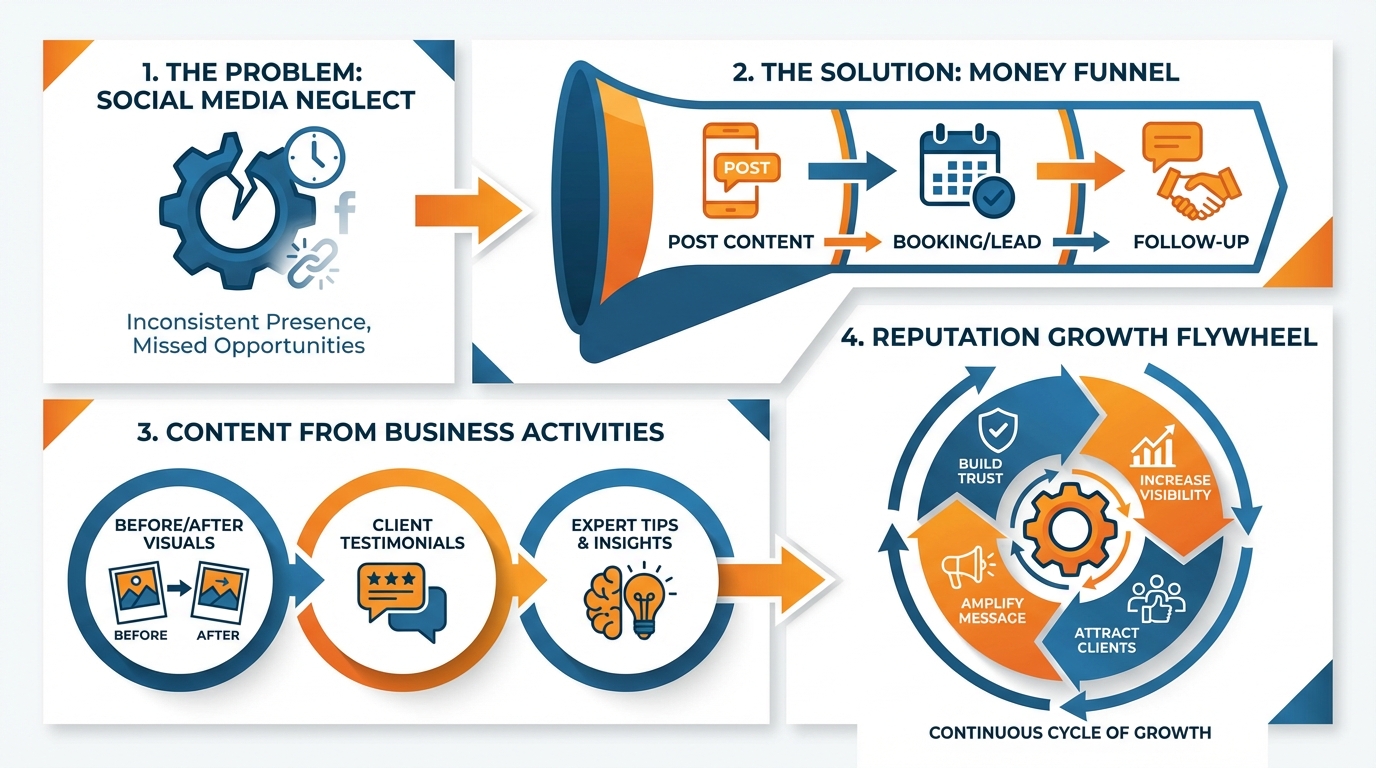
Develop a quick data collection process that can be completed in less than a minute per job, because that’s the only thing that will stick during your busy season.
From each job, you’ll capture 1 to 3 photos, a one-sentence summary, your city/service area, and one consumer-facing fact.
I make the sentence extremely straightforward (e.g. “cleared the main line and returned to full service in under two hours” and then add a geo-modifier (e.g. “here on the north side and in surrounding communities.”
This will give you four items that can be reused and crafted into a post, story, GBP post, or a fast little credibility piece without having to start from scratch.
- Now make the operations into rotating topics so that your feed is consistent but not repetitive.
If you have 5-7 topics, you can publish a lot and not sound repetitive because the topic is different: proof, education, objection handling, seasonal, trust, etc.
Add nuance to your publishing that most automated solutions don’t include by default: geographic nuance, seasonal windows, proof (stacking like photo + mini-case study + review).
For local service businesses this is important because it is the way people decide: proof -> geography -> trust.
Automation is the difference between providing automated value and providing automated spam.
Have the posts use actual job information, refrain from using sales-y language, and make sure that all the local indicators are uniform so that it appears as though they are coming from the same team operating in the same market.
My other filter is that before I let it post anything, could a customer identify this as having happened in the last week? Or is it generic advice?
Once you have those fields filled out, you can have services like WoopSocial render them into on-brand posts in a fast and consistent manner, but the true benefit is the real world job information you’re now capturing, not the automated text itself. If you want a more structured way to map this into a schedule, a social media content calendar can help you keep it consistent without adding chaos.
Harness reputation as a growth flywheel
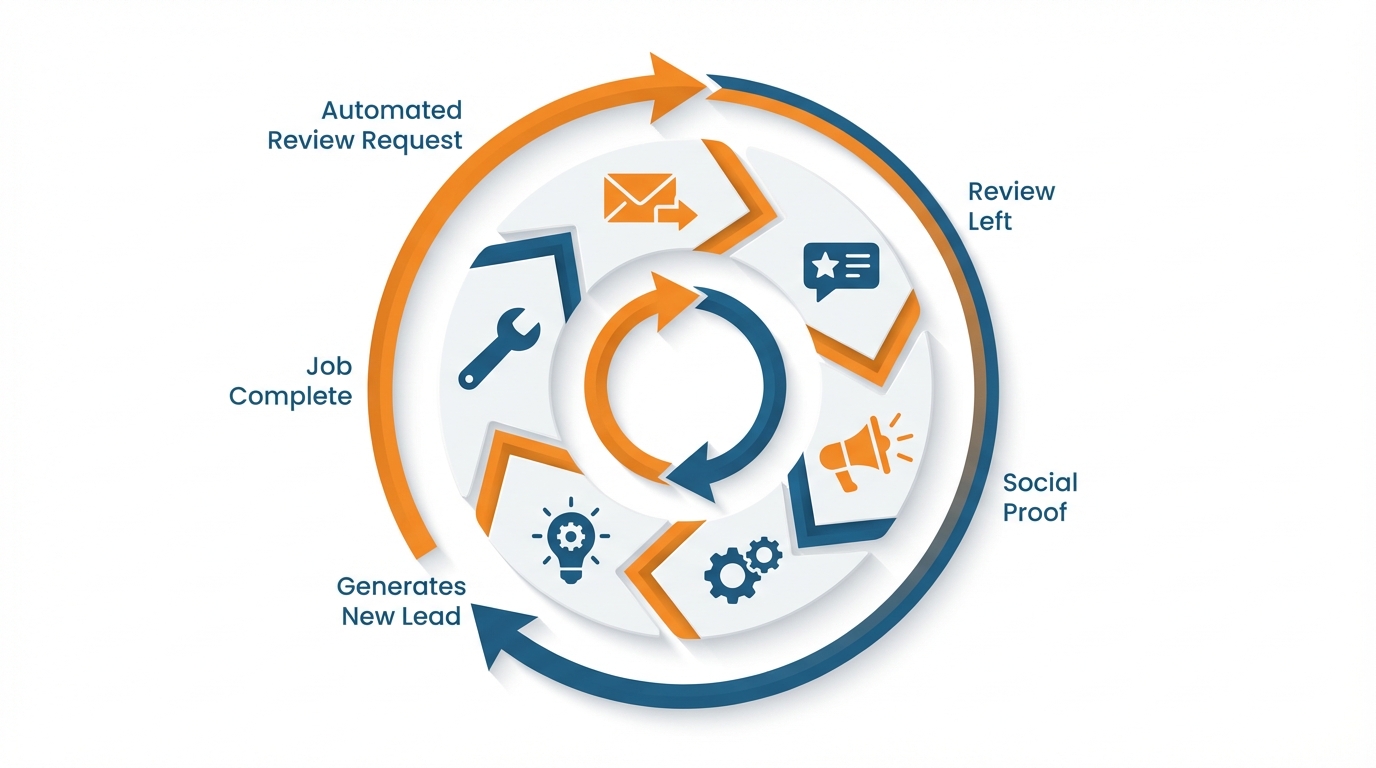
A lot of companies go as far as asking for a review, but the key is that the review kicks off the cycle: job complete automates a review request within 1-3 hours, the review is left, that review is automatically converted into social proof, and that social proof generates another lead and the cycle starts again.
You want this cycle to be as close to an assembly line as possible, because reviews are not just a good thing to have, they are intent driven decision gasoline: consistently, studies by BrightLocal reveal that most people look up online reviews for local businesses and that many of them wouldn’t dream of hiring a service with a low star rating.
If you automate the cycle, you aren’t just building reputation, you are also building trust on a predictable basis. This is also why workflow efficiency matters: in Constant Contact’s Aug 2023 small business AI findings, 60% of small businesses using AI or automation in their marketing say they have saved time and are working more efficiently.
Simply thank you posts won’t convert review posts.
Use four components each time: context, outcome, credibility markers, and a specific call to action for the same job.
Context is the job and the location so that it serves local intent and helps the buyer identify with that review.
The outcome is a quantifiable result: regained heat in home today, stopped water leak in 45 minutes, completed deep clean before move-in date.
The credibility markers are those things people seek fast: licensed and insured, guarantee offered, years in business, even a picture of the job result.
Finally, the call to action should be seamless and specific to that service so that the buyer knows exactly what to do when that happens to them.
Do it safely and compliantly so the flywheel never backfires.
Use customer names, addresses, or photos only if you have clear permission; if not, anonymize and focus on the problem solved rather than the person.
Avoid overpromising by keeping language tied to what you actually delivered on that job and what you can reliably repeat; one overstatement costs more trust than ten good reviews can gain.
I also recommend having a simple internal rule: if a claim would create a warranty dispute later, it does not belong in a post, even if it sounds good.
When it comes to sharing reviews to social media, keep your Google Business Profile and social media accounts in sync.
Use your GBP page as your “high intent” proof hub and your social media as your “distribution” hub.
Share the same review on both platforms, but in a frequency that matches your local intent.
I’d recommend posting a review on your GBP page weekly, and sharing review-based posts on social media 2-3 times a week.
Consider rotating which services and locations you share reviews for, in order to share proof that’s both trustworthy and relevant.
If you want this to be automated, you can share new reviews and job details to a template and use tools like WoopSocial to generate a shareable post that you don’t have to rewrite every time, even if you’re busy on jobs. If you also want to quantify what’s working, an Instagram engagement calculator can help you keep an eye on performance without overcomplicating the process.
Automate lead capture, but make it still sound personal
If you’re automating social media for service businesses and you actually want to book more jobs, automation has a home in 3 places in the conversation: speed, qualification, and routing.
Because speed is a thing, and response time is a conversion lever, not a vanity metric.
Multiple studies in our industry have demonstrated that reaching out to a new lead in under an hour drastically increases the likelihood of qualification compared to any other time.
So automation can be used to instantly respond to new leads, automation can be used to ask the few questions that determine whether or not this is a serious lead or a dud, automation can be used to route the lead to the next appropriate step.
Then, automation hands off to a human as soon as the conversation is no longer predictable, because that is when trust is built and deals are saved.
In direct messages and comments, the basic pattern that almost always works is keyword and intent.
You train you and your team to respond to words like cost, availability, quote, service area, and can you come today as buying signals, and you train your auto-response to collect the minimum viable details quickly: what service they need, their city/ZIP, photos if needed, and how best to reach them.
You want your questions to be the ones you’d ask on the phone, not the ones on a survey form.
I try to keep it brief since every additional question can drop response rates, especially among mobile users who are responding in between work, while in a busy home, or between running errands. And this time constraint is real: in Constant Contact’s Sep 2025 small business marketing report, 42% of SMBs globally have less than one hour per day to spend on marketing.
Once you’ve got the signal, your routing should be boring and consistent: DM -> short intake form -> pushed to calendar or estimate request -> confirmation + clear next steps.
That way you avoid the biggest problem I see with small service businesses: leads who were engaged enough to send a DM, but die in the inbox because the conversation got lost or the next steps weren’t clear.
You aren’t trying to close in the DM, you’re trying to get them onto a rail where you can respond as a pro with the information you need to quote properly and arrive prepared.
The guardrails prevent it from coming across as robotic and prevent you from getting into trouble.
You pause automation anytime it’s a high-judgment or high-emotion scenario: diagnostic work, complaints, refunds, high-dollar consults where voice tone and inflection are the difference between retaining and losing the customer.
The solution is straightforward: write your automation messages as if you’re a helpful dispatcher, in simple language, and insert one line of humanity, in terms of giving them context on the handoff (e.g. I’ll personally take a look at the details and get back to you shortly).
For the content side, I’m a fan of WoopSocial when I need to do set-once, on-brand publishing at scale, because generating a month of consistent content quickly and auto-applying logo/colors allows me to focus on the piece that cannot be automated: talking to customers. If you want to go further with the operational side of this, content distribution automation ties directly into the same idea.
What we want is less “how to post more often” and more “how to have a consistent flow”
The key distinction of automated social media for service-based companies is that you aren’t automating the ‘post’ button, you’re automating the journey to booked work.
Posting more can feel great, but if you don’t have a predictable path to conversion, it’s just a lot more noise, a lot more random links and a lot more leads going dark in your DMs.
Having a steady flow means that every post is directing to the same next action, every follow-up is coming quickly enough to win, and every project is creating the social proof needed for the next customer to feel safe. Industry expectations are moving this way too: according to the Capterra GenAI social content survey summary, businesses plan to use GenAI for an average of 48% of their social media content by 2026 (up from 39% in 2024), based on a survey of 1,600+ social media marketers worldwide.
Now if you want that one three-part system that actually works for your small business, it goes like this:
-
Make sure your money funnel isn’t broken by lining up your posts with ONE conversion goal you can actually deliver on without having to drop everything.
-
Line up your content machine with the work you’re already doing because the businesses that end up winning in the end are the ones that can create proof without having to take time away to do all the bookkeeping.
-
Line up your credibility engine with every conversion action so it creates reviews that can be recycled into proof-based content that leads to the next conversion action.
-
Line up your sales funnel with all three of these so your leads are actually moved into your sales process instead of sitting in the conversation.
The real benefit here is that this method compounds: reviews aren’t just a feel good marketing tactic, they’re a deal velocity machine.
BrightLocal always reports that a huge proportion of consumers consult online reviews for local businesses, and a significant proportion of those won’t even consider a vendor that has less than about a 4-star average rating.
This means that your pipeline is only as good as your ability to generate new proof, and when that proof generation is attached to operations, you’re no longer dependent on motivation but instead a system that continues to produce trust even when you’re incredibly busy.
The most important thing you can do now is define one action you want every post to push the user toward. Maybe it’s a quote, maybe it’s a booking, maybe it’s a call.
Then define one proof you can produce reliably, maybe it’s reviews, maybe it’s before and after photos.
Then make sure you have a consistent process that gets you from one end to the other, from the proof being generated on a job to the post being made from that proof to the post being sent out with that post’s call to action and follow-up on that call to action.
If you need the proof to post step not to be a hold-up, I use WoopSocial to take the proof and details from a job and generate consistent posts for you, but do it after you have the pipeline defined so you know you’ll be getting value out of the automation. And because many small businesses are already investing here—according to the Clutch small business advertising report, 70% of small businesses invest in social media advertising—tight operations make that spend work harder.
Related reads
5/8/2026
The 7 best Blotato alternatives for developers - cheaper pricing, better API and feature comparison
Blotato is an AI-powered platform that allows you to create content and distribute it to different social media platforms. It also works as a unified social media API, which means you can run it with your AI agents to automatically post to social media.
5/7/2026
The 8 Best Bundle.Social Alternatives - Faster, Cheaper and Better Social Media APIs
Bundle.social offers a single endpoint to post to multiple social media platforms. It is also known as a unified social media API or a social posting API.
5/6/2026
The 7 Best Outstand Alternatives In 2026 - Cheaper, Reliable and Faster Social Media APIs
Outstand is a unified social media API that allows you to post to many social media networks through a single endpoint. Instead of having to build integrations for each of these platforms, you can now just build a single one and get started much quicker.