Automating Social Media Workflow for Agencies: Prevent Chaos
Agencies often struggle with chaotic social media workflows. Learn to automate intake, creation, approval, and reporting processes to scale your offerings and minimize errors.
Automating Social Media Workflow for Agencies Without Creating Chaos
“I used to believe automation was a faster way to publish content, then I began working with multiple clients and I discovered that, in a small agency, the problem is not about speed, it’s about management.
When your team is working on briefs, content assets, approvals, platform guidelines, community management, and reporting for 5, 10, or 30 accounts, any little mistake that is made can be costly: missed deadlines, off-brand messages, duplication of efforts, and last-minute rallies that cost agencies silently.
If you’re looking to automate your social media workflow as an agency, you need to think beyond content scheduling. True automation is a scalable, sustainable process that ensures quality and reliability as output increases. It automates the intake process, the content creation and approval process, the publishing process, the response process (without letting anything slip through the cracks), and the reporting process (in a way that makes it easy to demonstrate value to clients and prevent churn). By automating these repetitive tasks, you’re not only cutting down on time spent, you’re minimizing your liability, minimizing rework, and making it easier to scale your offerings without scaling your team linearly.
In this guide, you’re going to automate the things that really destroy agencies: bad intake, poor feedback, siloed approvals, lost context, and reporting that’s longer than the project itself.
I’m going to walk you through how to create a process that doesn’t allow messiness to happen in the first place, so you can take on more clients confidently while keeping your standards, your mind, or your margins. If you want additional context, this pairs well with smart social media automation for agencies.
Fragmented tasks to a full life cycle: the social workflow in agencies
When you want to implement automation for a social media workflow for agencies, you need to plan out the entire delivery pipeline on a single page before you begin implementing automation.
You’re not automating a series of siloed tasks, you’re automating an assembly line with interdependencies.
Your planning document should include all aspects of the workflow:
- intake
- planning and alignment
- content creation
- asset management
- quality assurance
- approval
- publication
- basic community management
- reporting hand-off
Once you look at it as a unified whole, you start optimizing the correct bottlenecks instead of just treating the symptoms that keep small agencies playing a game of catch-up. The map should be designed with handoffs and done in mind; more time is spent on those, and more time is lost because of the gray areas in between stages than because of the need for a particular tool.
One way to cut those revision cycles short is to have each stage be binary; an output is either good or it gets kicked back in the same instant for one specific reason.
A rough metric in a lot of small teams is that between 30 and 50 percent of “time to make” slips through the cracks in revisions, checking statuses, and vague feedback, as opposed to making things; you can prevent that by having three key valves: what can be accepted at intake, what feedback is acceptable, and what makes something approval-ready, so that work that isn’t ready can’t enter the next stage.
Making it concrete by adding owner, expected turnaround time, and needed item to each step will immediately reveal your problem areas: generally on alignment, approval, and asset collection.
I capture this through tracking the number of days a stage takes and % that is sent back to the previous step over two weeks.
Once you track resubmissions, you will understand what needs standardization: a more detailed briefing if the production process keeps getting rejected, a more detailed style guide if quality assurance keeps rejecting the creative, and a more rigorous bundling if approvals keep coming back with disjointed feedback.
When you have the above defined, then you can automate with accuracy instead of fingers crossed.
You can standardize briefs so they always come to you fully populated, you can have one source of truth for brand assets, and only then, press the gas pedal.
For instance, I leverage WoopSocial to quickly generate on-brand social media ideas from a client website, which only works when your strategy phase has established content pillars, offerings, and guardrails.
Then automation multiplies a functioning ecosystem and your agency achieves greater output with fewer errors, not greater chaos.
Tackle multi-client scaling: normalize, batch, and don’t use zero capacity rules
Before you can optimize your agency social media workflow, you need to normalize your workflow.
This means creating standards for all the mundane aspects of workflow so that your team doesn’t have to decide every time: file naming conventions, folder organization, content formats, and any other key client variables that have to be managed.
If every client is allowed to develop their own vocabulary, you introduce unnecessary management tasks that increase exponentially as you add more clients to your roster.
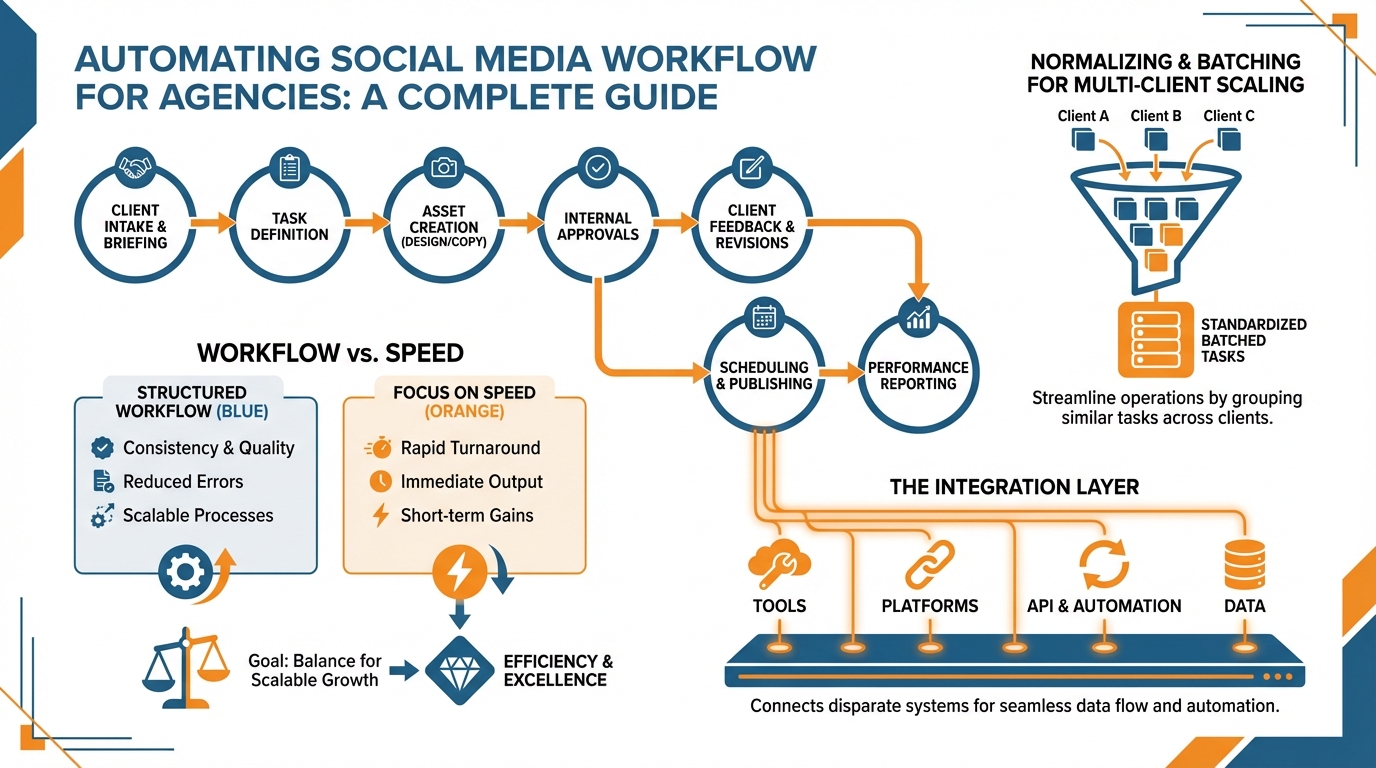
I manage my clients as variables, not as one-offs, so that adding a new client to the mix is more about completing a template than it is about reinventing a new process. If you’re struggling with this operationally, see inconsistent social media posting for adjacent failure patterns.
Once you’ve evened the playing field, you can win on batched work.
You can put all of the ideation work together, then all the writing work together, then all the design work together, then all of the final review work together.
This is because context shifting is where the agency gets lost.
In reality, my rough rule of thumb is that when you put all the work for the creator into one bucket, you’re generally 20 to 30% faster and more consistently excellent, because your decision-making work is at least applied at a per-post level.
And if you’re getting ideas/first draft ideas really fast via WoopSocial, you can actually push this to the next level by producing an entire month’s worth of “raw” material, and then focusing the human hours on what matters most for compounding: voice, angles, and proofreading.
Capacity planning is what allows your pipeline to hold its water as you stack on clients.
You have to have a simple (yes, simple) set of rules your clients will respect and your staff will implement: posts per person per week based on historical capacity, a maximum number of revisions, and approvals not allowed to take longer than X days.
If you set limits like one consolidated feedback per round and approvals expected back in X days, you will almost immediately feel better because you will have made delays visible exceptions to the rules instead of the rule.
In most cases I even build in a small buffer by default to allow for the 10 to 15 percent of interruptions and surprises that come up in real agency life, because pretending it will not happen is how you end up hiring linearly.
This is what agencies are actually good at: not cranking out a lot of content, but consistently turning out a lot of content for a lot of different clients while minimizing errors and minimizing the number of people involved.
You systematize so you avoid duplicating effort.
You batch so you don’t constantly shift gears.
You adopt service level policies so you avoid overpromising.
And all of a sudden, you can onboard another client without forcing your team to stay up all night, because your agency runs like a factory and not a series of emergency landings.
The integration layer: linking intake → tasks → assets → approvals → publishing → reporting
The fact is, many resources that provide social media workflow automation best practices for agencies end at the approval process within a tool - when the reality is, this is when delivery challenges truly arise.
At a small agency, work doesn’t fall through the cracks because someone can’t hit the “approve” button; it falls through the cracks because they don’t know what the next step is, or it’s manual, or it’s siloed in an email or a document somewhere.
You need an automation layer that advances the process when the parameters for doing so are met - so that the process doesn’t rest on someone’s to-do list, waiting for a human to recall the next action to take.
Let’s begin with the intake.
This should be locked down tight.
There should be a form for this and the form should dictate the inclusion of each item that helps reduce rework: goal, value proposition, target audience, distribution channels, content buckets, things we can’t say, links we must include.
Once completed, this form should assign tasks to individuals and apply deadlines, auto tag with the client name, and include the intake information as part of every subsequent step to ensure we never lose context.
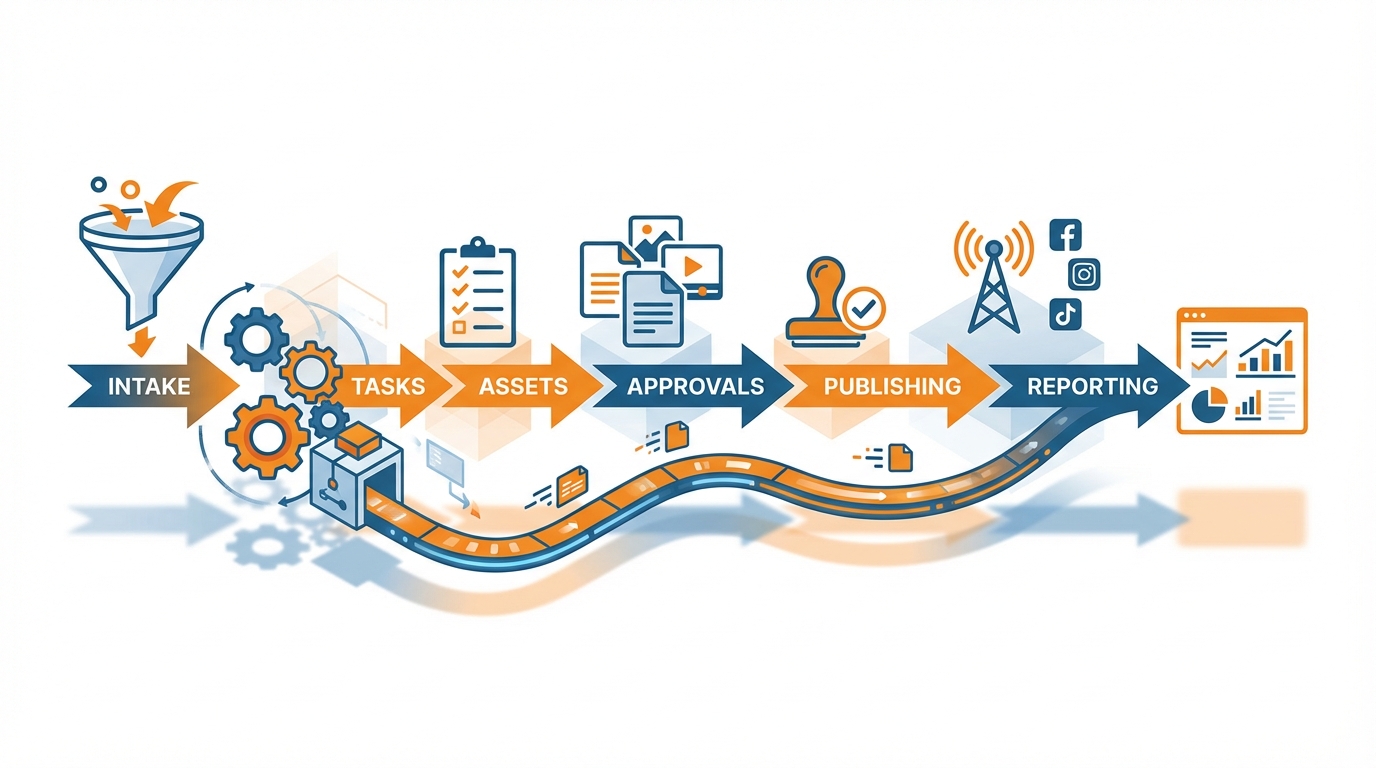
My KPI for intake is the frequency that work is rejected on the first pass; reducing the variables of a brief will typically remove one round of revisions and this is frequently the difference between a relaxed delivery and a panicked delivery.
Following this, you'll want to tie tasks to an asset pipeline that has a latest version requirement.
It should be configured such that each post concept links to a single source asset location, and only assets marked as final can be approved.
If a designer loads a new asset, the task should automatically update, and all previous versions should be flagged as read-only history, not alternate options.
This is the only way to stop the silent agency killer, where one person approves version four of an asset, and another person publishes version three because that's what was exported first.
Next, gate publishing behind approval, and gate reporting behind publishing.
You need a hard rule: no approval state = no publishable content, no excuses.
If you’re churning out first drafts in WoopSocial, the benefit isn’t just speed; it’s predictability: you can normalize your prompts so that every new draft comes through already matching the brief and brand guidelines, and then your approval stage can actually be about quality control rather than unexpected surprises. This also aligns with findings that generative AI users report saving an average of 11.4 hours per week, as noted in Deloitte Digital’s research on GenAI and content marketing.
Finally, gate reporting behind automation, by automatically importing results into a client-facing report that connects back to the initial goal and content pillar so that you’re not discussing shallow metrics, but what delivered, what fell short, and what you’re shifting next time. If you want a deeper model for this end of the pipeline, prove social media ROI to investors expands on how to make reporting easier to demonstrate value to clients and prevent churn.
The cool thing is that once these gateways are set up, your agency starts to depend less on Band-Aids and finger-crossing, and more on a process that can’t silently jam up. That’s increasingly relevant as 63% of marketing leaders plan to invest in generative AI in the next 24 months, according to a Gartner update on marketing leaders’ GenAI investment plans.
Fences that keep you from falling into costly pitfalls: access control, onboarding/offboarding, and when not to automate
With agencies, the number one way to burn money in social media workflow automation is to ignore risk.
For a small team, a single mis-configured permission or a single shared password that is not updated can wipe out a year of risk-free workflow in a single day, when a client stops and starts a campaign, or when a contractor changes roles.
Structure your workflow to make sure that access is not tribal knowledge: every connected social account has a business owner, every permission level is deliberate, and every sensitive password is managed like a critical asset.
The benefit to your operations is significant: teams that assign ownership and manage access are less likely to re-do work because of lost context and lost documents, and less likely to be at risk from team members who no longer need access.
While this can be handled as an administrative issue, I like to implement it as a security measure.
New clients always start with the same permission structure, and then we adjust as necessary based on who needs the ability to publish, draft, approve, or just see what’s going on.
A quick litmus test is to ensure that there are no shared personal accounts, no one can publish unless they are the final QA for the brand, and no accounts exist without a current “owner”.
I approach client “offboarding” in a similar fashion, in which access is removed, any attached tokens or accounts are rotated, and brand asset and content ownership is clarified to maintain consistency.
One of the metrics that many small groups overlook is the fact that over the course of 5-6 clients, you can easily have 10+ inactive links to your accounts, and it takes longer to triage an issue.
The ultimate guardrail is knowing what you don’t automate.
Yes, you should automate the repetitive parts of your production and planning, because in these areas, consistency will save you a ton of time and not open you up to additional risk.
But you should keep the nuances of your branding, sensitive responses to comments, and riskier claims all manual, because these are areas where a single mis-worded sentence can result in an angry customer or policy violation.
The dividing line for me is simple: if it involves taste, judgment, or context that can’t be fully captured, it needs to remain a human process.
If it’s purely mechanical, repetitive, and can be fully checked, it should be automated and put behind an approval state so that any failures cannot proceed to the next step. This is also why many teams see adoption gaps; for example, 27% of CMOs report limited or no GenAI adoption in marketing campaigns, according to Gartner’s 2025 CMO survey on GenAI adoption.
Last, create some guardrails that everything will move fast and in bulk, but must pass a gauntlet of quality checks.
If I used WoopSocial to generate a month’s worth of on-brand draft ideas in one hour, those ideas would be considered raw material until I apply a rigorous checklist to them: correct offer, correct claims, correct links, correct disclaimers, correct tone, and correct visual branding for the client.
Your workflow should be set up so that you cannot mark something ready unless those fields have been checked, because without quality checks is how an agency publishes the wrong version, tags the wrong partner, or re-pitches a concept the client already nixed.
The best workflow isn’t the one that theoretically saves the most time, it’s the one that reduces failure states as you scale.
A subtle trick for boosting productivity without making your agency a sweat shop
When it comes to automating your social media workflow as an agency, without killing your team, the key is to approach it as an operations level change rather than a content generation game.
Plan out the entire process end-to-end on a single client first, then figure out how to systematize that for multiple clients, and only then apply automation to reduce genuine bottlenecks.
One of the biggest low hanging fruits is simply reducing rework, because the actual constraint in a small agency isn’t the writing itself, but the second and third drafts: the unclear briefs, the missing image, the vague feedback, the late approvals.
Clean up the front and back end of the process, and throughput will take care of itself because the work stops coming back.
You gain efficiency by finding what you can do in bulk and what you can’t.
Wherever possible you should automate to assets what you can verify every time: briefings to first draft, visual identity styles, centralized asset management.
You should maintain human oversight where a misstep costs a lot: messaging, compliance, nuanced subjects, and anything that relies on context. It’s worth noting that 72% of marketing professionals use generative AI tools at least once a month, and 52% say they use generative AI for content creation, according to Basis Technologies’ survey of marketers’ GenAI usage.
I know automation is working if I monitor two metrics for two weeks: how many times work moves backward, and how many calendar days work languishes between steps.
If either of these metrics remains high, automation isn’t the problem, your process is.
Now, in terms of the production phase, you can continue to maintain quality, and double the quantity of content by automating the creation of the 80% that is the base material, and leaving the 20% of the time to humans for editing, tone, perspective, and relevance to the business.
That’s why I’m particularly fond of idea generators that can create 30 post concepts for the month in a matter of seconds, and automatically apply the brand’s colors and logo for your graphic designers, thus moving them from 0 to 80. If you want to operationalize that into planning, the social media content calendar can help structure the month so “raw” material turns into scheduled output, and you can also use an AI social media calendar generator to speed up the planning work.
WoopSocial is an example of a great tool that does exactly that: creates 30 post concepts in seconds, adapts the text to your brand tone based on your website, and automatically applies the logo and colors so that your graphics team doesn’t have to recreate the wheel for each post.
You know what the finish line looks like, too: throughputs are increasing, whilst logjams are decreasing, and as you get more done, your team size doesn’t necessarily grow proportionately.
When you have automated social media workflow for agencies in a way that isn’t about producing a lot of content just because, but rather, automating for on-time, on-brand content to be the norm.
It’s that way that you’ll continue to take on new clients without things becoming a nightmare, because the process is what multiplies your capacity, not your people.
Related reads
5/8/2026
The 7 best Blotato alternatives for developers - cheaper pricing, better API and feature comparison
Blotato is an AI-powered platform that allows you to create content and distribute it to different social media platforms. It also works as a unified social media API, which means you can run it with your AI agents to automatically post to social media.
5/7/2026
The 8 Best Bundle.Social Alternatives - Faster, Cheaper and Better Social Media APIs
Bundle.social offers a single endpoint to post to multiple social media platforms. It is also known as a unified social media API or a social posting API.
5/6/2026
The 7 Best Outstand Alternatives In 2026 - Cheaper, Reliable and Faster Social Media APIs
Outstand is a unified social media API that allows you to post to many social media networks through a single endpoint. Instead of having to build integrations for each of these platforms, you can now just build a single one and get started much quicker.