How to Automatically Generate Custom Social Media Graphics
Learn how to create custom social media graphics automatically with a hands-off, data-driven system. Design master templates and generate hundreds of images on demand.
How to Automatically Generate Custom Social Media Graphics (Without “Faster Clicking”)
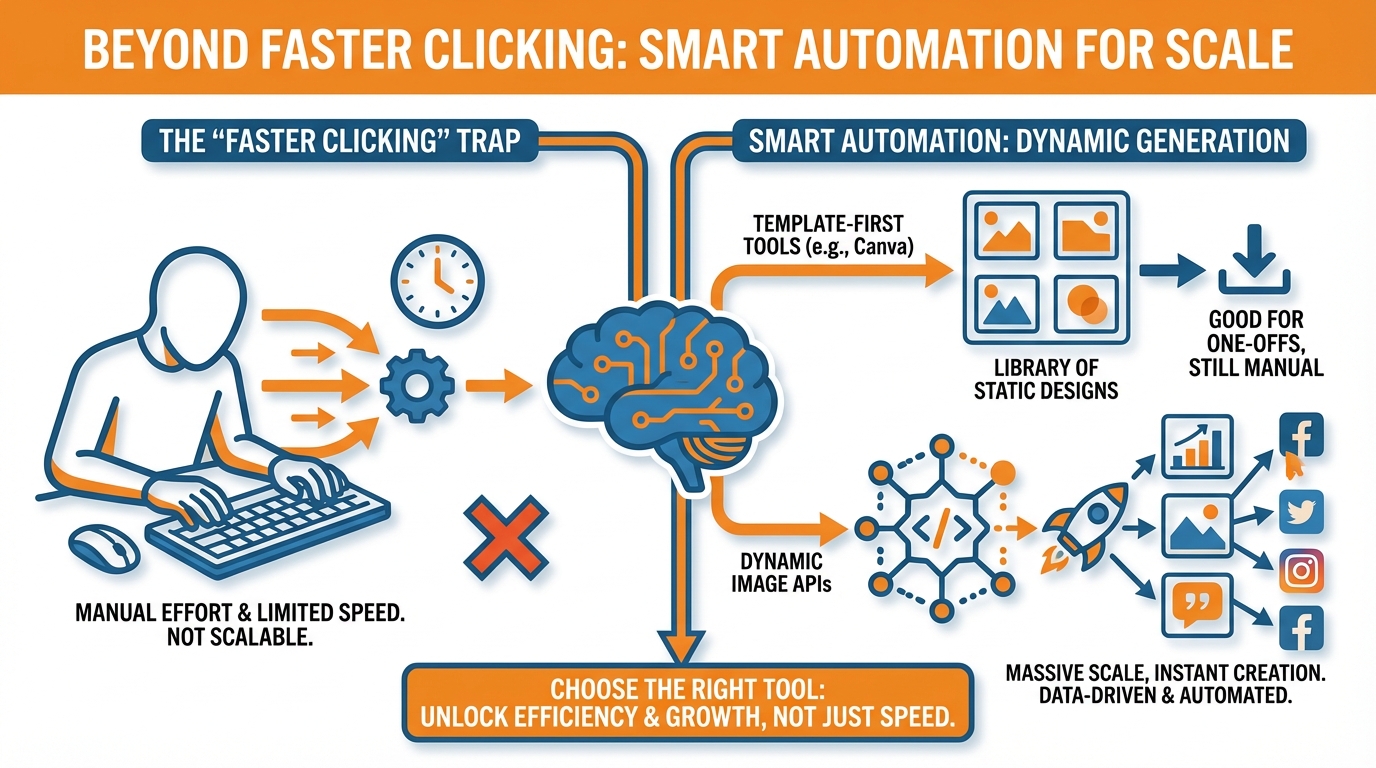
Most “fast design” tutorials are actually tutorials on “faster clicking”. Choose a template, drag and drop, resize, export, repeat. That’s fine for the first day, but will break the instant you need 30 posts a week, in 5 different formats per post, and a new promotional image every time you update your prices or offers. If you are googling for “how to automatically generate custom social media graphics”, you are not looking for a faster sprint. You are looking for a marathon runner that will get the graphics done while you are busy running a business.
When I say that you can create custom social media graphics automatically, I mean “hands off, data-driven, repeatable” creation. You create a small batch of master templates that fit your brand, then plug in real data from your business, such as product names, prices, locations, testimonials, event dates, inventory status, blog post titles, and so on. The software fills the templates with your data, then renders final images in all the sizes you really need, over and over, perfectly. You’re not designing 100 graphics. You’re designing one system that can generate 100 graphics on demand. I use this technique because it transforms social content from a creative crisis into an operational workflow you can count on.
My results are straightforward and ruthlessly pragmatic for SMBs: high quantity without exhaustion, high uniformity without inspecting every pixel, high versatility without constant re-formatting, and a system that does not break after two weeks of use when reality hits. If you want automation that scales, it is not about posting more quickly. It is about getting your content to a place where it works like a tool: consistent inputs, deterministic transforms, and publishable media on each trigger. If you want more context on scaling this beyond a few posts, see smart social media automation.
Choose the appropriate automation tool (and sidestep the biggest automation mismatch)
The biggest shortcut to learning how to automate your custom social media graphics is to pick the correct tool, because there’s more of a wasted time problem going on than an effort problem.
There are three tool paths that I see getting mixed up over and over again:
- template-first design tools
- dynamic image generation platforms and APIs
- OG or social preview generators
They share enough features to feel like they’re roughly the same thing, but they serve totally different needs, and they’re the reason that the average small business ends up “automating” by saving the same image 60 times.
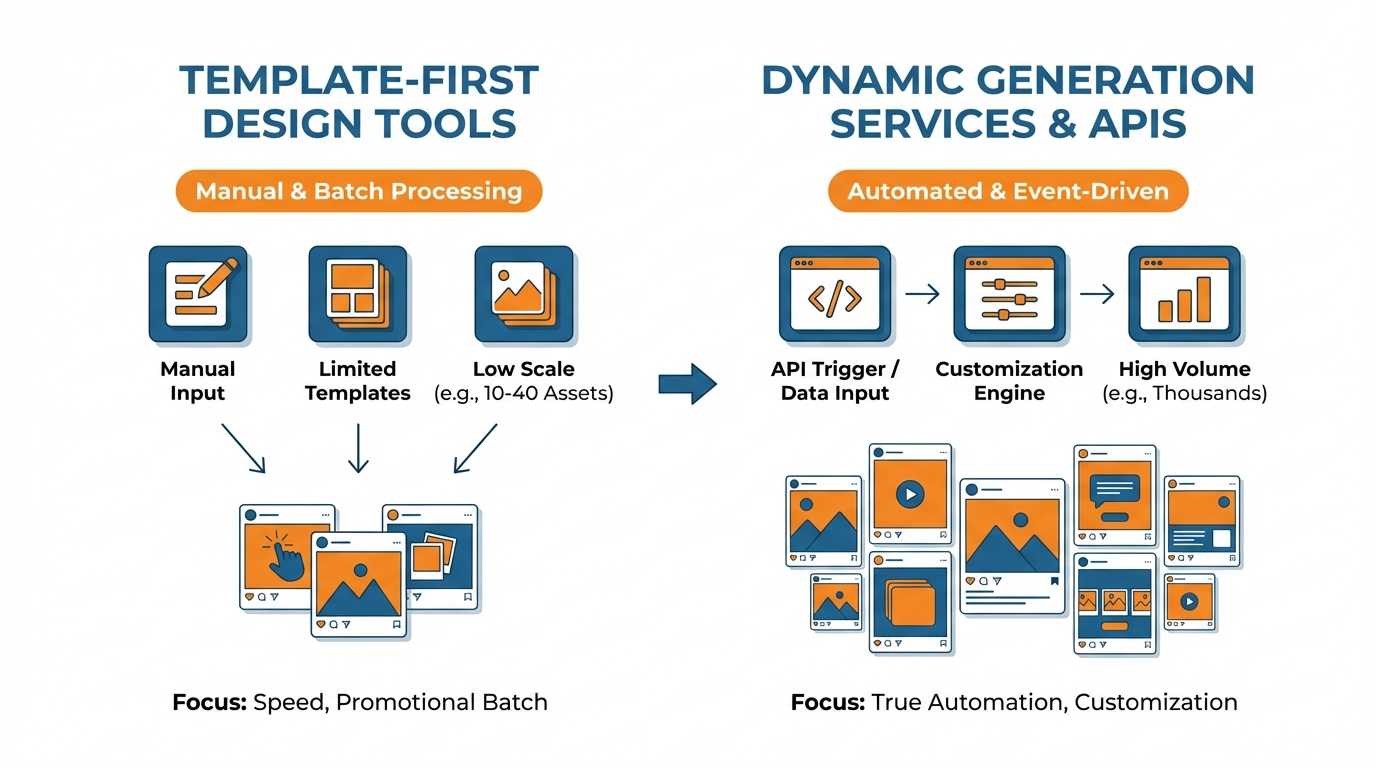
Template-first design tools
Template-first design tools are for when you’re doing manual batches and the constraint is speed, not scale.
When you need to produce 10-40 assets for a weekend promotion and most of the inputs are in your head or in a doc, this is the way to go since you’re spending most of your time designing, not setting up systems.
The gotcha here is trying to scale it to 100s of variants, multiple formats per post, or daily changes like prices and offers, since you have to go back and make all those tedious changes every time.
I use template-first when the creative is still moving and I need fast iterations, but I’ll transition away as soon as it starts feeling like assembly line work.
Dynamic image generation services and APIs
Use an image generation service or API if you actually want to automate, which means “input -> multiple outputs” and you expect to generate a high volume of graphics that are needed because of an event (e.g. new sale price, new event announced, new quote).
You also benefit from the speed gains of automating if your template needs customization (e.g. changing a city name, customer’s name, product ID, sale price, event time counter, event speaker) since you don’t have to manually create all the versions.
A key nuance is that if your graphics need to be created because of something that happened, then you need an automated image generation solution that can be triggered, either through no-code integrations or through an API. This is also where a scheduling and automation workflow matters; social media automation helps connect the system to publishing.
OG or social preview generators
The last option is an OG or social preview tool, but only if you are planning to create link cards and not campaign assets.
They were designed for a purpose: to create 1200×630 preview images for shared links, extracting titles, authors, dates, or categories from URLs.
They are fantastic for blogs and landing pages, but not for social campaigns with many formats, as they don’t conceptualize Stories, square formats, ad formats, safe zones, and aggressive sales formats.
As a rule of thumb: if you need less than 50 variants and no triggers, template first; if you need more than 50 variants, your data is structured, or you need triggers, dynamic generation; and if the graphic serves to make your website links presentable when shared, then use OG.
And if you want to feel like you’ve built a system and not a design project, pick something aligned with your skills, whether that is no-code or dev-enabled and have a platform like WoopSocial ensure the brand consistency of your generated assets. (For the publishing side, a social media content calendar will keep those outputs tied to real dates and campaigns.)
Implement the source → template → generate engine (the automatic bit)
The three components you need to automate custom social media graphics are a source of truth, a template system, and a generator.
The source of truth is the place where the data is stored and kept accurate: Google Sheets for promos and content calendar, Airtable for more nuanced fields, CRM for testimonials and lead magnets, or product catalog for SKUs, prices and stock availability.
The rule of thumb is, if there’s a field that has the potential to change, it should be stored in the source of truth, not inside the design file.
You organize rows to represent each visual asset and columns to represent variables such as headline, subhead, price, currency, city, language, image_url, logo_variant, disclaimer, etc., so that changing a value updates the next version to be generated, not a canvas that needs to be reopened.
2nd, you create templates as templates (as opposed to graphics).
You create a single template and simply change the values through data variables, you then create multiple “channels” of templates where changes to a single template propagate through the channels without having to recreate the template.
I also keep the layers for the template named according to the field name, and I make deliberate design choices: safe zones are always the same, text boxes are always the same, it is always clear what should be truncated if text exceeds a certain length.
A lot of automation falls apart in the nuance, so it’s best to just do it in advance:
- how line breaks in your spreadsheet will be treated (actual line breaks vs. two spaces)
- how text should overflow (shrink-to-fit vs. truncate to 2 lines with an ellipsis)
- what the font stack should be for characters with accents (often, those characters aren’t in the default font)
- how images should be cropped (so that the same product or headshot template will always be cropped from the center of the image)
And if you are working with multiple languages, you should have fields per language, as well as fields for character length (because the German and Finnish versions will absolutely ruin your template that looked great in English).
Last but not least, you decide how to render at scale: batch from a Google Sheet, URL parameters for one-off renders, or API for automated generation.
The Google Sheet method is ideal for small businesses since you can render between 30 to 300 media files at a time, and immediately diagnose any design issues.
URL parameters are best when you want to share a rendering link.
API is best when you want to generate new media files based on new products, events, or reviews.
Personally, I always add a render_status column and have failed media files return an error such as text_overflow_headline or missing_image_url.
That’s how you go from painful trial-and-error to efficient media production.
One additional level that gives this engine an Enterprise-worthy feel rather than a breakable toy is versioning and template caching.
You still have template_v1, template_v2 and you only rebuild when the template version changes or the source row changes, avoiding unnecessary rebuilds and providing a determinate output across runs.
This is also where enforcing brand continuity ceases to be a manual activity: if you’re using something like WoopSocial to ensure a consistent message and look-and-feel, you still want to maintain that rigor underneath, with a clean source, and determinate variables, and templates that are resilient to change without breaking, so you can ramp up the volume of output without losing that distinctive look that identifies your business.
This matters because AI adoption is widespread but results vary; one industry report notes that many advertisers still haven’t seen meaningful AI results, including the data point that 61% have not seen meaningful results from AI yet, which is exactly why a deterministic source → template → generate engine protects you from random output.
Putting it all together: triggers, QA, file cleaning, and a non-panicked publish
Want to know how to automate custom social media graphics without waking up to a folder full of mystery exports?
You define your triggers in a language a computer understands.
You say, for example:
- that a new blog post should trigger a graphic.
- Or a price change.
- Or a product launch page.
- Or that the number of people who’ve signed up for an event has reached a certain level.
- Or that a testimonial has been approved.
And then you hook up your generator so that, every time that happens, it generates a standardized set of graphics: 1 square. 1 portrait. 1 landscape. 1 story version.
(I find it easiest to tie each trigger to a template ‘family’ where blog graphics are always ‘link-led’ graphics, say, and product graphics are always ‘price-led’ graphics.
This avoids the SMB pitfall of every. single. post. being a design decision.)
Then nail down file management so you can find, match, and update your creations: you have a naming scheme that tells you everything you need to know about the image, including date, campaign, asset type, language and version 2026-02_winter-sale_ig-square_en_v03, and versioning is mandatory since you will be revising offers, optimizing text, and refreshing imagery.
Use one folder with a sub-folder for each campaign and use an explicit Generated and Approved divide, so you can always easily identify which images are cleared for distribution.
I use a little manifest alongside the images even if it’s just a table that captures the asset row ID, template version, render time and render warnings because the quickest way to kill an automated process is to have no idea where that strange image came from.
Do a mini Q&A before launch that won’t hold you back but keeps you safe.
This is not nitpicking, it’s checking for error clusters, such as: logo presence and size, contrast on mobile, text within safe zones, and that tiny claim and compliance risk no SMB ever thinks of, such as unintended warranty, missing disclosures or old prices.
A good guideline is 5 to 10% of variations, plus anything that triggered a render warning, since in any given batch errors cluster around the same causes, e.g. too-long titles, poorly cropped images or missing values.
I personally also do a last check within a phone grid preview, since what you can’t see on desktop is that thin fonts will vanish, cluttered images will obscure copy, and edge-aligned logos will be truncated in an actual feed.
Last, link generation with scheduling - don’t make it one-post-at-a-time.
You open the Approved folder, batch similar themes and platforms together, then schedule them as batches to cover the rest of your week in one session: here’s a core post, a reminder, a proof point, and an offer - all generated into the right formats.
Or if you prefer even less complexity, an all-in-one workflow can do it all for you in one go - for example, WoopSocial lets you generate on-brand graphics and text from your website, then schedule those approved posts into a full month of posts across platforms. If you want a deeper system for this, see social media calendar automation.
In both cases, the outcome is the same: your business activities get predictable content, your quality control keeps your branding consistent, your documents are organized, and your publishing routine is smooth and stress-free.
This is also supported by evidence that better metadata improves outcomes: a large-scale field experiment found that AI-generated titles increased valid watches, including a reported 1.6% increase in valid watches when users had access to AI-generated titles.
Keeping it scalable: governance, standards, and evolution
So, as you've now answered the question 'how to create custom social media graphics automatically?' and are now on your second production run, you've discovered that you've inadvertently created a new system that now requires some guidelines.
Establish a brand governance policy: who can edit the master templates, which layers are not to be messed with (e.g. logo, margins, legal lines, brand colors), and which layers are driven by variables (headline, price, image)?
You want automation to be simple to use, but difficult to break, because a single mistaken template edit can quietly ruin hundreds of versions.
I now manage templates like I do code: changes are deliberate, accompanied by a quick review, not just something done on a whim at 4:58pm before a promo is pushed live.
Template versions and hashes.
Without these, automation gets really, really pricey.
You see, the secret to not overspending on automation is to only generate files when you need to.
So you need a template_version column in your source-of-truth, and you need to generate all your assets with a template_version and a data_hash that is calculated based on fields like price, date, and product name.
Then you can have a regeneration policy that is very clear: regenerate this file if the row changes or the template version changes, otherwise, just use the cached copy of the file.
This way you avoid the SMB Gotcha where someone changes a price by a cent, and you re-render the whole file with a new filename, and now all the references are missing, and you have a whole folder full of duplicate, untrusted files.
Auditability is the rollback insurance for when something seems fishy in the feed: each generated image should be reconstructable to a row_id, to the actual input columns used, to a template_version, and to a render_time, so you should be able to answer in a second, what came from what and why.
you’ll also want warnings to be persisted, not just flashed, so you can recognize patterns: if 14% of renders returns a text_overflow_headline, it’s not a content problem, it’s a template constraint problem, and you fix it once.
I keep a lightweight manifest in the output dirs, to make rollbacks fast, to prove what price was shown, and to avoid the freakout of trying to reconstruct everything from memory.
The simplest way to ensure consistency between IG, LinkedIn, X, TikTok, and Pinterest is to stop thinking about individual templates and think about a template “family” with common rules.
You create one master template design language and apply it to individual formats by applying format-specific frame and safe zone values so that your typography, hierarchy, and cropping rules remain consistent between formats without having to recreate them.
Use a new template for each campaign if your offer structure changes (e.g. seasonal sale vs. webinar vs. testimonial), and use a new template for each format if platform dynamics require it (e.g. TikTok requires more negative space for UI).
To avoid automated template drift where your visuals slowly diverge from the brand, perform a monthly “brand sanity check”: Compare a new batch of templates to your standard templates and check to see that your logo is sized consistently, contrast is maintained, type is scaled correctly, and if you use a tool like WoopSocial to automatically apply your branding to your templates, make sure that you’re applying the same locked brand values to each new template so that it’s “born” with the same branding, rather than slowly drifting away from it over time.
This is aligned with what creators and marketers are already doing: a global survey reported that most creators now use creative generative AI, including the data point that 86% of creators actively use creative generative AI; and another survey noted that over half of brand marketers use AI for campaign creative, including the data point that 57.5% are using AI to generate content and creative campaign ideas.
Em conclusão,
The big change in auto-generating social media graphics for your brand is that automation isn’t designing more quickly. Instead, automation is designing a system.
That system consists of four components that can be updated as your business evolves: a decision tree on which assets to generate and when, template files that can withstand messy real-world data, a workflow that creates a repeatable process from data to design asset, and governance to ensure a single edit won’t inadvertently break a week’s worth of design assets.
By thinking about this process as an operations pipeline rather than a design assignment, you eliminate the ongoing cost of formatting, exporting, and proofing the same graphics.
Finally, the last thing you need to do right now is choose which strategy to use based on your requirements and not based on which one is less work to demo.
If you just need to do a tiny one-off promotion, use a template-first approach.
If you need to generate multiples from items like products, prices, locations, and testimonials, use a dynamic approach so one item is one image and one edit is one update.
And if you only need preview cards for the pages of your blog, stick with the OG approach and not build a campaign deployment facility.
Next, make a small proof of concept: one template and one data source.
Select one template family, tie it to one source of truth and generate 20-50 assets.
That’s enough to identify issues that will inevitably kill your auto magic in production, such as 12 percent of your rows exceeding the text character limit, or missing image URLs, or different currencies or German headlines that wreck your layout.
But it’s also small enough to debug and patch in one afternoon, not weeks of rebuilding.
With that mini-batch sanitized, scaling is a straightforward engineering challenge, which is the best kind.
Now add some fault tolerance: warning messages that are cached, a manifest so you can track every image back to a row_id and template_version, and cache invalidation rules to only rebuild the image if inputs have changed.
If you want a more predictable journey to brand consistency along the way, I’ve found it can be useful to allow a platform like WoopSocial to manage the branding overlay on the visual and copy, while you focus on keeping the data, templates and versions marching in step, so the entire system is predictable as you scale.
(If you need help making the publishing side equally repeatable, an AI-driven content workflow like an AI social media post generator can keep the copy and the output cadence aligned with the same system.)
Related reads
5/8/2026
The 7 best Blotato alternatives for developers - cheaper pricing, better API and feature comparison
Blotato is an AI-powered platform that allows you to create content and distribute it to different social media platforms. It also works as a unified social media API, which means you can run it with your AI agents to automatically post to social media.
5/7/2026
The 8 Best Bundle.Social Alternatives - Faster, Cheaper and Better Social Media APIs
Bundle.social offers a single endpoint to post to multiple social media platforms. It is also known as a unified social media API or a social posting API.
5/6/2026
The 7 Best Outstand Alternatives In 2026 - Cheaper, Reliable and Faster Social Media APIs
Outstand is a unified social media API that allows you to post to many social media networks through a single endpoint. Instead of having to build integrations for each of these platforms, you can now just build a single one and get started much quicker.