Automate graphic design for social media without losing brand control
Automate graphic design for social media without losing brand control When you automate graphic design for social media you’re no longer sitting do...
Automate graphic design for social media without losing brand control
When you automate graphic design for social media you’re no longer sitting down and designing a post each time. You’re implementing a scalable, repeatable design process that turns one approved design concept into multiple on-brand outputs in record time. The objective of automation is straightforward: reduce design production time and increase design output consistency to allow for higher-volume social media posting, and avoid having social feeds that appear to be generated by 5 different businesses. For a small business owner, this automation can mean the difference between posting when you happen to have the time, and posting at all times because your marketing infrastructure is equipped to handle promotions, sales, seasonal events and other time-sensitive social media updates as they occur.
Most folks mix up automation with idea generation. Ideation can be a nice add-on for sure, but it's rarely the actual bottleneck. The real challenge is reproducible creative production: developing different variations for different offers, adapting the size for each channel, customizing the text to different locales, maintaining visual identity (logos, typography, etc.), and the cleanest, most efficient route to approvals. It is not uncommon for me to see a team lose whole weeks just because each new ad or graphic necessitated the same manual process, every single time. For more on building reliable systems instead of ad-hoc work, see smart social media automation.
Set your expectations correctly. Automating social media graphic design isn't about a one-click perfection fix; it's about building a reliable workflow. In an ideal system, brand rules are baked into templates, your inputs are structured, and your outputs are predictable. When done right, it lets you speed up the creative process without giving up quality, and scale without sacrificing brand control. The pressure to ship more is real: a 2025 Adobe report says content demand has doubled for 96% of marketers and 76% of marketers say timelines have shortened, which is why this Adobe analysis of rising content demands matters here.
Transform your design operations into a cohesive system: the end-to-end automation cycle
Transform your design operations into a cohesive system: the end-to-end automation cycle. Don't just create social media graphics until week two then try to automate your workflow.
Map out the steps that everyone ignores: create an input source and feed it into design rules, then automate your batch graphic generation, review and approval process, create an export of your design variants, and finally, send them for publishing and performance analysis.
Automate it like an assembly line; do not just have random graphic creation.
When setting up a client's automated graphic workflow, my goal is to get a promo, product, or event as the input; create the graphic variations based on that input with design rules for multiple platforms; have humans review and approve it; and use the learnings from the performance feedback of those graphics to create the next batch of graphics, and rinse and repeat. If you want a broader system around planning and execution, a social media content calendar can help keep the workflow stable.
Pick a single source of truth for creative requests
It all boils down to one choice: what is your source of truth for your creative requests?
Decide on one specific place where the offers, start and end dates, prices, copy, disclaimers, images, and links exist, and have all other systems pull that information from this centralized location.
The most basic need can be fulfilled with a spreadsheet that requires the data to be in a tidy tabular format with columns like offer_name, start_date, price, cta, language, platform, and image_url.
A business with a large amount of content or product inventory should probably stick to a CMS or a product feed that already has these pieces of information in place and that you can simply automate to keep up to date on the go.
If your creative is a combination of a few of the above, or just varies, then a tool like Notion could work, if it’s built out in the proper way to avoid any inconsistencies.
Remember, the last thing you want with automation is a system where there are multiple sources where the offer, price, start and end dates are housed, because that’s the recipe for incorrect data and wasted time.
Distinguish reuse from automation
Then, distinguish reuse from automation.
Reuse means you open up the design and make the copy changes by hand; that will feel efficient until you're doing 40 versions and each copy change feels like another redesign job.
Automation means data layouts plus rules: text boxes that expand within constraints; safe zones where the logo can never go; dynamic type that won't cause overflow; conditionals like if discount_percent isn't null, then show badge.
The metric here is simple: you can edit one row in the data and regenerate an entire campaign across formats, and get predictable output versus cleaning up mess afterward.
Make asset management intentionally boring
Last, make asset management intentionally boring because automation generates volume, which generates mess.
Set up naming conventions on day one so you can find and audit and rerun your batches without any guessing: each filename and folder path should include campaign, platform, language, aspect ratio, and version, so you get something like SpringSale-IG-EN-1080x1350-v03 rather than final_final2.
And this is where tools like WoopSocial come in quietly: if your branding is consistent, and your inputs are organized, then putting even more outputs into one process begins to feel less like adding more work and more like building a system you can trust.
Keeping brand governance and quality assurance in check at scale
Keeping brand governance and quality assurance in check at scale: the secrets of automation without compromising your brand
Automating graphic design for social media does its greatest harm through silent failure.
Failure to comply isn't rare or idiosyncratic; it follows predictable patterns:
- text wraps when you don't want it to
- objects and subjects get sliced off when you don't want that
- a color scheme that looks okay to you fails on contrast requirements
- a small logo drifts a few pixels off each time
- mandatory footers and disclaimers are sometimes not present
- key areas get covered by overlays and user interface components
To minimize these, don't think about 'design' and think about 'defects.'
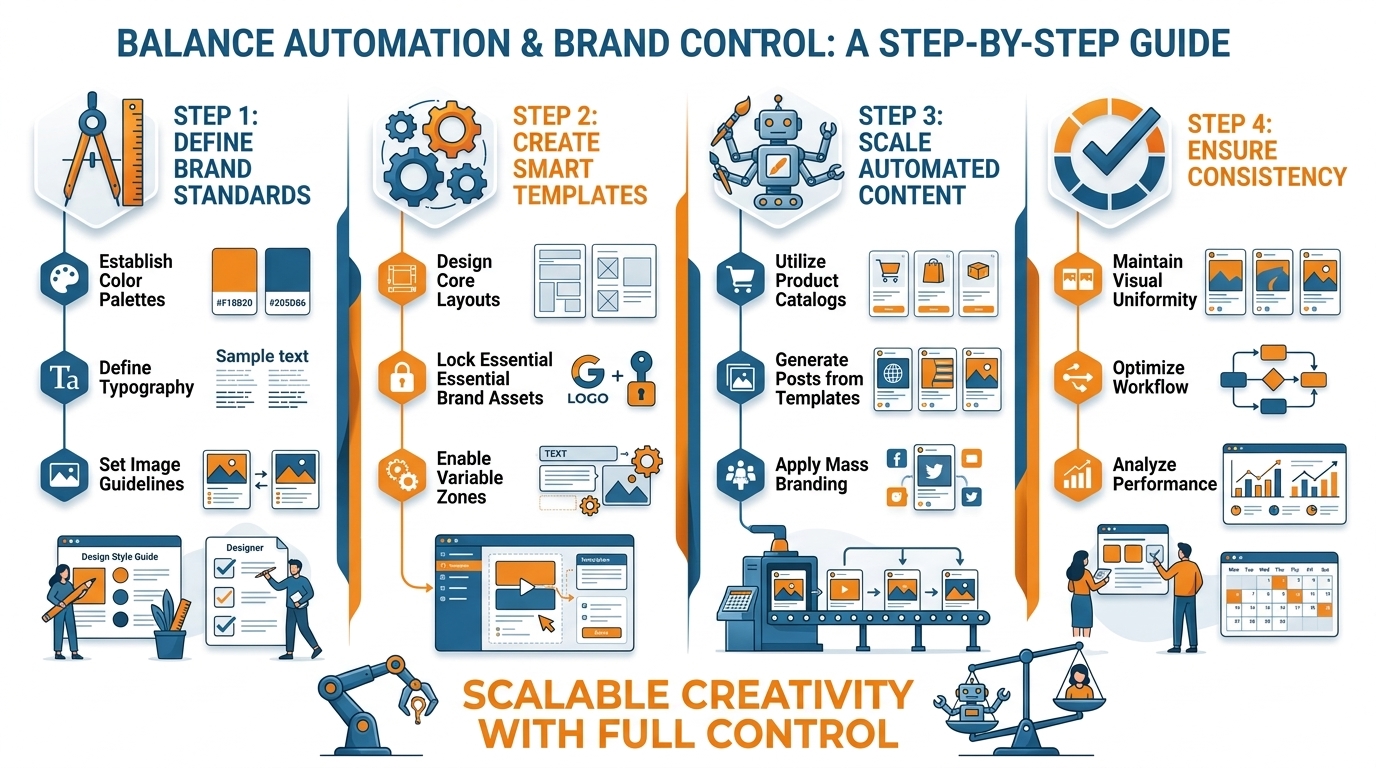
In an example experiment, when building a batch of 100 social media assets for a small-scale promotional campaign, about 16 out of 100 needed to be fixed when design rules were not rigorously enforced ahead of time, and the number dropped to around 4 out of 100 when strict rules were put in place from the start.
The reality is that brand rules really only work if there are rules that actually enforce themselves.
Instead of being a document that no one opens, these rules should be embedded as locked variables and measurable constraints in your templates: minimum and maximum text size, padding and safe areas, and contrast ratios, so there's no possibility that dynamic content shrinks to the point of illegibility, nothing of importance sits on or near an edge, and the readability ratio of content is always above a threshold.
There's also the logic around disclaimers that ties to your data, and if you've got an APR or a limited-time offer or a state-specific restriction, the disclaimer is pulled in only if it's triggered.
If you do it right, your team stops having a debate over whether a graphic fits the brand or not, and starts a check over whether or not it passes the rules, and that's how you can maintain quality, and still go fast.
Your QA flow should resemble a manufacturing line, not a committee reviewing designs.
Instead of manually reviewing each asset, run automated checks at scale, and then do a light, spot-check human review by sampling.
Set up a process that automatically validates every exported file for things like text overflow, safe zones, logo coverage, and accessibility contrast.
Then, perform manual approval on a tiny sample set, e.g., the first render from each template in each language for each aspect ratio.
Systemic errors get caught automatically, sampling will still reveal those outlier edge cases and errors that the system misses, but you don’t need to approve 120 almost identical assets by hand.
If you’re not building platform-specific constraints into your template variants from the beginning, you’ll just be automating the need for manual edits.
Every channel plays by its own rules: some require certain aspect ratios, others depend on safe area dimensions based on where the content appears, and even your assumptions about caption space dictate what you’re allowed to fit inside the visual.
Rather than attempting to force a single master design across every channel, you’re going to have to create multiple distinct variants, each with its own crop parameters, text boundaries, and designated safe zones.
It’s in this scenario that a platform like WoopSocial proves its worth.
Automated, bulk branding at scale is only possible if the system enforces the same guardrails you’d typically apply during a manual review process. If you want a deeper look at the broader operational layer, social media automation ties into this same idea of guardrails and repeatability. Also, a TechRadar piece citing Dropbox research notes the average creative uses 14 digital tools and that better digital organization could improve performance by 54%-a useful lens for why your workflow must stay simple; see this breakdown of tool overload and organization gains.
From none to no-code to API automation: How to build implementation paths that don't break (and how to stay stable)
If you just need a handful of designs per week, the best way to scale your design work without getting bogged down is to adopt no-code batching.
With this approach, you lock in your brand kit and template designs first and then just run production to generate and crop each size on command.
The big advantage here is speed with control, although you do have to think of your design templates like products and not throwaways, establishing rules about where text can expand, the logo cannot move, or a badge, or disclaimer, would show up.
I've set up batching design production for several small businesses and the difference between just making posts and actually running production is noticeable immediately.
But once you're in the business of updating prices frequently, cycling promotions, or managing multiple locations, I would move to spreadsheet or CMS driven generation.
You keep a single clean table as your ground truth, and you then generate the graphics from the rows, one row one post.
So if a row updates, you regenerate the graphics with a new row.
Standardize your formats.
Date formats, numbers stored as numbers, not strings, URLs that have https, language codes that have consistency.
So this is where localization stops being scary if you build with localization in mind.
Character limits for languages, extra room to grow, German runs longer, rules for characters, accents, currency symbols.
When the volume gets higher, you’ll need API and webhook-based pipelines, which basically operate like an assembly line.
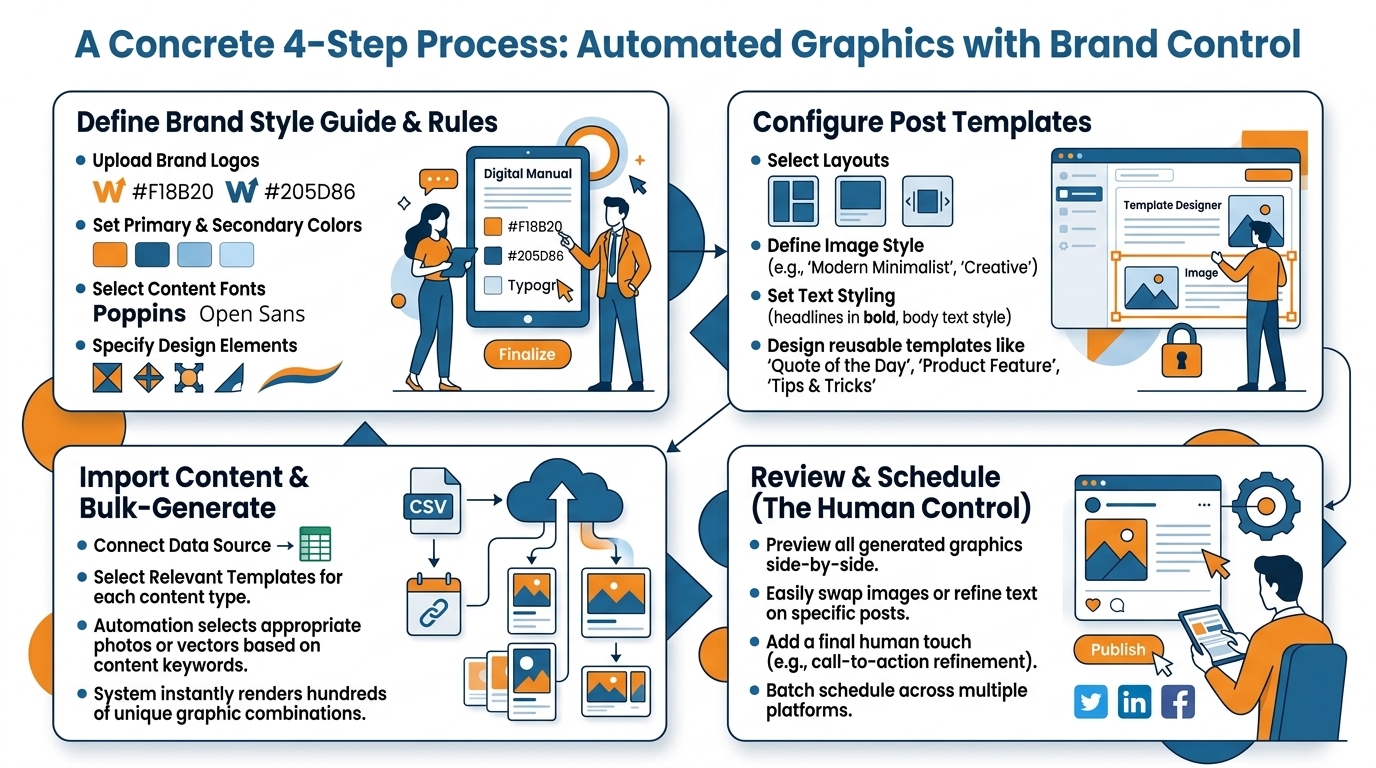
A new or updated record will kick off a render, and all the renders will be queued up.
If something goes wrong, the pipeline will just retry, and the final outputs are saved to well-defined folder structures with predictable and deterministic filenames.
But for this to work, the missing reliability components that often get overlooked will need to be there: template versioning with a rollback mechanism (so you can easily roll back to v12 if needed), a render error detection service (so you can detect when something fails for the usual suspects, such as missing fonts, broken image URLs, text overflow, etc.), and an edge case management policy (for long titles, missing images, weird punctuation, or anything else that can trip it up).
This way, when your pipeline starts, 95% of records will render on their first attempt, while the other 5% are explicitly taken care of and not just ignored.
What distinguishes automation that frees up your schedule from automation that adds you more work is resiliency: minimize manual steps, and make each handoff explicit (one source of truth, one library of templates, one naming scheme, and one way of re-generating the campaign when changes happen).
Define and document any dependencies, such as fonts, logo files, brand colors, and template IDs, so nobody has the only copy of the workflow in their head.
For future maintenance and scaling, choose a platform with embedded brand rules and predictable outputs; I usually prefer WoopSocial for the lightest, most cost-effective option because I can get lots of branded creative made in bulk with WoopSocial, so I don’t have to worry about building some very hacky, very delicate workflows. For context on how widely creators are adopting these tools, Adobe reported 86% of global creators surveyed say they use creative generative AI; see Adobe’s Creators’ Toolkit survey summary.
Align automation solutions to your specific scenario
Align automation solutions to your specific scenario: individual creator, agency, e-commerce venture, or B2B enterprise.
To automate your social media graphic design process, you have to find a system that works well for your business, not one that looks impressive in the product demo.
First, you need to know what your business goals are.
Maybe you want to post a lot more without lowering your quality standard?
Maybe you want to spend less time on revisions or cut down the time between the promotion launch and execution?
Maybe you need tighter connection to actual revenue?
Automation is successful when it addresses the main bottleneck of a process, and that bottleneck looks very different for a single content creator compared to an agency, an ecommerce site, or a B2B service.
If you're solo or a local brand, your competitive advantage is speed and consistency.
Set up 3 to 5 evergreen post templates that account for 80% of your content, then batch your work.
In one sitting, write all your weekly hooks.
Insert them into your locked, easy-to-edit templates (don't fiddle with the spacing) so they'll output the correct dimensions for each channel without you having to manually resize and recrop them.
This will save you hours, since you won't be redesigning layouts repeatedly.
Your goal should be to eliminate decisions and save a few minutes per post.
Consistency leads to growth.
In my own experience, I've seen many clients who were only managing two to three posts a week shift to daily publishing once they learned to reuse their templates instead of trying to create everything from scratch every time.
If you run an agency, you'll need governance plus approvals as your first choice.
One slip up on branding can cost you more than one hour of design time, so ensure templates are locked down so client logos, disclaimers, safe zones, and other elements cannot change.
Enforce client-specific brand requirements as variables, and build your campaign templates so they use repeatable structures you can deploy quickly across the board.
Localization is where agencies quietly bleed time, so set rules that accommodate language growth as a hard requirement and treat your template assets with a version system, which can be rolled back if needed.
Avoid the classic cycle of one round of client feedback that leads to 30 manual edits across different sizes and languages.
For ecommerce, automation means you must be able to push through thousands of variants at the SKU level.
The key is to set up a 'design once, then data-driven generation' workflow: input price, discount %, region, and product image to auto-trigger badges, strike-throughs, and localized promo text.
The big opportunity is that the bulk of ecommerce creative waste isn't from design, it's from rework caused by minor data changes.
Therefore, you want a system where updating price in a single row automatically regenerates every creative variant needed, with no one ever touching a file.
For pure speed in ideation, where you just want to churn out branded assets with logo, colors, and voice intact, plus maintain high output for recurring promos, I recommend testing the WoopSocial workflow; it's great if you prioritize consistent, branded volume over a few one-off, perfect-inches. If you want to connect this to a broader repeatable process, plan and batch workflows like plan social media content for a month fit naturally with this approach. Industry reports also reinforce time savings: a Canva-related report summary found that a majority of marketers save around 4 hours per week using AI tools; see this report coverage on weekly time savings with AI.
For B2B, focus automation on campaign timing and funnel fit: template webinar promos, quote cards, carousels, and event series, and then judge everything by lead actions and registrations.
Your creative engine must be tied to revenue, not likes. And to keep the design side from becoming the bottleneck, Canva reports its AI-powered design tools have been used more than 4 billion times; see Canva’s newsroom note on AI design usage.
The actual key to success is a repeatable pipeline, rather than a 'magic design button.'
Conclusion: The actual key to success is a repeatable pipeline, rather than a 'magic design button.'
To automate social media graphic design with measurable week-to-week returns, measure progress using three metrics: throughput, brand safety and minimal human touches.
Throughput is where one validated campaign input produces dozens of properly dimensioned, correctly labeled outputs in minutes, not hours.
Brand safety comes from the system blocking the common mistakes before they go live, knowing a lone noncompliant posting could easily outweigh days of designer time saved.
Minimal human touches is where single source updates change once and update everywhere, meaning you don't need to go file by file, export and import when an offer changes.
Start by running small to earn trust in your system before it scales.
Choose a single campaign that occurs regularly, such as a weekly promotion, an appointment availability message, or an event reminder.
Clarify exactly what makes the campaign templatable: Which fields must always be populated? Which are free-form fields that will expand? What elements are static and will never change? What elements are required?
When I used a small set of promotions and applied the approach, I saw a marked change.
When we applied no restrictions, the amount of exports that require editing was ~16%; when we applied restrictions, the amount dropped to ~4%.
One means smooth sailing; the other means frustration.
When that particular campaign type hits a state of stability, it becomes trivial to scale the output; no longer is it a matter of crafting a new strategy but simply multiplying the existing one.
First, bring in new formats, then languages, and then different variations.
The process is identical to before: a single source of input truth, versioned templates, deterministic naming schemes, and well-defined edge-case rules (e.g., no image, too many characters).
This is where tools such as WoopSocial are beneficial, in that they keep volumes uniform from a branding perspective by applying your styling automatically to your output; you need never worry about your logo, color palette, or layout structure with each run of the system.
The most important point most teams ignore is that you want to automate the routine parts and leave humans for the outliers and for decisions where it counts.
The goal isn't to have a human push the logo five pixels or to change the size of the copy on 20 versions of the page.
We need to build systems that prevent the problem from happening.
What we do need is a person to see that the message feels wrong, that the statement could use more nuance, or that the offer isn't strategically appropriate for the week.
That's the real payoff, more output, cleaner brand, and marketing as fast as you can go.
Related reads
4/7/2026
Free Google Spreadsheets For Social Media (Calendars, Analytics, Content Plans)
Use these free Google Spreadsheets to plan, schedule, and analyze your social media posts with more structure and consistency.
4/7/2026
Build On-Brand Social Media Graphics at Scale (Without the AI Vibe Shift)
Build On-Brand Social Media Graphics at Scale (Without the AI Vibe Shift) So let’s be honest: the question isn’t how to create that one really cool...
4/6/2026
How to manage your social media in 1 hour a week
How to manage your social media in 1 hour a week Managing social media in 1 hour a week is achievable, if you quit thinking of social media as a co...