The best way to auto schedule tweets for small businesses
The best way to auto schedule tweets for small businesses isn’t a set-and-forget solution. It’s a simple system for consistent posting, improved visibility, and a strong brand voice, reducing your time commitment significantly.
The best way to auto schedule tweets for small businesses
The best way to auto schedule tweets isn’t an auto-magic pill you set and forget. It’s a simple system you can follow daily to maintain consistent posting when you get busy, without undermining your own reach. Best for a small business means four things, all at once: your tweets post reliably, your content frequency helps your visibility, not harms it, your brand voice is consistent across each post, and your time commitment goes from all day to a simple weekly routine.
Almost every other guide ends with scheduling. That’s where companies get bitten. I’ve seen schedules which look great on paper but don’t work in practice, because of obvious things like posts which aren’t posting, times which conflict with when your audience is actually online, or a balance of content which makes your profile seem fake. What’s valuable is deciding which is right for you, and how to implement it with some kind of checks, so you know what’s gone out, what hasn’t, and how to deal with it before it affects your engagement and your sales. If you also want a broader framework for this, see social media time management.
In this guide, we’ll show you how to set up an auto-scheduling system that will function as a mini-marketing engine: you create content once, you post it regularly, you lock in engagement metrics, and you maintain agency without needing to actually live in X every single day.
How to select the right autoposting strategy (a useful tool to help you decide)
The optimal method for auto scheduling tweets is based on the limitations you face, not the aspirations you have.
If you’re managing a single X account, posting only a few times a week and all you’re trying to do is stop forgetting to post, then the X native scheduler is usually more than sufficient: least amount of effort to set up, least amount of moving pieces and you get to retain 100% direct control over everything you post.
It’s the moment you start to feel certain pains, such as having to write like crazy every morning, remembering to post while doing client work, or wanting to maintain a steady frequency over an entire month that is your cue to start looking at moving from native scheduling to a more dedicated scheduling process that is optimized for batch-processing, queuing, and bulk-scheduling. If this is happening because of inconsistent cadence, it’s worth reading inconsistent social media posting.
2nd, do you need queues or fixed time scheduling? Different use cases.
Use a queue when most of your content is evergreen. Tips, FAQs, customer stories, behind-the-scenes, product education. Queues are a consistency play. You can load up 30 posts at once, and your week takes care of itself.
Use fixed time scheduling when timing is a strategy. Launches, limited-time offers, event reporting, announcements that need to hit at 8am sharp.
Generally, I think of it like this. Evergreen into a queue to maintain baseline visibility. Time sensitive content into a fixed time slot so it isn’t lost behind whatever happens to be the next post up.
Thread scheduling is the tiebreaker more often than you’d think.
If you have a content plan that uses narratives like a short story, or a tutorial, or a case study that requires 5-8 consecutive posts, you’re going to want to opt for a tool that can schedule threads, in sequence, without interrupting the thread.
Because if not, you’ll be doing the worst of both worlds: you’ll have planned your content ahead of time, but you’ll still have to be present to post parts two and three, which defeats the purpose of autoposting for a small business owner that’s busy.
Last but not least, define automation the right way: automate distribution, not your voice.
It should mean that your content goes out even when you don’t have the time, and that your posting frequency is consistent enough for reach to build upon itself over the course of months, not that some AI thingy decides to talk on behalf of your brand.
You can guarantee the quality of what goes out is still good, by putting some basic guardrails in place: review before you schedule, don’t repeat the same post too many times, maintain a human touch by varying the formats and purpose. To dial in timing while you do this, one 2025 analysis by Sprout Social looked at nearly 2.7 billion engagements across 463,000 social profiles and also lists best posting windows by day for X (for example, Wed: 10 a.m.-5 p.m). In other words, timing can matter, but only when it’s part of a real system.
When you do get into a rhythm, the best way to do this is often by planning X for each of the different platforms you use in one sitting so that they’re all on-brand, and a tool like WoopSocial can really help to manage a cross-platform content calendar without making it your full-time job.
Create an auto-scheduling system that compounds (and still feels human)
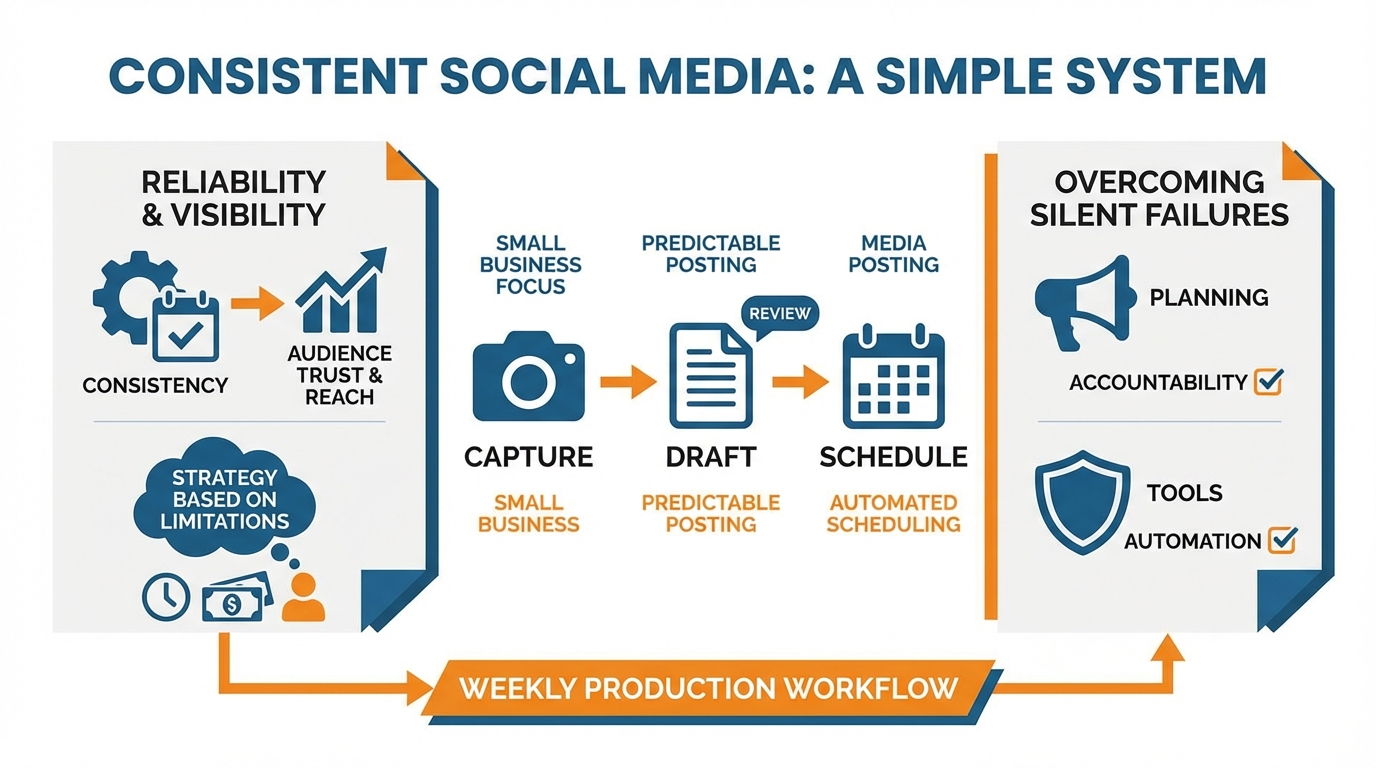
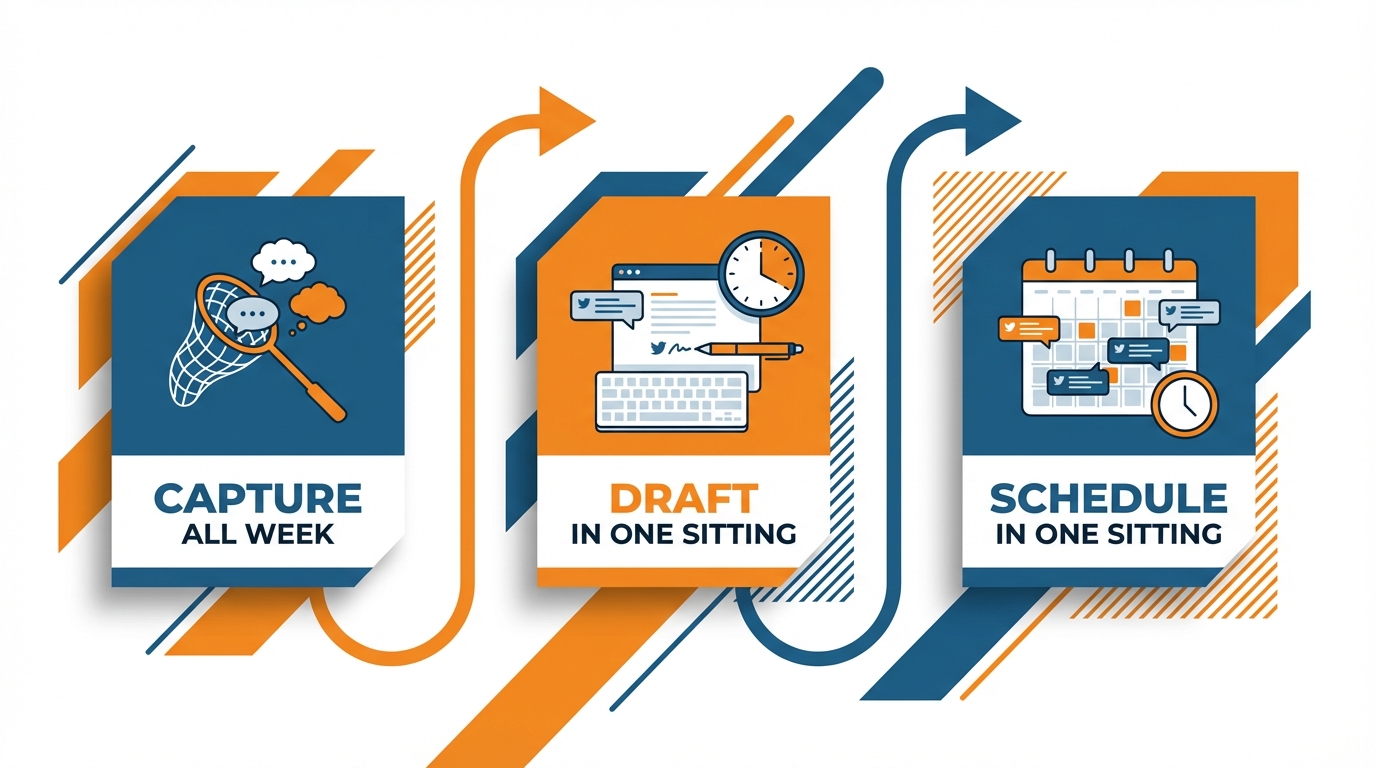
The most effective way to auto-schedule tweets in real life, then, is to shift your thinking to weekly production.
You work in a single session: you capture all week, you draft in one focused sitting, you schedule in one focused sitting.
This way, the output becomes predictable and your brain doesn’t have to pay the daily switching-cost tax.
As a rough rule-of-thumb, you need 60-90 minutes to draft and 30-45 minutes to schedule, and most small businesses can easily bank 2-4 weeks of content in one session once they have the system down.
I do the capturing in the moments you already have, say after a customer call, after you solve a support issue, or right after you ship an order, because that’s where the clearest language and most believable examples live.
To prevent your scheduled posts from appearing too arbitrary, organize them into content pillars that are based on your audience’s needs, not the date.
Choose 3 to 5 pillars that you can endlessly repeat, like quick wins, common mistakes, behind-the-scenes evidence, customer results, and your unique perspective on the niche.
Then, as you schedule, you’ll want to deliberately cycle through pillars so that your feed resembles a useful mini-magazine, not a buffer.
A rough guideline that’s effective for most small businesses is to have at least 50% of your posts be directly useful to your reader, about 30% be credibility-enhancing, and the last 20% promotional, since your audience is initially seeking solutions and later validation.
Here’s the best part: Sequencing.
Sequencing is where engagement compounds because the algorithm and the reader react differently to different formats:
- Use individual tweets for one-off ideas that can compete on simplicity.
- Use threads for ideas that need momentum and context.
- Use 3-4 post runs if you want to dominate a topic for 2 to 3 days but can’t justify a big thread.
The trick is to sequence with purpose: If you write a 6-part thread, craft post one as a promise.
Posts 2-5 as the how-to.
The last post as the example, since completion rates seem to be another distribution lever. One large-scale 2022 Scientometrics study found that in the scholarly tweets it analyzed, likes were present for about 44% and retweets for about 36%, while quotes and replies were much rarer (about 9% and 7%, respectively), which is a useful reminder that different formats can pull different interaction patterns.
I often use 2-day bursts to sequence ideas around a theme.
For example, problem day one, solution day two.
It’s top of mind, not top of content.
Last, balance evergreen and topical so it’s clear your feed is scheduled, but not totally automated.
Evergreen should be your core because those have a life of their own after a few months, but still, keep a few vacancies each week for topical commentary, customer experiences, and a quick learning to share from your business’s past week.
Keep 10 or 20 percent of your schedule open for topical so you can stay topical and human and not compromise your consistency.
If you need to quickly create a month’s worth of brand-consistent tweets and then schedule them to all your accounts from one interface, WoopSocial is a good tool for you because it’ll make the idea-to-schedule process faster while still giving you the power to decide what to post and what it will say. If you want a deeper look at systems that publish consistently, see social media auto publishing.
Make it reliable: No silent failures and auto headaches.
The best auto schedule tweets tool is the one you build like a miniature operating system, not a dream journal.
The hardest part to overcome is silent failures: You think everything’s set to go, and then…nothing. Your account disconnected. The token expired. A permissions dialog was reset after you changed your password.
And then there are the typical small business use cases like file uploads that sometimes fail for no reason, rate or volume limits when you try to upload a large number at once, time zones that aren’t quite what you expected (is 9am your local time or the scheduled timezone?), and tweetstorms that don’t work because one of the replies failed to be published.
You only have to account for the first 5 classes of errors and you won’t lose weeks of consistency to a silent failure.
Here is the checklist that I go through every single scheduling session to help you detect problems in real-time instead of only realizing them when your reach is already in freefall:
-
You check the publishability, not just that things are in a buffer: after scheduling, you check that the next 24 hours has posts scheduled at the correct time, and that at least one scheduled post has the most complex feature you use (e.g., photo, link preview, long text, etc.).
-
You do a “no silent error on scheduling” check like an operator: you look ahead one week in the calendar to ensure that there aren’t any “silent errors” where no post is scheduled for the day, since you know that if one day is “silent”, three more will be.
-
You do a “check that the scheduled posts went live” check at the beginning of the day and end of the day: I do a quick check 10 minutes after the first scheduled post of the day to ensure it went live, and another check at the end of the day to ensure nothing got stuck; it’s less than a minute, and it stops “well, I set the autoposting 2 weeks ago, and it’s clearly been working fine this whole time” situations.
Automating your content is all about creating breathing room.
Leave space between posts, maintain a minimum queue depth, and have a 3rd rail for when they try to schedule you to the last minute.
This could be as easy as maintaining a minimum of 3-5 days’ worth of content in the pipeline, so that even if one thing fails you are never reverted back to posting daily.
Avoid dumping everything into the next 48 hours, this triggers platform friction and doesn’t leave you space for content in real time.
If you’re automating a month’s worth of content at a time like in WoopSocial, make sure to still leave a few intentional blank slots per week to fill in manually, so you don’t jeopardize your framework.
Threads have additional accountability rules, because a single failed reply could topple the rest of the thread and make you appear irresponsible.
You must ensure the integrity of the thread by writing each tweet such that it stands alone for someone who may only see that in the feed, yet reads fluidly when consumed in the sequence.
Prior to scheduling, you verify that each tweet accurately contextualizes the next without assuming someone has seen the prior, particularly when including links, dates, or promotions.
If a reply does not publish, you do not attempt to continue with the original sequence; instead you publish the missing piece of information as a new standalone tweet with a one-line explanation, and reply to the original thread with a one-line continuation, so the reader can continue uninterrupted and you do not lose the entire thread.
Maintain safety and efficacy: automating while preserving scope and confidence
The worst thing you can do with automation is set it and forget it.
While you might not be violating auto scheduling rules, your followers will notice your pattern. Among U.S. adults who used Twitter in the past 12 months, a 2023 Pew Research Center survey found that 60% said they took a break for several weeks or more, which is a reminder that attention is fragile and consistency has to earn trust.
If you come across as repetitive, they’ll conclude you’re not really present, which undermines your credibility in a big way if you’re a small business that lives on its reputation.
In practice, the easiest way to seem like a spammer is to send the same tweet about the same thing with the same words on the same day every single week.
The goal is to find a way to auto schedule tweets that makes you seem like a consistent publisher rather than an absentee landlord.
Repetition is not the problem. Hyper-repetition is.
The problem with repeating on X is that if people see the same lead-in, the same format, and the same ending repeatedly, you come across as unoriginal.
When I repeat a post, I always refresh it, rather than simply re-post it: I change the lead-in to the post to reflect a different challenge, I change at least one example to make it current, and I ensure I leave more time between repeats, so regular readers never notice.
As a guardrail, you should space any near-duplicate idea far enough apart that an active follower is unlikely to see it twice in a short window, and you should avoid scheduling clusters that create bot-like rhythms, like identical gaps between every post or the same post time every single day.
To ensure that automation remains useful, you need to introduce a little bit of humanity into the equation, and you can do this by leaving a few gaps in your weekly schedule.
This allows you to fill them with reactive content, short insights gained from engaging with your customers, and a brief perspective on something that’s currently going on in your industry.
It also provides you with the flexibility to post the occasional direct reply, which remains the most powerful sign of trust you can use on Twitter.
If every minute of every day is accounted for, you’ll be unable to join in when something big happens, and this is when your presence will begin to appear somewhat robotic.
Lastly, please be honest about what scheduling can and cannot fix.
Scheduling solves consistency, which is a real growth lever because it multiplies how often people see you.
It can’t solve weak positioning, an undefined offer, or vanilla content that could come from any other company.
If what you write is vague, then you’re just automating vagueness.
When you are using a system that can generate and schedule a month of on-brand drafts quickly, like WoopSocial, your edge comes from the same place: you still have to add your point of view, sharpen the promise in the first line, and make every post sound like it came from a human, not a template. If you want to align this with a more repeatable system, social media content systems fits this exact workflow.
The best one is the one you can use every week.
The best way to auto schedule tweets is the way that fits your true weekly volume, your content type, and your comfort with cogs.
If you post 3 times a week, you don’t need a complicated process designed to handle 30 posts a day.
If you post 3 times a day, you can’t use a process that needs daily manual intervention to survive.
The sweet spot for small businesses is simple: your tweets go out reliably without any babysitting, your frequency is high enough to stack up reach over months, and the feed still feels like a human that’s in the trenches.
Optimize for reliability over perfection.
You need a batching cadence that you can maintain even on busy weeks: idea capture as you go, writing in 1 sitting, scheduling in 1 sitting, and reliability tests that take you a few minutes, not a few hours.
As a rough heuristic, if your batching system takes over 2 hours to maintain, it will fall apart when sales calls, support, deliveries, or hiring get busy.
Reliability matters more than intensity because one skipped week quickly turns into a skipped month, and consistency is where the compounding happens.
Implement guardrails to keep auto easy and efficient.
Some minimum volume means you’ll never be bone dry, some distribution so it doesn’t become robotic, and some buffer to make room to post in-the-moment if needed without breaking up your calendar.
I like to keep about 10-20% of the time open for things I’m thinking about in the moment, have had a customer interaction with, or have a quick view on, as that’s what will keep auto not feeling like a repeat cycle.
If you’re repeating themes, update the context and illustrations so that repeat readers see progress, not re-runs.
Which tool you pick, focus on reducing points of failure, speeding up batching and consistency with your branding, more than extra features you won’t even use.
If it helps you clear the hurdle to generate and schedule a month of on-brand content in one go, then a tool like WoopSocial will reduce the time required, but regardless of which tool you use, focus on minimising the scheduling required to meet the quantity you need, creating a workflow you can easily repeat every week and making sure you have enough redundancies and failsafes in place to keep your marketing going even when you can’t be present. One 2025 arXiv analysis of 3.13 million tweets mentioning the Bank of England reported that videos increased engagement by ~1,700% and photos by ~126%, which is one more reason to build a workflow you can actually sustain. In addition, a 2022 arXiv paper on virality prediction trained on 330k tweets and reported a 13% increase in both F1 score and accuracy versus the best-performing baseline, but even those kinds of gains don’t replace a system you can run every week.
Related reads
3/6/2026
Automate B2B Social Media: Post Better, Not More
Discover how to automate B2B social media posting effectively. Prioritize quality and consistency over quantity to drive pipeline influence, sales enablement, and partner engagement.
2/26/2026
How to Select the Best Social Media Auto Poster Tool
Unlock the secret to choosing the best social media auto poster. Learn to match requirements, verify platform capabilities, and use a compliance checklist to prevent account suspension.
2/25/2026
How to Schedule Social Media Posts Without a Credit Card
Discover how to schedule your social media content without a credit card. Bypass hidden charges and payment walls to automate posting efficiently.