Create Your X/Twitter Posts with AI
Use AI to draft X/Twitter posts faster. Generate tweet ideas and caption text within 280 characters, then edit and schedule them from one calendar.
Create X/Twitter posts with AI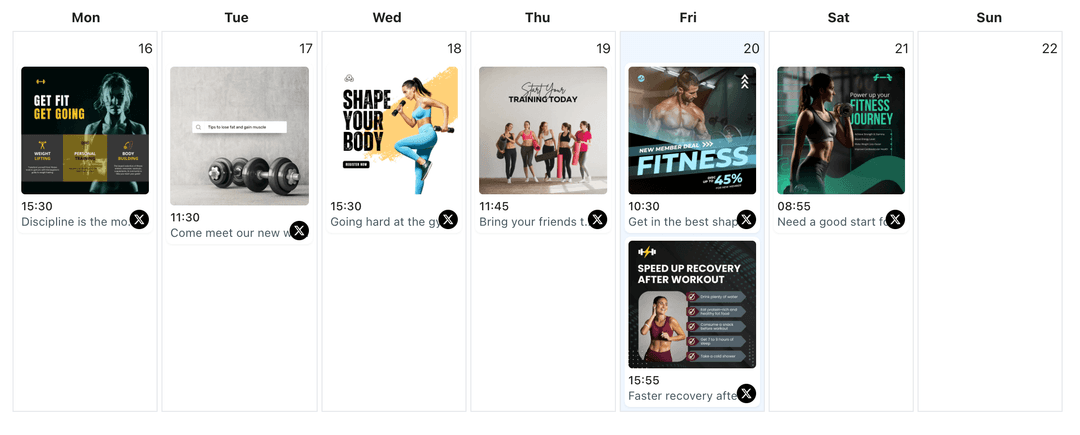
Used by founders, marketers, and creators who want to keep their X/Twitter feeds active without writing every tweet from scratch
Posting consistently on X/Twitter requires a steady stream of ideas and concise wording. WoopSocial’s AI post creation tools help you draft individual tweets and caption text for image or video posts in seconds. You decide what you want to say, AI suggests options that stay within character limits, and you schedule only the versions you trust.
Grow your presence
Streamline your X/Twitter strategy with powerful features designed for creators
AI Drafts Within 280 Characters
Share your core message and let AI produce tweet drafts that respect Twitter’s 280-character limit so you do not have to fight with manual trimming.
- Character-aware suggestions
- Multiple phrasings
- Quick first drafts
Copy that Matches Your Visuals
Describe the image or clip you are posting and ask AI to write tweet text that frames it clearly. When you are ready, you can schedule X/Twitter image posts that reuse the final copy. schedule X/Twitter image posts
- Image and video context
- Caption + media fit
- Feed-ready messaging
AI Ideas for Everyday Tweets
Prompt AI with themes like tips, product news, or light engagement questions and receive tweet ideas you can refine, approve, and place on the X/Twitter content planner. X/Twitter content planner
- Prompt-based ideation
- Tone and style options
- Planner integration
How It Works
Describe the Tweet You Need
Explain the topic, audience, and intent of your tweet- such as an update, opinion, or question- and include any phrases that must appear in the final text.
Review AI Tweet Drafts
Look through suggested tweets, merge the best lines if needed, and edit wording until the message feels accurate, on-brand, and within character limits.
Schedule Posts to Your Handle
Attach the approved copy to a tweet in WoopSocial, choose your publication time, and let WoopSocial publish to X/Twitter automatically on schedule.
Reusable Prompt Templates
Save prompts for recurring tweet types- such as launch reminders, content teasers, or weekly tips- so AI can quickly generate new drafts that follow patterns you already trust.
Tone and Clarity Controls
Ask AI to keep tweets more direct, friendly, or neutral depending on the account and audience, then refine suggestions to match your brand voice exactly.
Support for Single Tweets and Replies
Use AI to draft standalone tweets or reply copy for important conversations while you remain in charge of how the final text reads before anything is scheduled.
Draft-Only, Human-Governed Workflow
AI never posts straight to your timeline. It only helps you create drafts. You decide which tweets go onto the calendar, which need edits, and which should be deleted.
Why Create X/Twitter Posts with AI?
Coming up with something to tweet is often harder than reacting to conversations once they start. AI-assisted drafting removes the blank box problem by giving you several reasonable ways to phrase the same idea, so you can focus on choosing the best one instead of writing from scratch.
Because you always edit the output, AI stays in the role of assistant rather than replacement. You maintain control over opinions, claims, and tone, while AI speeds up the step between idea and publish-ready copy.
How AI Fits Into a Twitter Content Plan
Use the X/Twitter content planner to outline which days need product notes, educational posts, or lighter engagement tweets. For each slot, prompt AI with a topic and goal, then adapt the suggested copy until it matches what you want to say.
Once tweets are approved, schedule them alongside manually written posts so your handle stays active even when your day is full. Over time, saved prompts and examples help AI get closer to your preferred style, reducing edits while still keeping you in charge.
Ready to Create X/Twitter Posts with AI?
Use AI to draft tweet-ready copy faster, then schedule it with WoopSocial so your handle keeps posting while you focus on replies and conversations.
Create X/Twitter posts with AIFrequently Asked Questions
AI can assist with drafting single tweets and reply text based on your prompts, keeping to the 280-character limit while you stay responsible for the final wording.
No. WoopSocial’s AI is focused on helping you draft individual posts and replies. You can still plan longer narratives yourself using the existing thread tools.
Yes. You can specify tone, audience, and style in your prompts so AI suggestions feel closer to your usual way of posting, then adjust them as needed.
AI only generates copy. WoopSocial publishes at the times you configure in the calendar once you approve and schedule each post.
Yes. Free plan users can generate AI drafts and schedule up to 15 posts per month across all platforms, while Pro unlocks unlimited scheduling.
You can paste your own draft into the prompt and ask AI for clearer, shorter, or alternative versions, then choose the one that fits best before scheduling.
Start Writing X/Twitter Posts with AI Today
Combine AI-assisted drafting with WoopSocial scheduling to keep your Twitter presence sharp, consistent, and easier to manage.
Get Started with WoopSocial